EasyManua.ls Logo

Teuco T08 - Display Settings - Info (Clock - Language)

Teuco T08
64 pages
Print Icon
To Next Page IconTo Next Page
To Previous Page IconTo Previous Page
Loading...
EN
14
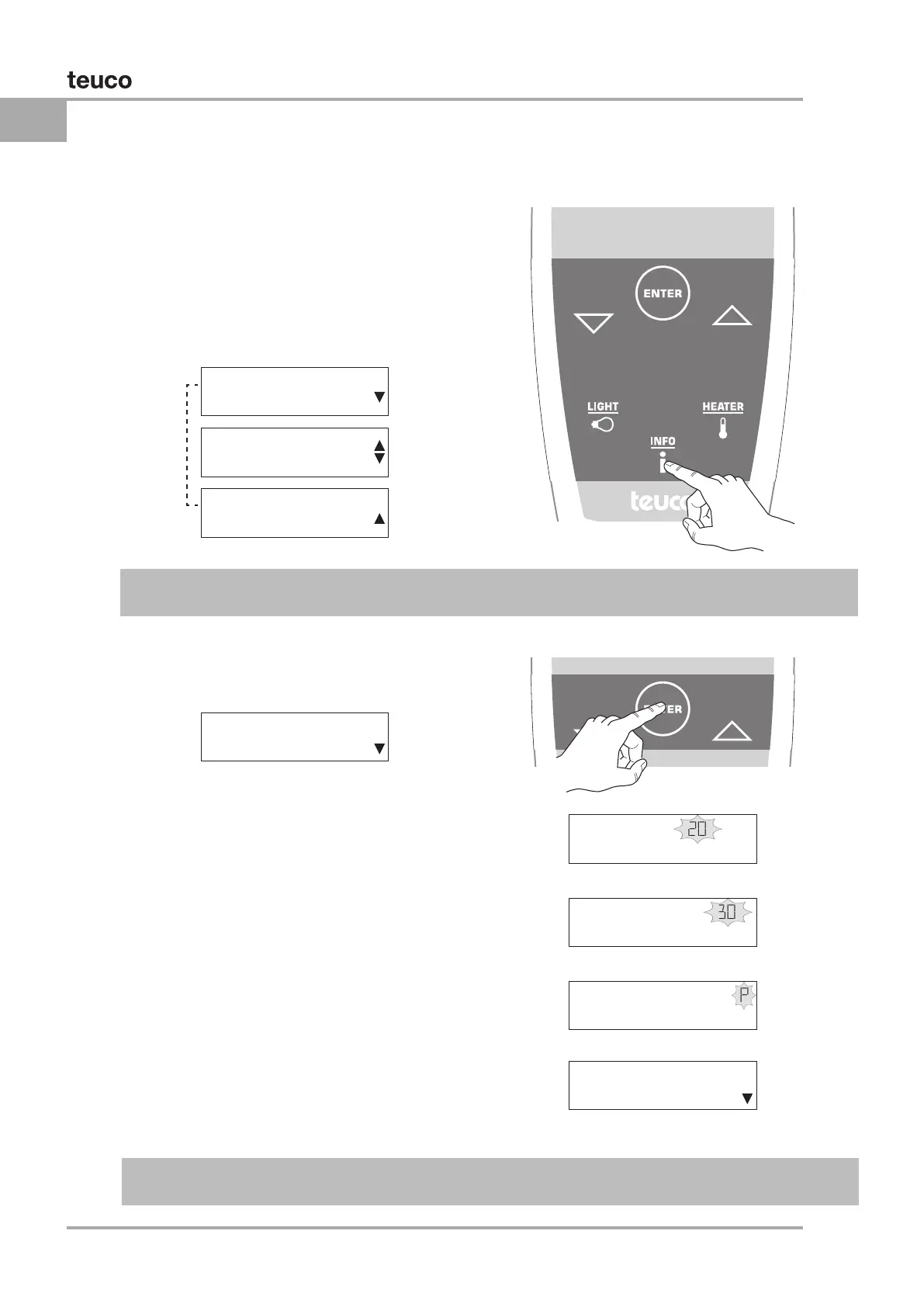
INFo 20:30
CLoCK
INFo 20:30
LANGUAGE EN
INFo 20:30
INFo 20:30
CLoCK
INFo 20:30
CHANGE HoUR
INFo 20:30P
CHANGE MoDE
INFo 20:30
CLoCK
INFo 20:30
CHANGE MINUTES
DISPLAY SETTINGS - INFO
CLOCK
Whenever a function is activated, or the system is



Press the “INF O” button the display will show the
Info menu. Select the setting to be changed using


Press “ENTER”
the display will show SET HOURS.

displayed.
      


displayed.
      



      
display will revert to the Info menu.
Info menu
AUTOCONFIRM: If no button is pressed for 5 seconds while the Info menu remains active, the display
reverts to the previous item.
AUTOCONFIRM: If no button is pressed for 5 seconds while the Clock menu remains active, the
current setting AUTOCONFIRMS and the display reverts to the Info menu.
Info menu

Info menu




Table of Contents

Other manuals for Teuco T08

Related product manuals