EN
7
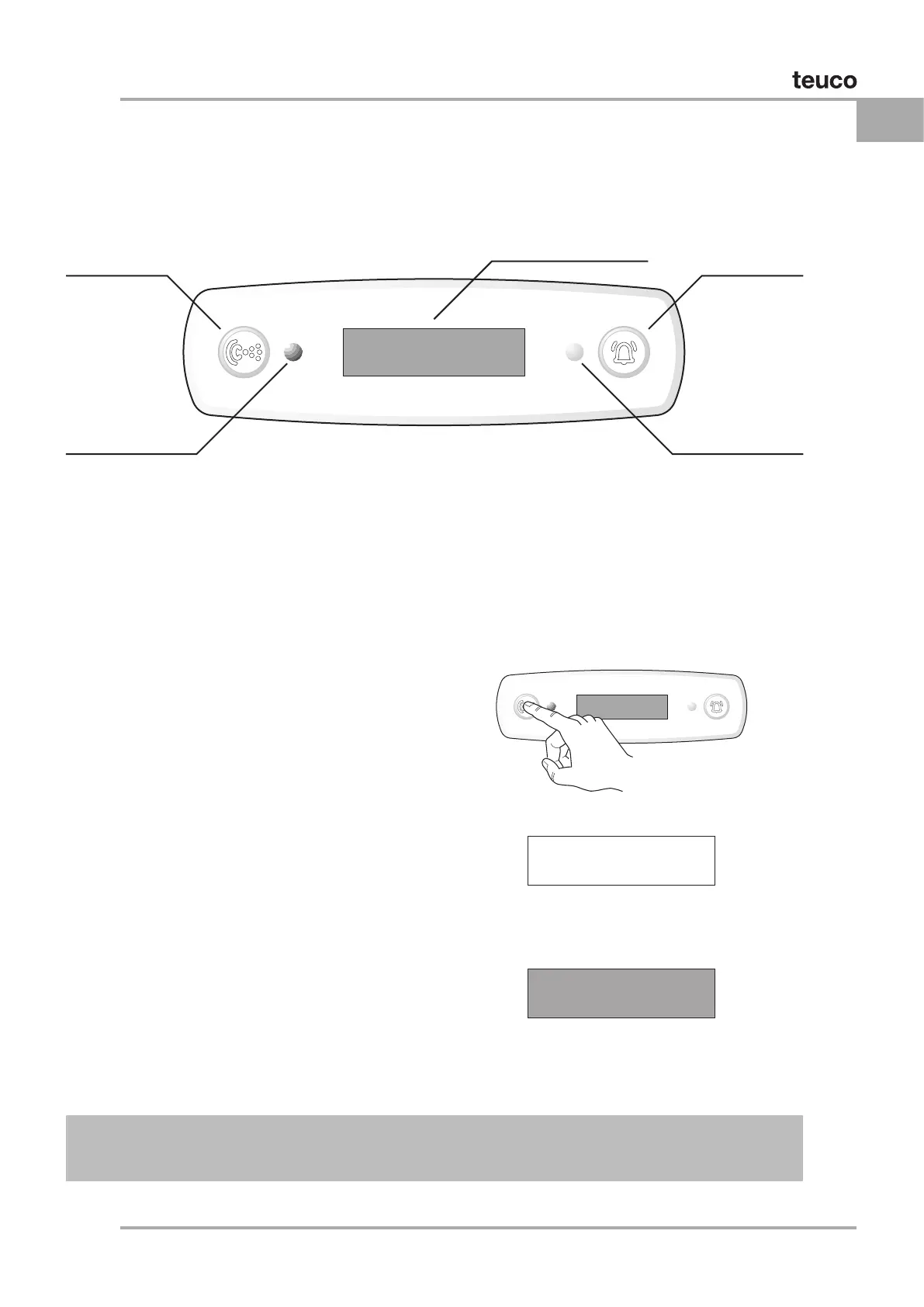
To start the whirlpool, press the “HYDRO” button.
The whirlpool starts and the display shows:
The exact time.
The temperature of the water in the tub.
The duration of the whirlpool session
(TIMER) in minutes.
Conrmation that the Whirlpool is in
operation.
DISINFECTION of the system is not carried out
Whirlpool
ON/OFF button
LED
Display indicating
Whirlpool in progress
To cut the session short, press HYDRO a second time or use the remote control (see Remote
Control: Preliminary Operations); the system shuts off and the display reverts to STAND-BY.
WHIRLPOOL QUICK START
Once the system has been powered up, the whirlpool function can be activated by pressing a single
DETAILS OF CONTROL PANEL AND DISPLAY
20:30
ALARM
ON/OFF button
Display
Shows messages
Infrared receiver
15 36
o
C 20:30
WHIRLPooL


 To Next Page