18 • IP 3000 BR Mk 2
Special function buttons
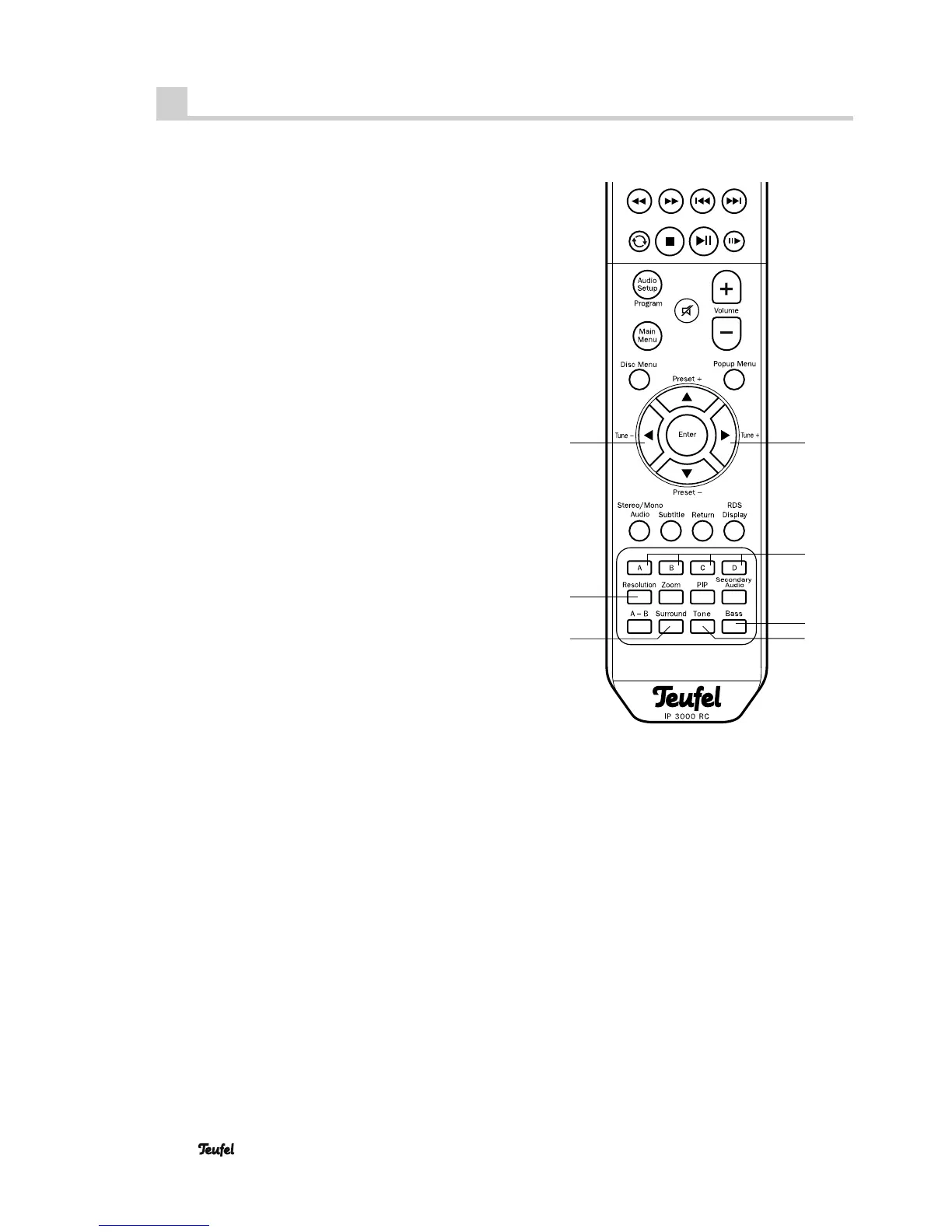
“Resolution” button
Tipping the button 55 “Resolution” adjusts the resolution
of the television set for HD playback. Possible values:
HDMI Auto, 1080p, 1080i, 720p, 576p, 576i
HDMI Auto will automatically select the highest possible
resolution.
Note: 1080p resolution is only available at the HDMI
output.
“ Surround” button
By repeatedly tipping the button 52 “Surround” you
switch the surround sound:
“5.1 CH” 5.1 channel surround sound
“DPLII” Dolby® ProLogic 2.
“STEREO” Stereo playback.
“Tone” button
Sound control. Repeatedly pushing the button 51 “Tone”
selects the desired range:
Bass low tones (bass tones)
Treble high tones
With the navigation buttons 59 “Ï” and 43 “Å”, you
can set the selected range from “–6” (decrease) to “+6”
(increase).
“Bass” button
Push the button 50 “Bass” to adjust the volume of the
subwoofer with the navigation buttons 59 “Ï” and 43 “Å”
.
Buttons “A B C D”
The coloured buttons 47 “A B C D” control the menus of
interactive Blu-ray discs.
59
43
47
50
51
52
55


 To Next Page