EasyManua.ls Logo

Teufel RADIO ONE - User Manual

Teufel RADIO ONE
29 pages
Print Icon
To Next Page IconTo Next Page
Loading...
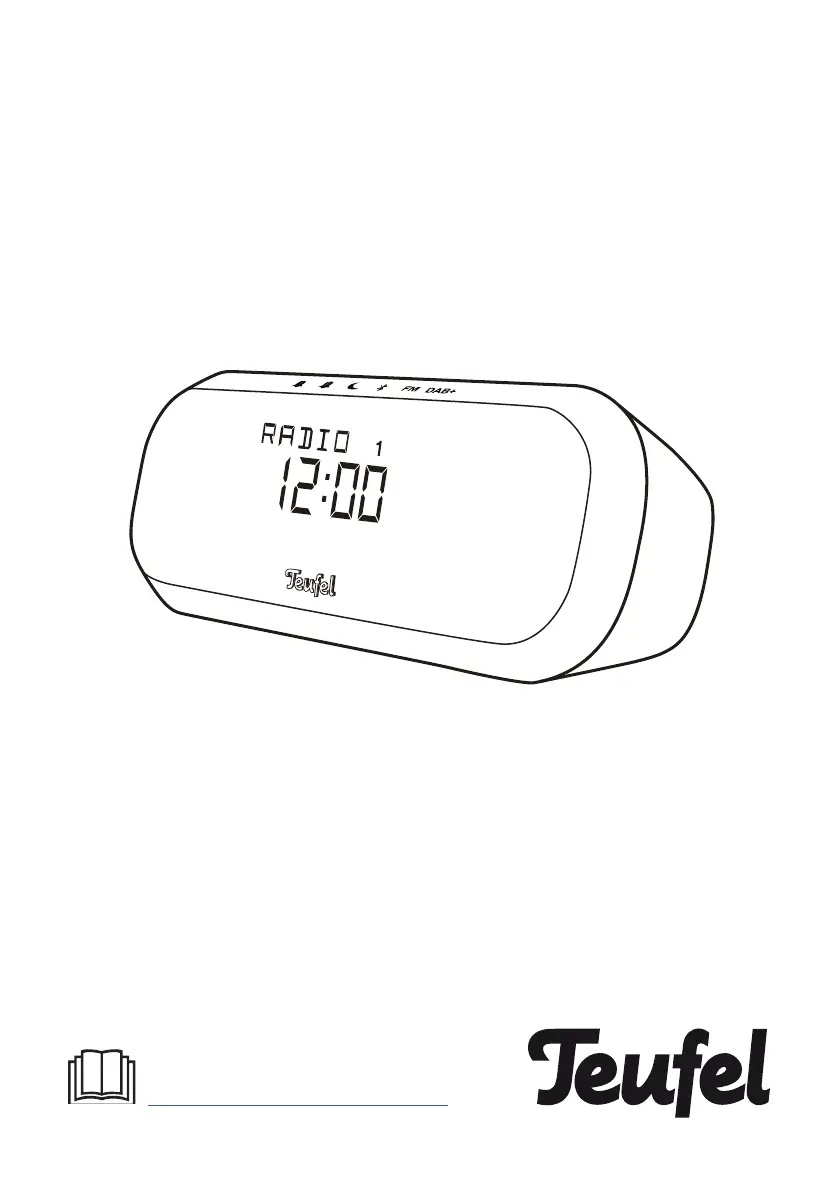
RADIO ONE
Bluetooth Bedroom Speaker with alarm clock and DAB/
DAB+/FM functionality
You can find an extensive user manual
online at
http:/www.teufelaudio.com/radio-one
Technical Description And
User Manual

Other manuals for Teufel RADIO ONE

Questions and Answers

Summary

General Information

Notice

Information subject to change without prior notice and restrictions on reproduction.

Complaints

Information required for processing complaints, including invoice and serial numbers.

For Your Safety

Proper Use

Speaker is designed for music, alarm, and radio; intended for private use only.

Safety notes

Explanation of terms

Defines signal terms like CAUTION and NOTICE used throughout the manual.

Electrical Safety Precautions

Warnings about touching live parts, checking for damage, and proper disconnection.

Device Handling and Usage

Precautions against opening housing, using unauthorized accessories, and using the device indoors.

Operating Environment and Safety

Wet Conditions and Modifications

Warnings against use in wet rooms, liquid exposure, and unauthorized modifications.

Unsuitable Placement Risks

Dangers of unstable placement, heat sources, explosion risk, and trip hazards.

Children and Hearing Safety

Risks of suffocation from packaging and hearing loss from high volumes.

Fire and Damage Prevention

Disposal Guidelines

Trademarks and Copyright

Package Contents

Product Overview

Controls and Connections

Identifies and explains the function of various buttons and ports on the device.

Setting Up the Speaker

Speaker Placement

Recommendations for optimal placement to ensure audio performance and safety.

Power Connection

Step-by-step instructions for connecting the speaker to a power source.

Clock Setting

Details on how the clock is set automatically or manually.

Using the Speaker

Volume Wheel Operation

Explains the function and operation of the volume wheel for volume control and navigation.

Display Information

Describes how the VA LCD display shows time and information text.

Speaker Operation Modes

Powering On;Off

Instructions for turning the speaker on and off, including standby mode.

Volume Adjustment

How to adjust the volume level using the volume wheel.

Sleep Timer Function

Guide on how to set and cancel the sleep timer for automatic shut-off.

FM Radio Operation

Tuning FM Stations

Instructions for tuning into FM radio stations, including manual and auto-scan methods.

FM Radio Presets

DAB+ Radio Operation

Tuning DAB+ Stations

Steps for tuning into DAB+ radio stations, including fast scan functionality.

DAB+ Radio Presets

Instructions for saving and recalling DAB+ radio stations using presets.

Bluetooth Connectivity

Bluetooth Options

Overview of available Bluetooth options and device-specific settings.

Pairing and Connecting Devices

Step-by-step guide to pair and connect external devices via Bluetooth.

Bluetooth Playback and Disconnection

Managing Bluetooth Connection

Methods to disconnect the Bluetooth connection and handle interruptions.

Controlling Bluetooth Playback

How to control playback and manage phone calls during Bluetooth playback.

Alarm Settings and Usage

Configuring Alarms

Detailed instructions on how to configure alarm settings like time, frequency, and sound.

Incoming Alarm Behavior

AUX Input Usage

Menu Navigation

Changing System Settings

Instructions on navigating the menu and changing system settings.

Care and Cleaning Instructions

Troubleshooting Guide

Technical Specifications

Declaration of Conformity

Summary

General Information

Notice

Information subject to change without prior notice and restrictions on reproduction.

Complaints

Information required for processing complaints, including invoice and serial numbers.

For Your Safety

Proper Use

Speaker is designed for music, alarm, and radio; intended for private use only.

Safety notes

Explanation of terms

Defines signal terms like CAUTION and NOTICE used throughout the manual.

Electrical Safety Precautions

Warnings about touching live parts, checking for damage, and proper disconnection.

Device Handling and Usage

Precautions against opening housing, using unauthorized accessories, and using the device indoors.

Operating Environment and Safety

Wet Conditions and Modifications

Warnings against use in wet rooms, liquid exposure, and unauthorized modifications.

Unsuitable Placement Risks

Dangers of unstable placement, heat sources, explosion risk, and trip hazards.

Children and Hearing Safety

Risks of suffocation from packaging and hearing loss from high volumes.

Fire and Damage Prevention

Disposal Guidelines

Trademarks and Copyright

Package Contents

Product Overview

Controls and Connections

Identifies and explains the function of various buttons and ports on the device.

Setting Up the Speaker

Speaker Placement

Recommendations for optimal placement to ensure audio performance and safety.

Power Connection

Step-by-step instructions for connecting the speaker to a power source.

Clock Setting

Details on how the clock is set automatically or manually.

Using the Speaker

Volume Wheel Operation

Explains the function and operation of the volume wheel for volume control and navigation.

Display Information

Describes how the VA LCD display shows time and information text.

Speaker Operation Modes

Powering On;Off

Instructions for turning the speaker on and off, including standby mode.

Volume Adjustment

How to adjust the volume level using the volume wheel.

Sleep Timer Function

Guide on how to set and cancel the sleep timer for automatic shut-off.

FM Radio Operation

Tuning FM Stations

Instructions for tuning into FM radio stations, including manual and auto-scan methods.

FM Radio Presets

DAB+ Radio Operation

Tuning DAB+ Stations

Steps for tuning into DAB+ radio stations, including fast scan functionality.

DAB+ Radio Presets

Instructions for saving and recalling DAB+ radio stations using presets.

Bluetooth Connectivity

Bluetooth Options

Overview of available Bluetooth options and device-specific settings.

Pairing and Connecting Devices

Step-by-step guide to pair and connect external devices via Bluetooth.

Bluetooth Playback and Disconnection

Managing Bluetooth Connection

Methods to disconnect the Bluetooth connection and handle interruptions.

Controlling Bluetooth Playback

How to control playback and manage phone calls during Bluetooth playback.

Alarm Settings and Usage

Configuring Alarms

Detailed instructions on how to configure alarm settings like time, frequency, and sound.

Incoming Alarm Behavior

AUX Input Usage

Menu Navigation

Changing System Settings

Instructions on navigating the menu and changing system settings.

Care and Cleaning Instructions

Troubleshooting Guide

Technical Specifications

Declaration of Conformity

Teufel RADIO ONE Specifications

General IconGeneral
TypePortable Bluetooth Speaker
Frequency Response60 Hz - 20 kHz
Charging Time3 hours
Inputs3.5 mm AUX
FeaturesNFC
ConnectivityBluetooth, AUX
DisplayLED

Related product manuals