Need help?
Do you have a question about the Tevion 43744 and is the answer not in the manual?
Steps to remove the existing car radio unit from the dashboard, including trim frame removal.
Instructions and diagrams for installing the unit using the DIN front mount method.
Detailed steps for installing the unit using the Din rear-mount method, including supplied parts.
Steps to pair your mobile phone with the car stereo via Bluetooth, including password input.
Using buttons to answer or reject incoming calls.
Playing music from your phone via Bluetooth (A2DP) and controlling playback.
How to insert and eject CDs, and how the unit handles MP3/WMA files.
Guidance on replacing the fuse, including correct amperage and potential issues.
Connecting external audio devices via the front panel AUX IN jack.
Using the RCA output for connecting amplifiers, equalizers, or other audio components.
 General
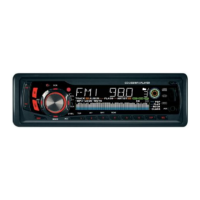
| Brand | Tevion |
|---|---|
| Model | 43744 |
| Category | Car Receiver |
| USB Port | Yes |
| Auxiliary Input | Yes |
| MP3 Playback | Yes |
| Display Type | LCD |
| Radio Tuner | Yes |

 To Next Page