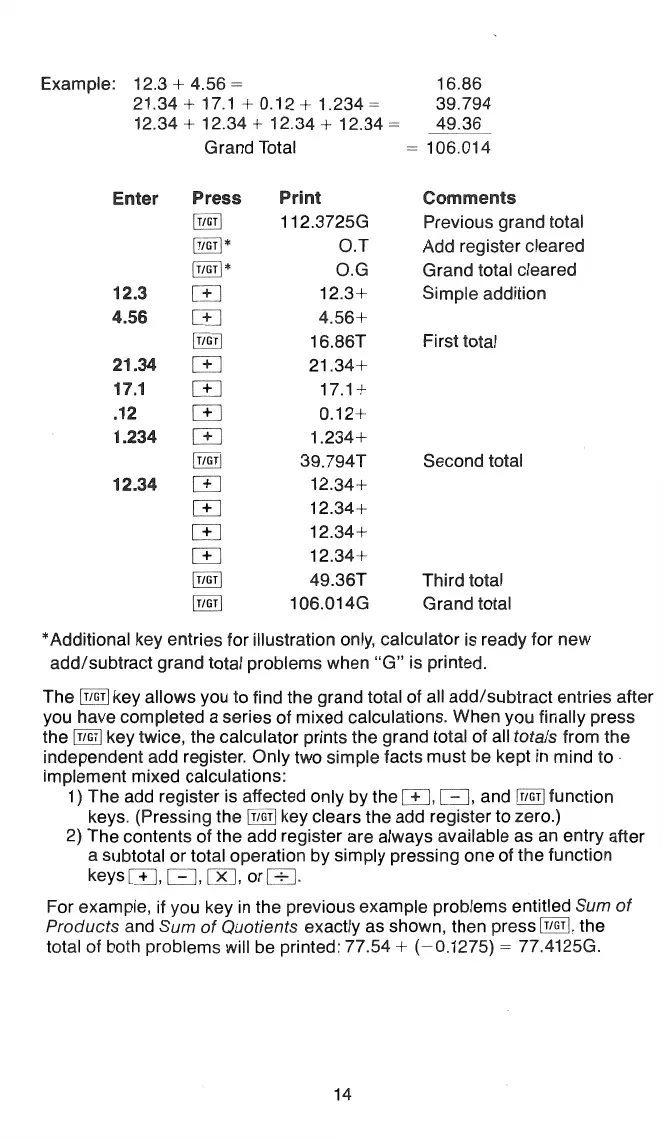
Example: 12.3 + 4.56 = 16.86
21.34
+
17.1+0.12+1.234-~
39.794
12.34 + 12.34 + 12.34 + 12.34
~
49.36
Enter
12.3
4.56
21.34
17.1
.12
1.234
12.34
Grand Total =
106.014
Press
@GT
I
[!m] *
[!lQ!]
*
[.±]
[]]
[r"illJ
[+]
["f
J
[~]
[±]
[!!"0]
[±]
[±]
[+_]
CTI
@i;r]
[TiG!J
Print
112.3725G
O.T
O.G
12.3+
4.56+
16.86T
21.34+
17.1+
0.12+
1.234+
39.794T
12.34+
12.34+
12.34+
12.34+
49.36T
106.0i4G
Comments
Previous grand total
Add register cleared
Grand total cleared
Simple addition
First total
Second total
Third total
Grand total
*Additional key entries for illustration only, calculator is ready for new
add/subtract grand total problems when
"G"
is printed.
The
[i'!_~T]
key allows you to find the grand total of all add/subtract entries after
you have completed a series of mixed calculations. When you finally press
the
[TJGrJ
key twice, the calculator prints the grand total
of
all totals from the
independent add register. Only two simple facts must be kept in mind to
implement mixed calculations:
1) The add register
is
affected only by
the[+
J,
l=],
and [i!]I] function
keys. (Pressing the
[_T1Gi!
key clears the add register to zero.)
2) The contents of the add register are always available as an entry after
a subtotal or total operation by simply pressing one of the function
keys[+
J,
- [ )(],
or[±:].
For example, if you key
in
the previous example problems entitled Sum
of
Products and Sum
of
Quotients exactly as shown, then press
[f1Gr!,
the
total of both problems will be printed: 77.54 +
(-0.1275)
= 77A125G.
14




 To Next Page