Chapter 2: Linear Equations Name
Section 1: Using Graphs & Tables Date
Topics in Algebra 1 © 2001 Texas Instruments Student Worksheet 2-3
³
Try-It!
é
on Your TI
.
83 Plus or TI
.
73
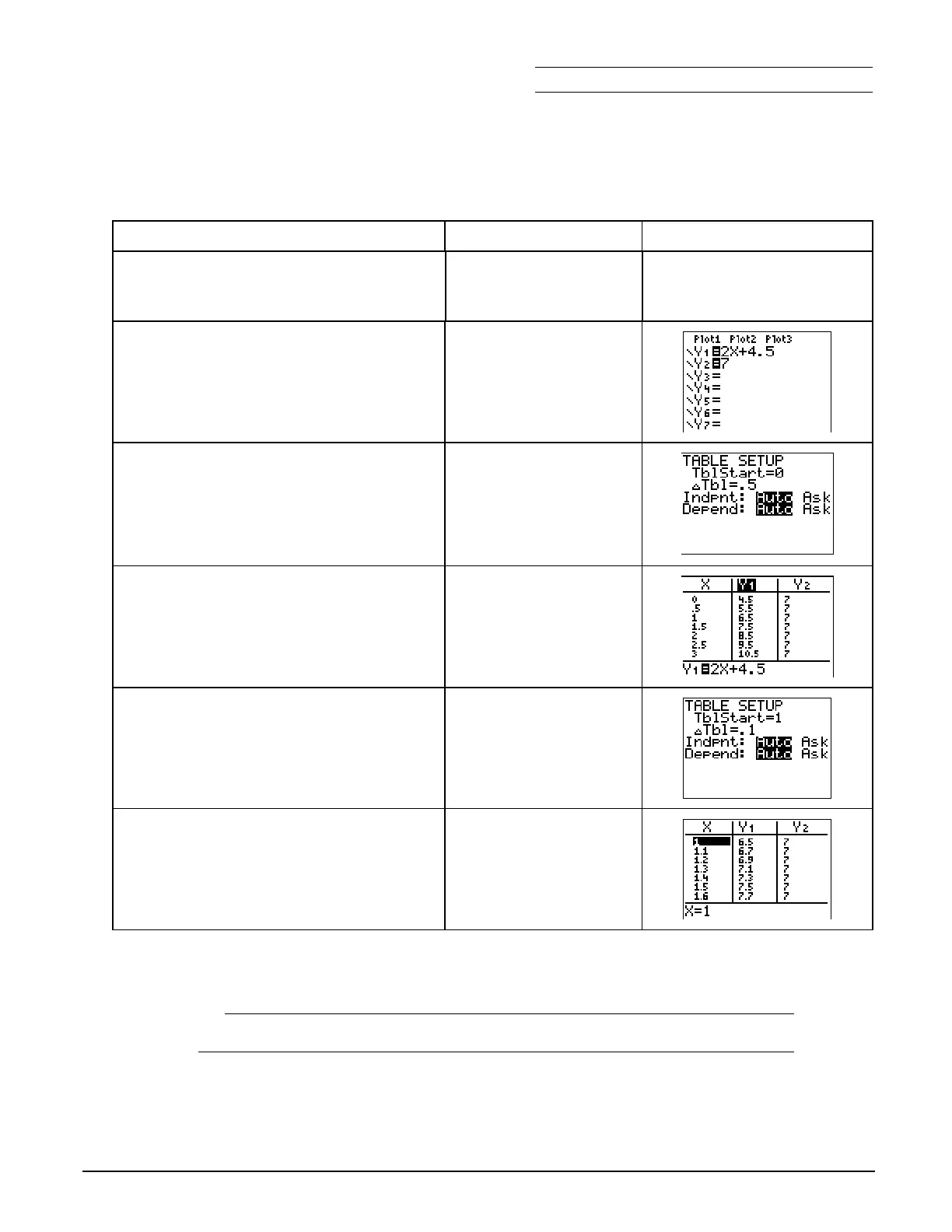
Use the table feature on your calculator to search for the solution (when
Y
1
=Y
2
).
To Do This Press Display
(TI
.
83 Plus shown)
1. Exit the Topics in Algebra 1
application and clear the Home
screen.
y
l
á
EXIT
â
:
2. First, enter
2X+4.5
as
Y
1
and
7
as
Y
2
in
the Y= editor.
Note:
See
³
TIp
é
3:
Graphing a Function in the
Standard Window
for more information.
Note
: On the TI
-
73, use
I
rather than „.
&
‘
2
„
\
4
`
5
#
‘
7
3. Change the table settings to those
used in the Worksheet Activity.
y
f
0
#
.5
#
Í
#
Í
4. Display the table.
y 0
5. Change the table settings to focus on
the range you found in the Worksheet
Activity. Begin the table at the lower
value and make the increments
smaller.
y
f
1
#
.1
6. Display the table with the new
settings.
y 0
7. The table still does not display the exact solution. What table settings would you choose in
order to display the exact solution?
TblStart=
@
Tbl=
8. What is the solution (when is
Y
1
=Y
2
)? _________________________________________
9. How do you know this is the solution? ________________________________________



 To Next Page
 Loading...













