Chapter 3: Linear Functions Name
Section 2: Slope Using Coordinates Date
Topics in Algebra 1 © 2001 Texas Instruments Student Worksheet 3-12
³
Try-It!
é
on Your TI
.
83 Plus or TI-73
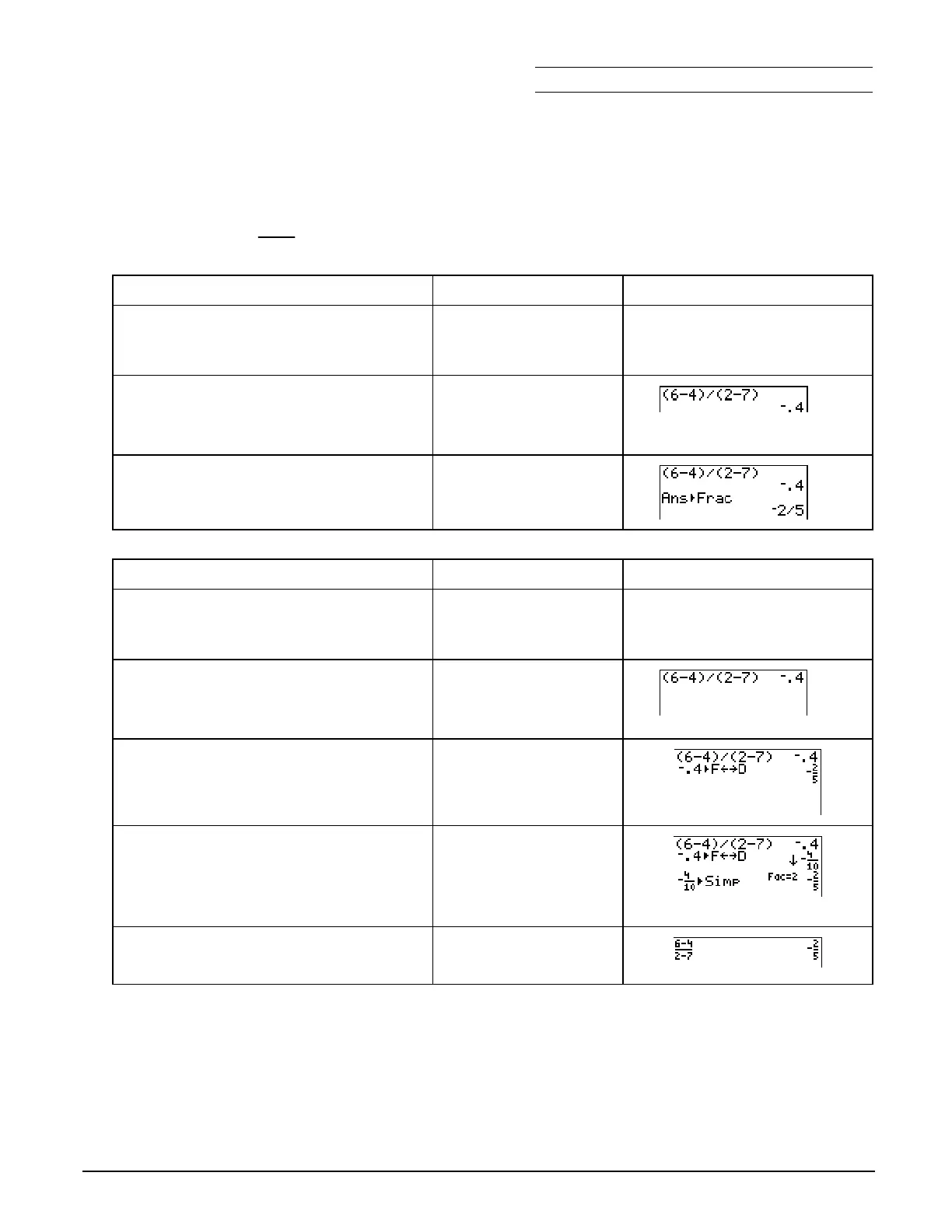
Use the calculator to find the slope of a line through the points (2,6) and (7,4).
The slope is:
m
=
6
N
4
2
N
7
To Do This on the TI
.
83 Plus Press Display
(TI
.
83 Plus shown)
1. Exit the Topics in Algebra 1
application and clear the Home
screen.
y
l
á
EXIT
â
:
2. Calculate the slope.
£
6
¹
4
¤ ¥
£
2
¹
7
¤
b
3. Change the fraction to a decimal.
Use the
4
Frac
function on the
MATH
menu.
1
:
4
Frac
b
To Do This on the TI
.
73 Press Display
(TI
.
73 shown)
1. Exit the Topics in Algebra 1
application and clear the Home
screen.
y
l
á
EXIT
â
:
2. Calculate the slope.
£
6
¹
4
¤ ¥
£
2
¹
7
¤
b
3. Change the decimal to a fraction.
>
b
4. Simplify the fraction.
Note
: The mode setting
ManSimp
must be
selected first. For more information, see
³
TIp 2:
Adjusting Your Calculator Settings
.
.
#
#
#
#
"
to
ManSimp
b
B
b
5. Use
=
to enter the problem.
=
6
T
4
=
2
T
7
b



 To Next Page
 Loading...













