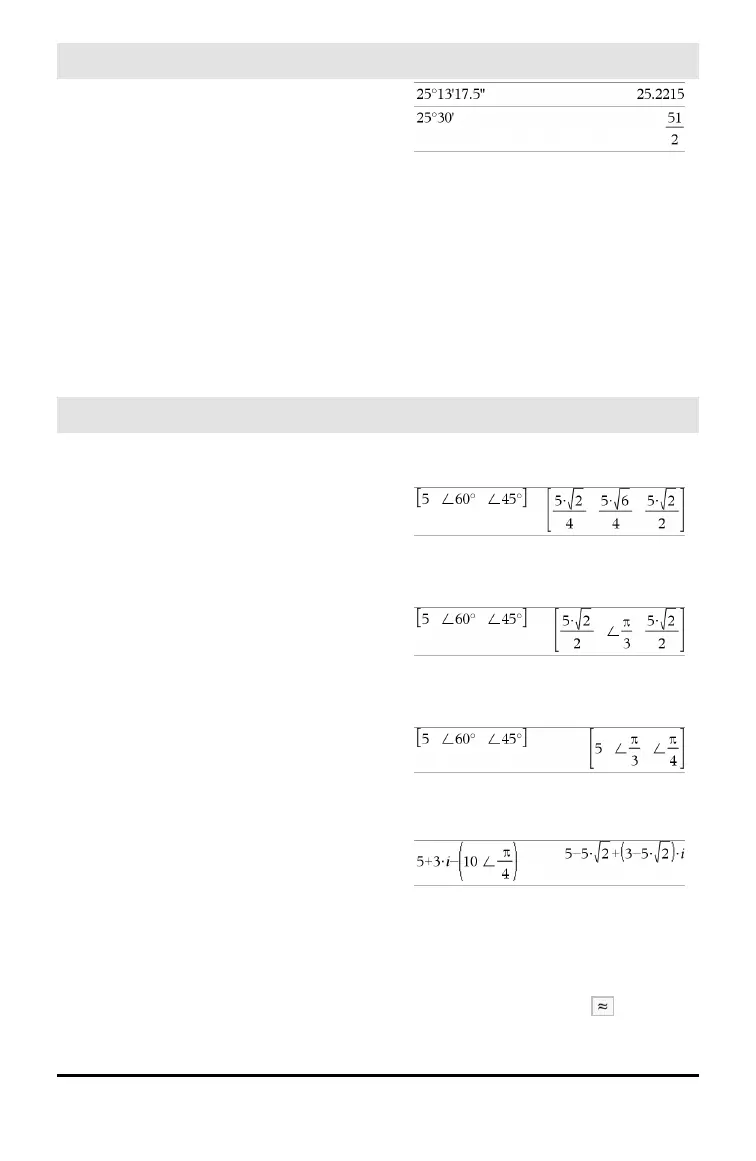
°, ', '' (degree/minute/second)
/k keys
dd A positive or negative number
mm A non-negative number
ss.ss A non-negative number
Returns dd+(mm/60)+(ss.ss/3600).
This base-60 entry format lets you:
• Enter an angle in
degrees/minutes/seconds without regard
to the current angle mode.
• Enter time as hours/minutes/seconds.
Note: Follow ss.ss with two apostrophes
(''), not a quote symbol (").
∠ (angle)
/k keys
[Radius,∠ θ_Angle] ⇒ vector
(polar input)
[Radius,∠ θ_Angle,Z_Coordinate] ⇒
vector
(cylindrical input)
[Radius,∠ θ_Angle,∠ θ_Angle] ⇒ vector
(spherical input)
Returns coordinates as a vector depending
on the Vector Format mode setting:
rectangular, cylindrical, or spherical.
Note: You can insert this symbol from the
computer keyboard by typing@<.
In Radian mode and vector format set to:
rectangular
cylindrical
spherical
(Magnitude∠ Angle) ⇒ complexValue
(polar input)
Enters a complex value in (r∠ θ) polar
form. The Angle is interpreted according to
the current Angle mode setting.
In Radian angle mode and Rectangular
complex format:
Note: To force an approximate result,
Handheld: Press / ·.
Windows®: Press Ctrl+Enter.
Macintosh®: Press “+Enter.
iPad®: Holdenter, and select .
Symbols 225


 To Next Page
 Loading...