GRAPHICS CALCULATOR INSTRUCTIONS 15
Casio fx-9860g
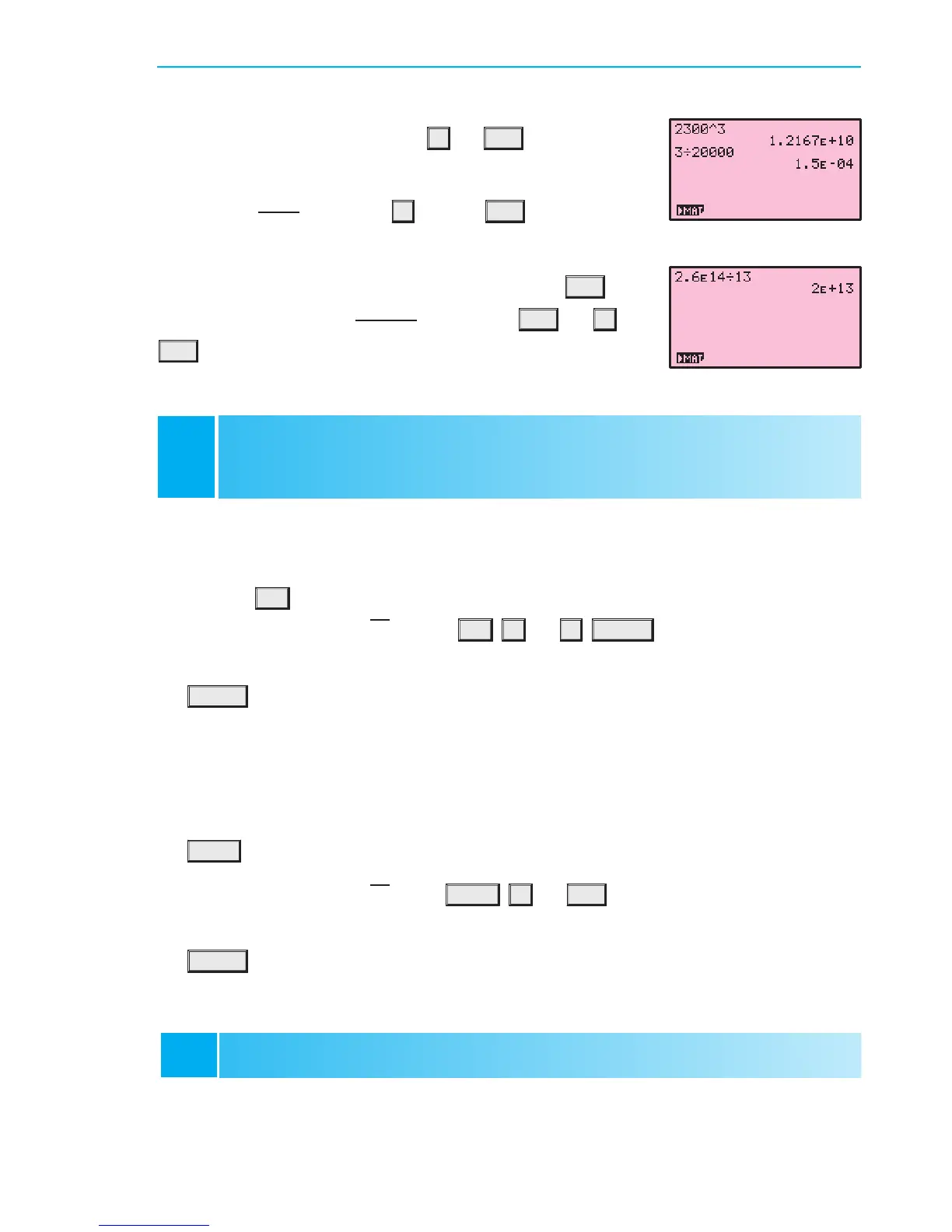
To evaluate
3
20 000
, press 3
¥
20 000 EXE . The answer
displayed is 1:5e¡04, which means 1:5 £ 10
¡4
.
You can enter values in scientific notation using the
EXP key.
For example, to evaluate
2:6£10
14
13
, press 2:6 EXP 14
¥
13
EXE . The answer is 2 £10
13
.
Texas Instruments TI-83
The secondary function of each key is displayed in yellow above the key. It is accessed by
pressing the
2nd key, followed by the key corresponding to the desired secondary function.
For example, to calculate
p
36, press 2nd x
2
36
)
ENTER .
The alpha function of each key is displayed in green above the key. It is accessed by pressing
the
ALPHA key followed by the key corresponding to the desired letter. The main purpose
of the alpha keys is to store values into memory which can be recalled later. Refer to the
Memory section.
Casio fx-9860g
The shift function of each key is displayed in yellow above the key. It is accessed by pressing
the
SHIFT key followed by the key corresponding to the desired shift function.
For example, to calculate
p
36, press SHIFT x
2
36 EXE .
The alpha function of each key is displayed in red above the key. It is accessed by pressing
the
ALPHA key followed by the key corresponding to the desired letter. The main purpose
of the alpha keys is to store values which can be recalled later.
MEMORY
D
C
SECONDARY FUNCTION AND
ALPHA KEYS
To evaluate 2300
3
, press 2300
^
3 EXE . The answer
displayed is 1:2167e+10, which means 1:2167 £ 10
10
.
Utilising the memory features of your calculator allows you to recall calculations you have
performed previously. This not only saves time, but also enables you to maintain accuracy
in your calculations.
IB10 plus 2nd ed
magentacyan yellow black
0
0
5
5
25
25
75
75
50
50
95
95
100
100
0
0
5
5
25
25
75
75
50
50
95
95
100
100
Y:\HAESE\IB_10_PLUS-2ed\IB_10P-2ed_00a\015IB_10P-2_00a.CDR Thursday, 24 January 2008 10:27:41 AM PETERDELL


 To Next Page