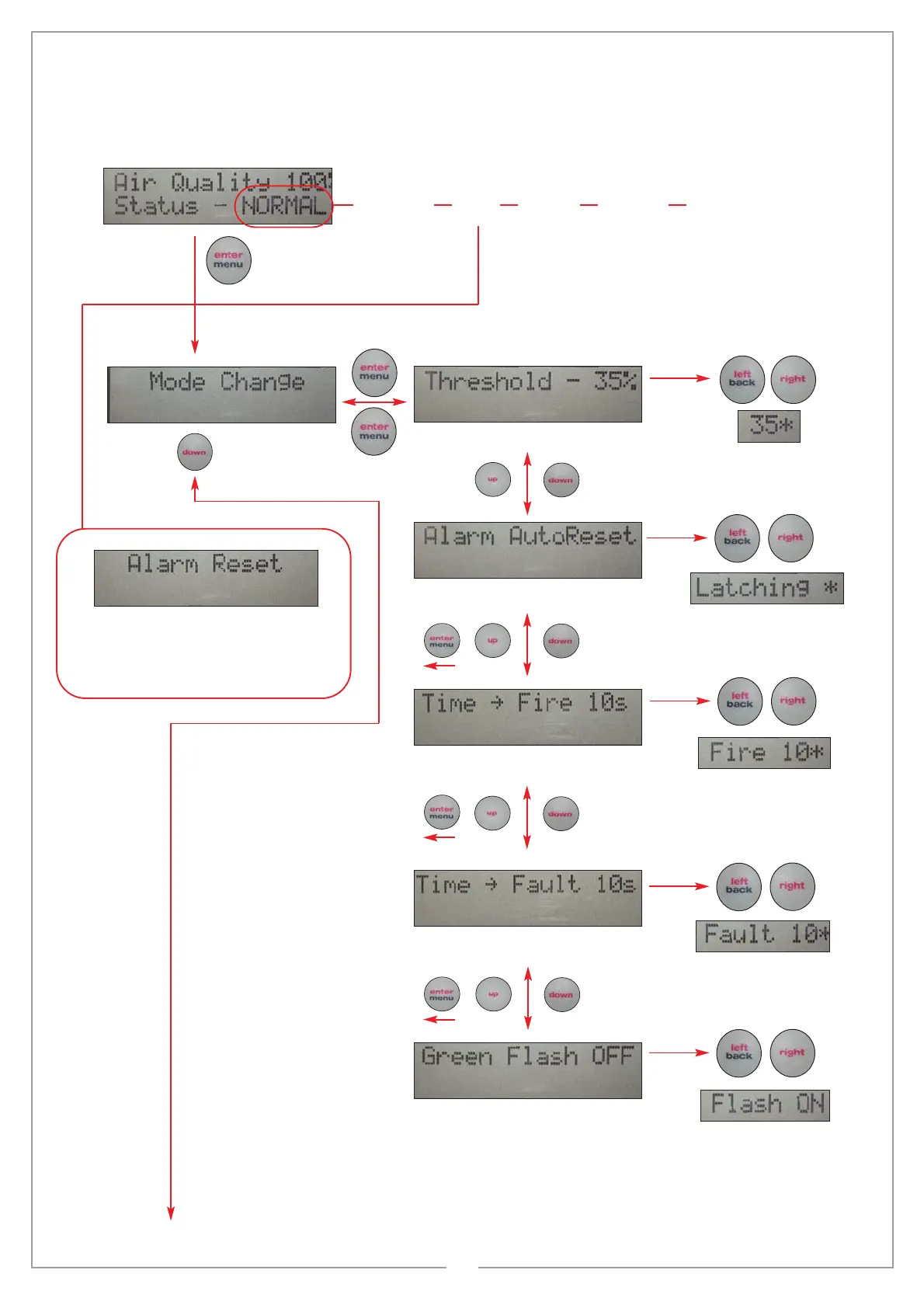
screen and menu system
issue 0026-02
NORMAL FIRE FAULT ERROR ALIGN
default 35% adjustable between 25% and 50%
to enter sub menus
to exit sub menus
default autoreset
press enter / menu to enter
menu system
shows (
*
) when updating
If alarm is set to latching and you need to reset
from fire press ‘enter’ to see this screen and
‘enter’ again to reset and return to the normal
screen, if in fire you will need to press ‘back’to
go back to the main menu. If set to auto reset it
will reset to normal automatically
no
comms
beam head is
performing
a self
re-alignment
procedure
to increaseto decrease
use left and right buttons to change
shows (
*
) when updating
use left and right buttons to change
shows (
*
) when updating
default 10s
default 10s
default off
use left and right buttons to change
shows (
*
) when updating
use left and right buttons to change
11


 To Next Page