THE ADVANCED SWITCHING SYSTEM
THE GIGRIG G3 USER MANUAL
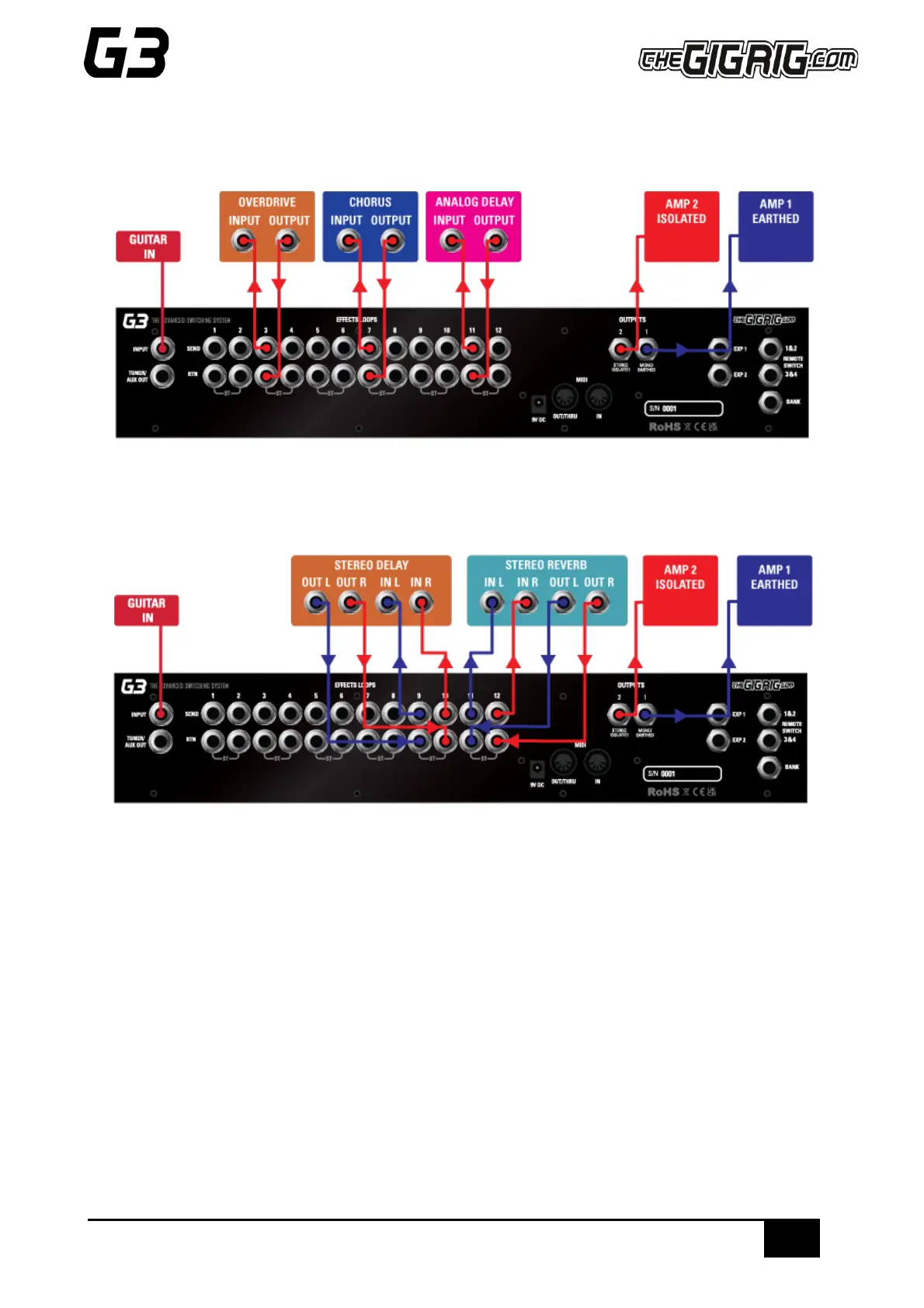
3.10 CONNECTION EXAMPLES:
a. CONNECTING MONO EFFECTS
Connect G3 FX Loop SEND to FX Pedal Input. Connect FX Pedal OUTPUT to G3 Loop Return
b. CONNECTING STEREO EFFECTS
If you want to use stereo effects with G3, you can pair two mono loops together into a single stereo loop. G3’s
loops are paired as follows:
Loop 1/2, Loop 3/4 etc.
Of course, you can use a combination of mono and stereo loops.
To pair loops together:
a. Enter the DEEP EDIT menu then select GLOBAL.
b. Select STEREO PAIRS
c. Select the loops you want to pair. The red LED indicates two loops are paired in stereo.
d. Select the stereo loop by pressing either of the paired loops.


 To Next Page