Please retain the instructions for further reference,
as they contain important information.
INSTRUCTION MANUAL
ENERGY SAVING
The unit will automatically enter the Standby mode after 30 minutes in
the following situations:
1. No button has been pressed for 30 minutes.
2. Not singing to the microphone for 30 minutes.
The unit can be turned on by pressing button.
Bottom ViewFront View
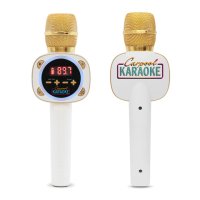
LOCATION OF CONTROLS
BEFORE YOU GET STARTED
CHARGING THE UNIT
Pair
Play/Pause Button
Display
MIC V OL
- Button
ON/Standby Button
MIC V OL
+ Button
Line Out Jack
Micro USB
charger port
Lights Button
ECHO
+ Button
FM
+ Button
FM
- Button
ECHO
- Button
To External Unit
HEADPHONE/
AUDIO DEVICE
AUX AUDIO CONNECTION
Connect to a
Bluetooth® Device
Play your favorite music
and sing through your
car audio
Adjust VOLUME and ECHO to your preference
NOTE: If the MIC crackles or breaks up
then adjust MIC volume down
FM
BLUETOOTH
CARPOOL KARAOKE
TUNER
VOLUME
TO START SINGING
1
2
3
4
Press to turn the MIC off
5
This unit is able to connect to your car audio,
headphones or favorite audio device. You can
connect by 3.5mm AUX cord (included).
Find an FM station with no signal on your car radio. Tune
to the same channel on THE MIC by pressing FM +/- to
match to your car radio
Singing Machine’s Carpool Karaoke The Mic (“the Product”) is intended
solely for use by passengers.
The Product is not intended for use by drivers of any motor vehicle.
Improper use of the product can lead to risks such as distracted
driving, accidents, personal injury or death. All users of the
Product can avoid these risks by following the Product’s instructions
and their respective state’s driving laws, including the affirmative duty
to operate vehicles free of distraction.
CAUTION
INCLUDED
1. Insert the included USB charging cable into
micro USB port on bottom of the unit.
2. Plug the other end of the cable into computer
USB port or USB charging device (charge the unit
4 hours to ensure it is fully charged.
3. The battery indicator (on display) will slowly
flash while the unit is charging. The battery
indicator will change to full and solid once the unit
is fully charged.
NOTE: The battery indicator (on display) will
show the battery charge left indicated by the
amount of bars. The rechargeable battery must
not be replaced by the user.
LIGHT MODE
Press the button repeatedly to select mode as
follows:
Light Mode 1: The lights will light up and will
synchronize with sound when you speak or sing
into the microphone.
Light Mode 2: Will display the light show but will
not respond to the microphone.
Light Mode 3: The lights will be turned off.
USB Charging Cable Audio CordManual
TROUBLESHOOTING GUIDE
Vocal Delay
Some car's audio systems have enhanced audio processing systems that can
cause a delay in the transmission of vocals. Try connecting to car audio via Aux
cord. Also, consult car user manual for directions how to disable Digital Signal
Processor.
No Power
The unit has no battery left. Connect to power source.
No sound from the microphone
• Press the button to turn THE MIC on.
• Ensure the mic and your car audio are connected.
• Your Mic’s volume is set to minimum; raise volume.
No sound from your car audio
• Conrm the FM frequency of your car audio is matching with Mic’s.
• Volume of your car audio is muted or too low; raise volume.
The Bluetooth® device cannot be paired or connected with the unit
• Ensure any other Bluetooth® devices are turned o to avoid accidental pairing.
• You have not activated the Bluetooth® function of your device; refer to
Bluetooth® device user manual.
• The Mic is not in pairing mode; press and hold the Bluetooth® button to
restart pairing.
The Music is not available on the unit after successfully connecting the
Bluetooth®
• Ensure your Bluetooth® device can support the A2DP Bluetooth® prole.
• The volume on the external Bluetooth device is set too low or muted; raise as
desired.
SPECIFICATIONS
Microphone: Dynamic Microphone
Frequency Range: 87.5 - 108.0MHz
Battery: Lithium ion
Input Power: Micro USB DC5V 1A battery 3.7V 1.2A
Line Out: 3.5mm Stereo jack
Dimensions: 3.6 x 2.1 x 10.6 (inches) / 9.2 x 5.4 x 26.8 (cm)
Weight: 0.35 (kgs) / 0.77 (lbs)
Statement: The battery is not replaceable. Specications are
subject to change without notice.

 Need help?
 General











 To Next Page