
 Need help?
Do you have a question about the The Singing Machine Classic iSM990BT and is the answer not in the manual?
Key safety instructions for proper unit operation and user protection.
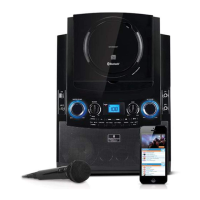
Details the controls and connections on the front of the unit.
Details the ports and handle on the rear of the unit.
Explains the indicators and information shown on the unit's display.
Guides on connecting the unit to external audio and video equipment.
Instructions for connecting the AC adapter and powering the unit.
Guides on connecting microphones to the unit's jacks.
Step-by-step guide for playing music from CDs and USB devices.
Explains how to adjust master volume, microphone volume, echo, and key.
Details features like Auto Voice Control, Balance, Skip, and Search.
How to repeat tracks, folders, or all tracks, and program playback order.
Instructions for pausing and stopping music playback.
Step-by-step guide to pair and connect Bluetooth devices.
Adjusting volume, microphone, echo, AVC, and balance for Bluetooth playback.
Managing playback with skip/pause and handling device reconnections.
Guides on connecting external audio devices via the Line In jack.
Adjusting echo/balance and turning off the unit.
Instructions for purchasing, downloading, and using MP3+G karaoke files.
Guidelines for handling, cleaning, and storing compact discs.
Addresses common problems like no power, no sound, and connectivity issues.
Technical details on audio output, impedance, and CD player performance.
Technical details on Bluetooth version, dimensions, weight, and power.
 General
| Product Type | Karaoke System |
|---|---|
| Model | iSM990BT |
| Brand | The Singing Machine |
| Bluetooth | Yes |
| Microphone Included | Yes |
| Microphone Type | Dynamic |
| Display | LED |
| Power Supply | AC Adapter |
| CD Player | Yes |
| USB Port | Yes |
| Microphone Inputs | 2 |
| Built-in Speakers | Yes |
| Compatible with Singing Machine App | Yes |
| Compatibility | Bluetooth Devices |
| Audio Input | 3.5mm AUX |
| Connectors | AUX input |
| Power Source | AC |

 To Next Page