— E19 —
Operation
Playing Songs from the USB (Continued)
14
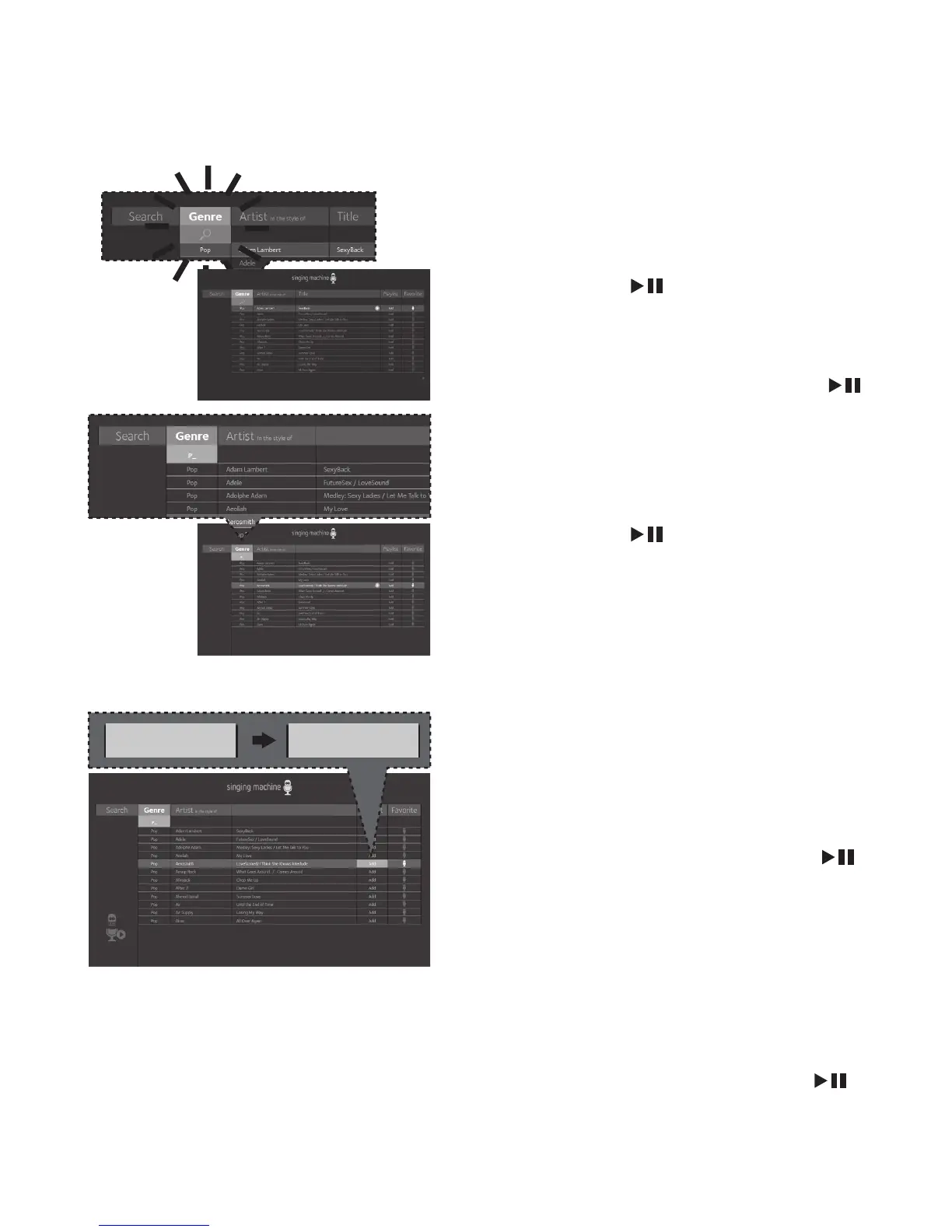
SEARCHING BY GENRE, ARTIST
or TITLE: To filter by Genre, Artist
or Title, select the Genre, Artist, or
Title using the NavigationLeft
andRight buttons, then press the
ENTER
button. The alphabet
will appear at the bottom of the
screen; select the desired starting
letter using the MASTER VOLUME
control, then press the ENTER
button to select it. A list of songs
that meet the criteria will appear.
Use the Navigation
Up and
Down buttons to navigate through
the list of songs, then press the
ENTER
button to play your
selection, or select the next letter
the same way.
Note:
You can search up to six letters. After the
sixth letter the search will reset.
15
CREATING THE PLAYLIST: To
create a personalized playlist,
select a song using the Navigation
Up and
Down buttons, then
scroll to the Playlist column (Add)
using the Navigation
Right or
Left button. Press the ENTER
button to confirm the operation;
“Added” will appear. Repeat this
step to add more songs.
Notes:
• The personalized Playlist will be kept even
if the unit is turned on or off.
• You can always edit your Playlist after
you create it by selecting a song that
was added and pressing the ENTER
button again; “Added” will change to
“Add”.
Add Added










 To Previous Page