— E21 —
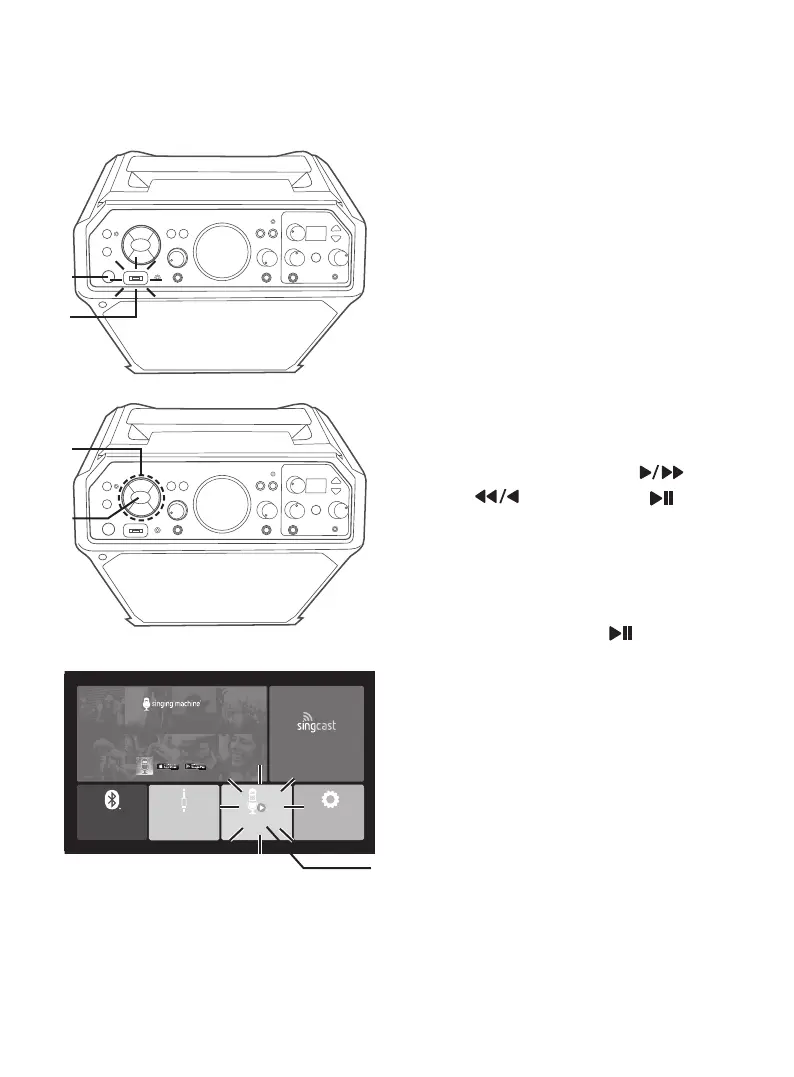
BLUETOOTH
®
OPEN
SETTINGS
OPEN
FREE 1-MONTH ACCESS
Download The Singing Machine App!
100,000+ Hd Karaoke Videos
THE SINGING MACHINE KARAOKE APP
App required to use casting function
CASTING
OPEN
AUX-IN
OPEN
USB
OPEN
Operation
Playing Songs from the USB
1
Connect the unit as described
previously. Press the STANDBY/ON
button to turn the unit on.
2
Insert a USB flash drive into the USB
slot on the unit so it faces upward.
2 WAYS TO ENTER USB MODE
3
Press the FUNCTION button
repeatedly until “USB” flashes on
the display.
4
Use the Navigation Right or
Left and ENTER/ button to
select USB OPEN in the main
menu; the unit should be
connected to a TV.
5
Press the ENTER/ button to enter
the USB mode; the Function indicator
will light orange.
NOTES:
• A loading “Loading U Disk, Please.....” will
appear on the TV when the system is loading
the songs.
• Unit must be connected to a TV to access
the USB song list. Songs will not display on
this unit’s mini display.
• Unit can only read files in the “karaoke”
folder.
x
v
u
y
w



 To Next Page