
 Need help?
Do you have a question about the The Singing Machine SMC2040 and is the answer not in the manual?
Warnings about electric shock, internal voltage, and not opening the unit.
Alerts against exposing the unit to moisture, rain, dripping, or excessive heat.
Information on FCC regulations and RF exposure limits for the equipment.
Essential guidelines for safe operation, including reading instructions, avoiding water, and proper cleaning.
Instructions for proper installation, ventilation, and safe usage to prevent hazards.
Guidance on correctly using plugs and protecting power cords.
Instructions on when to seek qualified service personnel and battery safety.
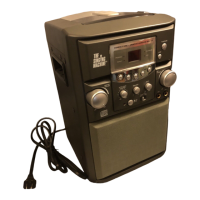
The primary karaoke system device.
The AC adapter for charging the unit.
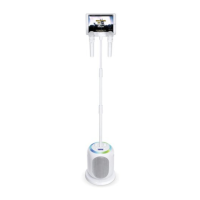
Includes the extendable mic stand and cradle with mic holders.
Lists the wireless microphones and the user manual.
Instructions for securely connecting the main unit to its base.
Steps to insert and tighten the microphone stand into the main unit.
Guide to adjust the height of the microphone cradle pole.
Instructions for attaching and tightening the cradle onto the mic stand.
Steps to adjust the total height of the microphone stand.
Instructions for inserting and securing the mic stand into the base.
Guide to adjust the height of the microphone cradle pole.
Instructions for attaching and tightening the cradle onto the mic stand.
Steps to adjust the total height of the microphone stand.
Recommended distance for main unit placement as a speaker.
Identifies key controls on the main unit like volume, playback, and power.
Identifies parts like cradle, mic holders, and adjustment caps.
Explains the display screen and various status indicators.
Details the locations of DC IN, HDMI, and Mic jacks.
Identifies controls and indicators on the wireless microphone.
Information on the built-in rechargeable battery and its cordless usage.
Step-by-step guide for charging the unit's internal battery.
Recommendations for maintaining optimal battery health and longevity.
Explanation of the Auto Power System (APS) and its standby mode function.
Guidelines for proper disposal and recycling of rechargeable batteries.
Instructions for connecting the AC adapter to charge the unit.
Guide for establishing an HDMI connection to a television for video output.
Key points regarding charging and TV connectivity for optimal use.
Steps for pairing and connecting wireless microphones to the unit.
Detailed instructions on how to change batteries in wireless microphones.
Essential safety guidelines for battery usage, installation, and handling.
Guide for connecting an optional wired microphone to the unit.
Information on the maximum number of microphones that can be connected simultaneously.
How to cycle through and select different built-in light effects.
Instructions on how to place devices, like smartphones, in the microphone cradle.
Step-by-step guide to connect the unit to a Wi-Fi network.
Using a mobile device to initiate and manage the Wi-Fi setup process.
Process for selecting and connecting to a specific home Wi-Fi network.
Notes on Wi-Fi frequency compatibility and security settings like WPA3.
How to confirm a successful Wi-Fi connection and its indicator.
Using BACK and HOME buttons for menu navigation within the unit.
Steps to disconnect from the current Wi-Fi network to connect to another.
Guide to navigate to and open the main settings menu on the unit.
Connecting, disconnecting, and checking Wi-Fi signal levels.
Instructions for updating the unit's firmware to the latest version.
How to view the current software version of the unit.
Procedure to reset the unit to its original factory default settings.
Steps to start casting content to the TV using the SingCast feature.
Connecting the unit to a TV and powering it on for casting.
Selecting the SINGCAST icon on the TV screen to activate the feature.
Downloading and using the mobile app to select and cast karaoke videos.
Process of selecting "SingCast Ultimate" to cast videos from the app.
Using the volume control for music playback during casting.
Controlling the volume specifically for the microphones during casting.
Continuing guide for various SingCast features and operations.
Turning the wireless microphones on or off for use.
Instructions on how to record vocals and music played through the unit.
How to access and listen to previously recorded vocal performances.
Further operations related to SingCast features like effects and pitch.
Selecting and applying different vocal effects to the microphone input.
Controlling the intensity level of the selected vocal effects.
Adjusting the pitch of the voice using the PERFECT PITCH button.
Instructions for properly powering down the main unit.
Guide to connecting and using external Bluetooth-enabled devices with the unit.
Steps to turn on the unit before initiating Bluetooth operations.
Methods to activate the unit's Bluetooth pairing mode.
Navigating the unit's menu to open Bluetooth options.
How the unit automatically reconnects to previously paired Bluetooth devices.
Starting the Bluetooth pairing process by holding a specific button.
Instructions for disconnecting a currently paired Bluetooth device.
Step-by-step guide for successfully pairing a Bluetooth device with the unit.
Indicators that signify a successful Bluetooth connection.
Key considerations and tips for Bluetooth pairing and connectivity.
Controlling music volume from both the unit and the connected Bluetooth device.
Controlling microphone volume during Bluetooth audio playback.
Continued instructions for using Bluetooth devices and their features.
Turning on wireless microphones for use with Bluetooth audio.
How to record singing and music from a connected Bluetooth source.
Accessing and listening to recorded vocal performances from Bluetooth sources.
Final operations related to Bluetooth device usage and features.
Selecting and applying vocal effects to the microphone input when using Bluetooth.
Using the VOCALS OFF button to remove lead vocals from audio tracks.
Controlling the intensity level of the selected vocal effects for Bluetooth audio.
Adjusting the pitch of the voice when using Bluetooth audio sources.
Instructions for properly powering down the unit after Bluetooth operations.
Solutions for units not powering on or general sound output problems.
Troubleshooting sound problems specifically when the unit is connected to a TV.
Solutions for issues where the microphone is not producing any sound.
Steps to resolve issues with Bluetooth device pairing and establishing connections.
Troubleshooting difficulties with music playback after successfully connecting via Bluetooth.
Solutions and checks for problems encountered when connecting to a Wi-Fi network.
Solutions for problems encountered during the QR code scanning process for setup.
Troubleshooting steps for issues related to internet connectivity required for casting.
Resolving issues where the SingCast unit is not appearing in the karaoke app's casting list.
Specifies the audio output power in Watts RMS for the unit.
Details the Bluetooth version and the operational working distance.
Indicates the supported Wi-Fi frequency band for network connectivity.
Lists the types and specifications of various connecting jacks on the unit.
Covers power requirements, output ratings, physical dimensions, and weight.
 General
| Brand | The Singing Machine |
|---|---|
| Model | SMC2040 |
| Category | Karaoke System |
| Language | English |








 To Next Page