— E18 —
Operation
Using a Bluetooth Device (Continued)
X
9
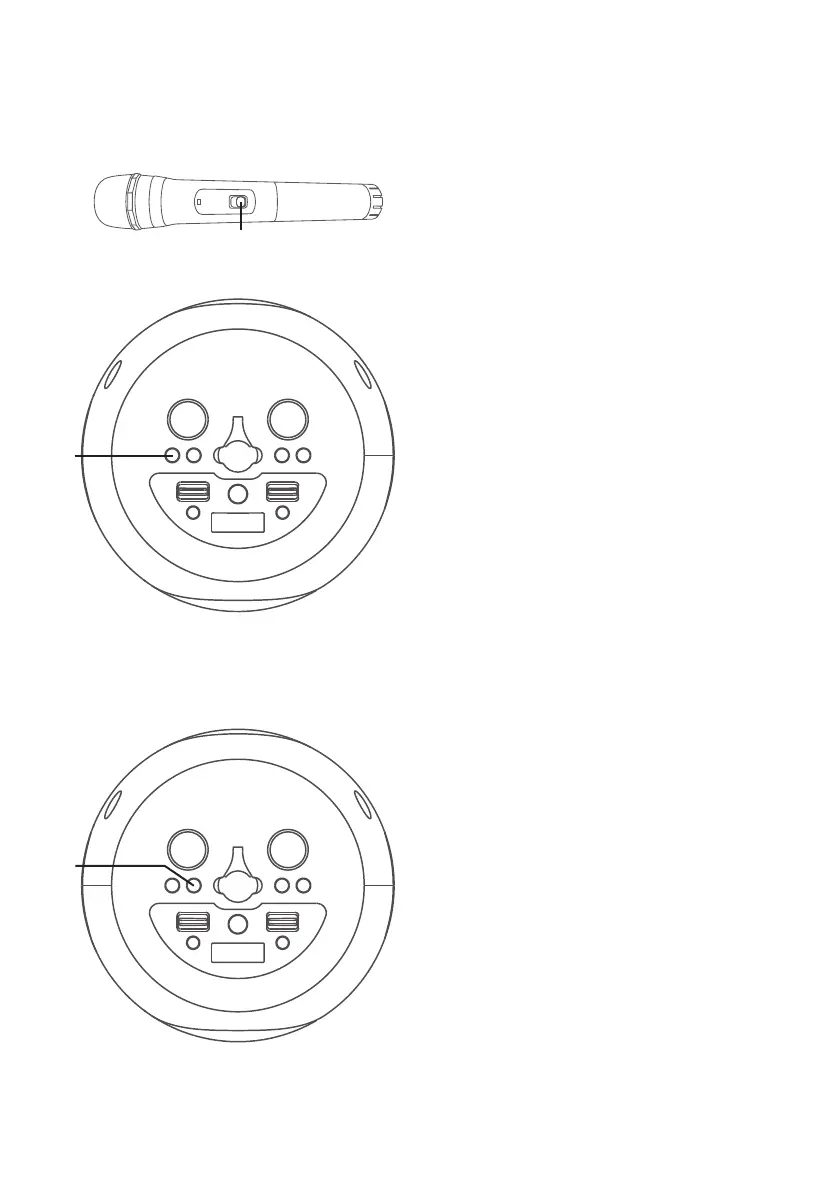
Slide the Wireless Mic’s ON / OFF
switch to the ON position.
NOTE: Sliding the switch to MUTE will
temporarily stop the microphone input.
10
RECORD YOUR SINGING
PERFORMANCE
During music playback, press the
RECORD button to record your
singing and the music, "REC" will
appear in display and light solid.
Press the RECORD button again
to stop recording, the "REC" will
turn off.
This unit is able to record for 5
minutes. It will also stop recording
automatically after 5 minutes and
the "REC" will turn off.
NOTE: Please note that each time when
the new recording is being recorded, the
existing recording will be deleted.
11
PLAYBACK YOUR SINGING
PERFORMANCE
To playback your singing
performance, you can press the
PLAYBACK button. "PB" will
appear solid on the display. Press
again to stop. Press and hold the
PLAYBACK button to delete the
recorded track.
at
ak



 To Next Page