— E27 —
Operation
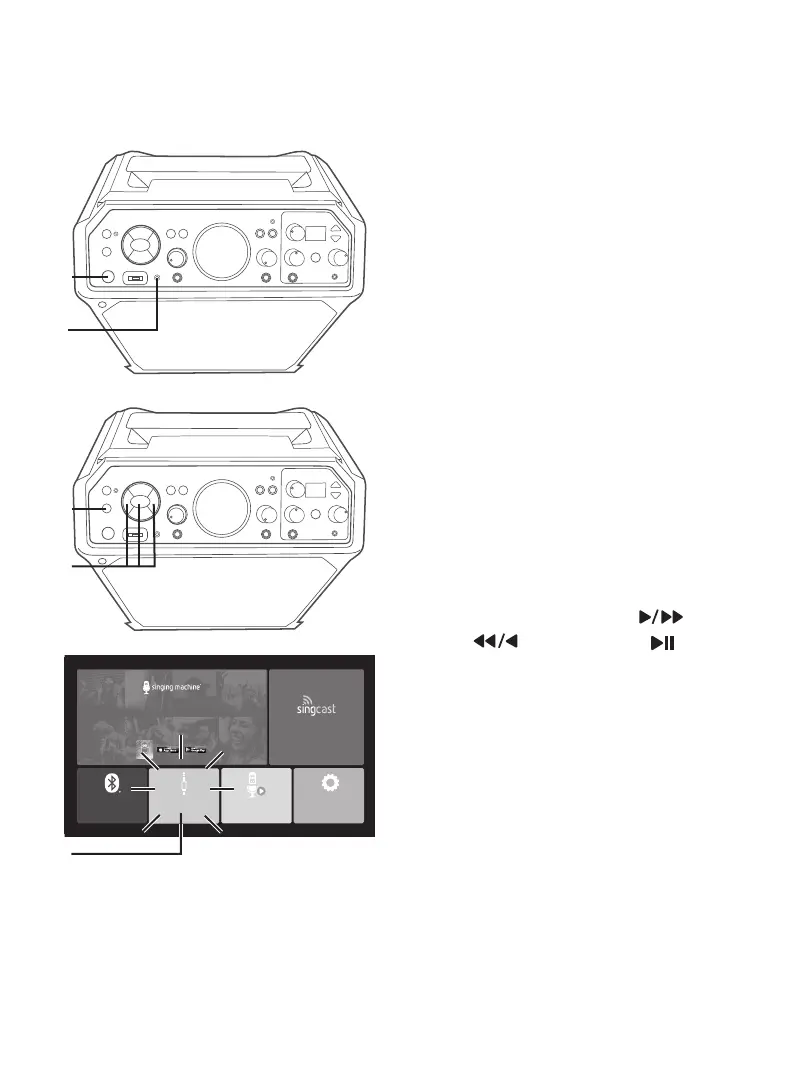
Using the AUX IN Jack
1
Connect the unit as described previously.
Press the STANDBY/ON button to turn
the unit on.
2
Connect the external unit to the AUX
INPUT Jack using a 3.5mm auxiliary
audio cable (not included). Connecting
an external unit will allow the audio to be
played through your Singing Machine.
NOTES:
• It is highly recommended to set the volume
on the auxiliary unit to 1/3 or lower to avoid
distortion.
• Skipping files/tracks is not possible in this
unit when using an external device.
2 WAYS TO ENTER AUX IN MODE
3
Press the FUNCTION button
repeatedly until “AUX” flashes on
the display.
4
Use the Navigation Right or
Left and ENTER/ button to
select AUX IN OPEN in the main
menu; the unit should be
connected to a TV. The Function
indicator will light green. You can also
repeatedly press the FUNCTION
button until the Function indicator
lights green to select the Line In
mode. “AUX” will start to flash on
the display.
u
v
w
x
BLUETOOTH
®
OPEN
SETTINGS
OPEN
FREE 1-MONTH ACCESS
Download The Singing Machine App!
100,000+ Hd Karaoke Videos
THE SINGING MACHINE KARAOKE APP
App required to use casting function
CASTING
OPEN
AUX-IN
OPEN
USB
OPEN
x




 To Next Page