EasyManua.ls Logo

The Singing Machine SML505 - Connecting to TV; Line In Connection; Master Volume Adjustment

The Singing Machine SML505
12 pages
Print Icon
To Next Page IconTo Next Page
To Previous Page IconTo Previous Page
Loading...
MAKING
THE
CONNECTIONS
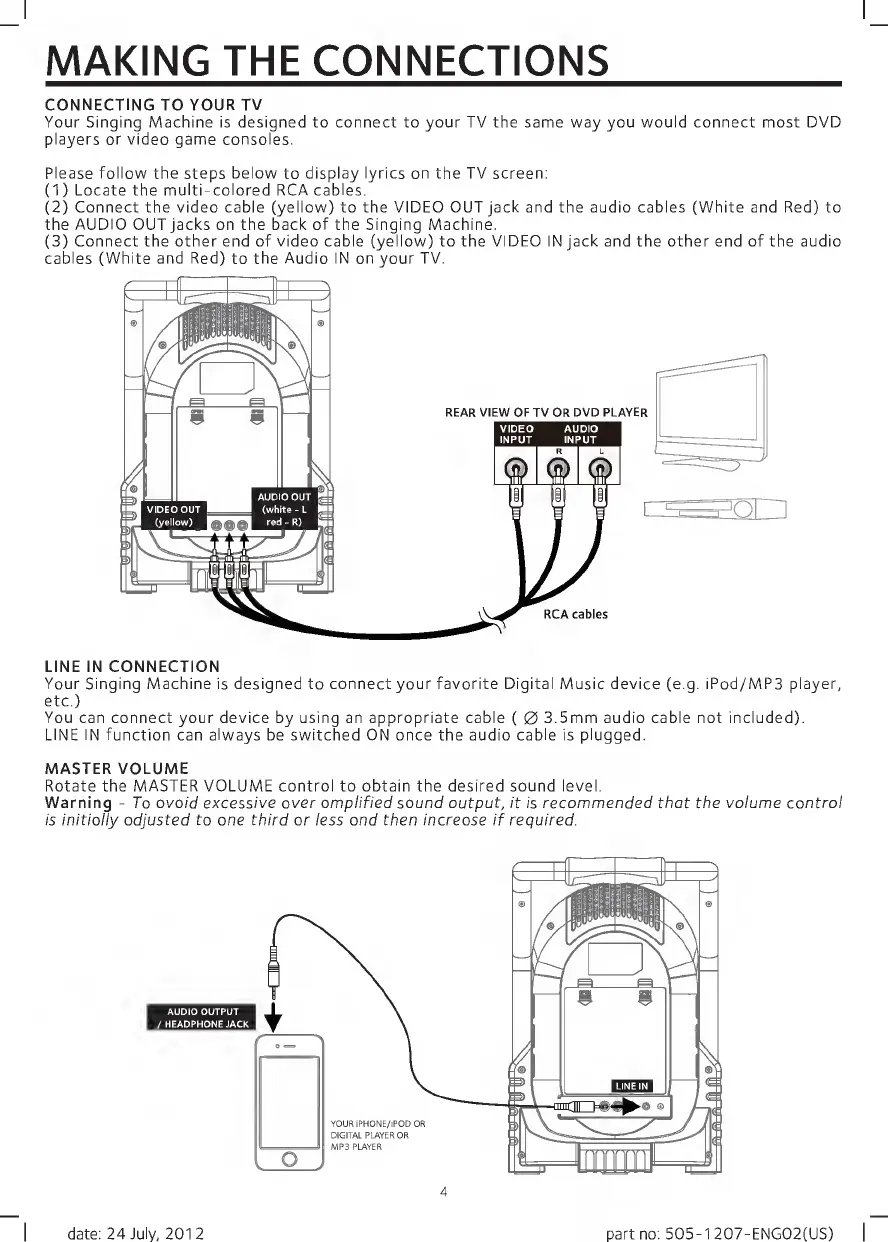
CONNECTING
TO
YOUR
TV
Your
Singing
Machine
is
designed
to
connect
to
your
TV
the
same
way
you
would
connect
most
DVD
players
or
video
game
consoles.
Please
follow
the
steps
below
to
display
lyrics
on
the
TV
screen:
(1)
Locate
the
multi-colored
RCA
cables.
(2)
Connect
the
video
cable
(yellow)
to
the
VIDEO
OUT
jack
and
the
audio
cables
(White
and
Red)
to
the
AUDIO
OUT
jacks
on
the
back
of
the
Singing
Machine.
(3)
Connect
the
other
end
of
video
cable
(yellow)
to
the
VIDEO
IN
jack
and
the
other
end
of
the
audio
cables
(White
and
Red)
to
the
Audio
IN
on
your
TV.
LINE
IN
CONNECTION
Your
Singing
Machine
is
designed
to
connect
your
favorite
Digital
Music
device
(e.g.
iPod/MP3
player,
etc.)
You
can
connect
your
device
by
using
an
appropriate
cable
(
0
3.5mm
audio
cable
not
included).
LINE
IN
function
can
always
be
switched
ON
once
the
audio
cable
is
plugged.
MASTER
VOLUME
Rotate
the
MASTER
VOLUME
control
to
obtain
the
desired
sound
level.
Warning
-
To
avoid
excessive
over
amplified
sound
output,
it
is
recommended
that
the
volume
control
is
initially
adjusted
to
one
third
or
less
and
then
increase
if
required.
AUDIO
OUTPUT
/HEADPHONE
JACK
date:
24
July,
2012
part
no:
505-1
207-ENG02(US)

Related product manuals