
 Need help?
Do you have a question about the The Singing Machine SML505 and is the answer not in the manual?
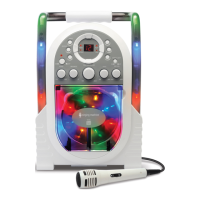
Diagram and labels identifying controls on the front panel of the unit.
Diagram and labels identifying connections and features on the rear panel of the unit.
Instructions and precautions for installing 'C' size batteries into the unit.
Guidance on powering the unit using the AC adapter and connecting to a power outlet.
Steps to connect the power adapter to the unit and the AC outlet.
Steps to connect the unit to a TV using RCA cables for displaying lyrics.
Instructions for connecting external digital music devices via the LINE IN jack.
Guidance on adjusting the master volume and a warning about excessive output.
Procedure for powering the unit on and off using the ON/OFF button.
Instructions for opening the CD door and placing a disc into the compartment.
How to start, temporarily stop, and resume playback using the PLAY/PAUSE button.
Function of the STOP button to cease playback and display track count.
Guidance on adjusting the desired sound level using the MASTER VOLUME control.
How to skip tracks forward/backward and search at high speed.
How to repeat the current track or all tracks, and how to clear the repeat function.
Steps to program and play songs in a preselected order, up to 20 tracks.
Instructions to turn the Disco light ON and OFF.
How to use the microphone jacks for singing along with music.
Adjusting the microphone volume for optimal performance and avoiding feedback.
Adjusting the ECHO control to enhance the singer's voice with a concert hall effect.
Functionality for multiplex discs to mute lead vocals when microphone is used.
Adjusting the balance to eliminate lead vocals or music, or shift sound to channels.
Solutions for problems related to the unit not powering on when plugged in.
Troubleshooting steps for when there is no sound or volume is too low.
Solutions for CD player not working, including disc issues and lens cleaning.
Resolving issues where audio is routed through TV/DVD player or home stereo.
Troubleshooting steps when lyrics do not display on the TV screen.
Solutions for no sound or low volume from the microphone.
Resolving issues where music or vocals cut out while playing a CDG and singing.
Troubleshooting when only music or vocals play from a CDG track.
 General
| Brand | The Singing Machine |
|---|---|
| Model | SML505 |
| Type | Karaoke System |
| Disc Playback | CD/CDG |
| Microphone Inputs | 2 |
| Built-in Speaker | Yes |
| Display | LED |
| Recording Capability | No |
| Power Supply | AC adapter |
| Echo Control | Yes |
| AVC (Auto Voice Control) | Yes |
| Microphone | Yes |
| Connectivity | Aux-in, USB |
| Audio Inputs | 3.5mm Aux-in |













 To Next Page