EasyManua.ls Logo

The Singing Machine SML505 - Repeat Function; Programmed Playback; Disco Light Operation; Karaoke Functions

The Singing Machine SML505
12 pages
Print Icon
To Next Page IconTo Next Page
To Previous Page IconTo Previous Page
Loading...
I
OPERATION
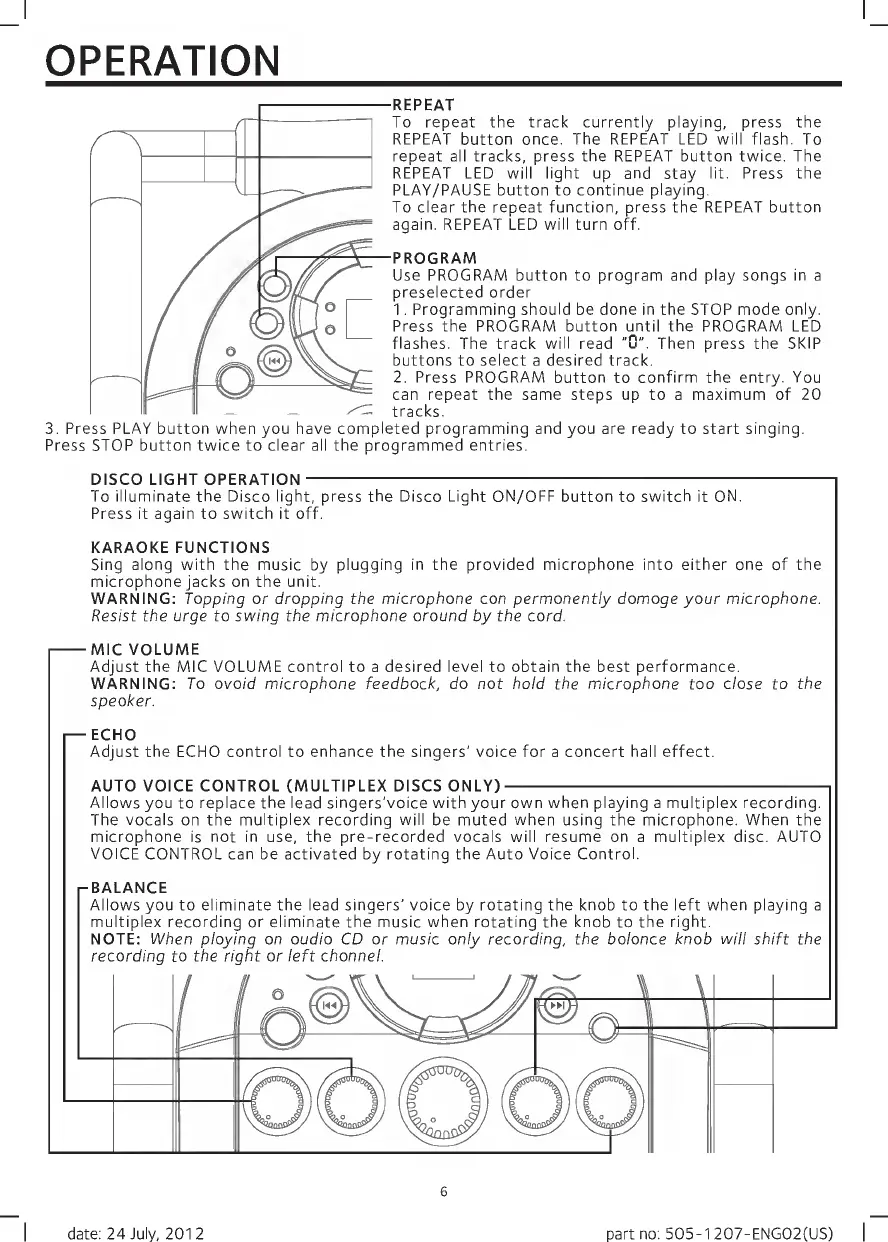
REPEAT
To
repeat
the
track
currently
playing,
press
the
REPEAT
button
once.
The
REPEAT
LED
will
flash.
To
repeat
all
tracks,
press
the
REPEAT
button
twice.
The
REPEAT
LED
will
light
up
and
stay
lit.
Press
the
PLAY/PAUSE
button
to
continue
playing.
To
clear
the
repeat
function,
press
the
REPEAT
button
again.
REPEAT
LED
will
turn
off.
PROGRAM
Use
PROGRAM
button
to
program
and
play
songs
in
a
preselected
order
1.
Programming
should
be
done
in
the
STOP
mode
only.
Press
the
PROGRAM
button
until
the
PROGRAM
LED
flashes.
The
track
will
read
"
0
".
Then
press
the
SKIP
buttons
to
select
a
desired
track.
2.
Press
PROGRAM
button
to
confirm
the
entry.
You
can
repeat
the
same
steps
up
to
a
maximum
of
20
tracks.
3.
P
r
ess
PLAY
button
when
you
have
completed
programming
and
you
are
ready
to
start
singing.
Press
STOP
button
twice
to
clear
all
the
programmed
entries.
DISCO
LIGHT
OPERATION-
To
illuminate
the
Disco
light,
press
the
Disco
Light
ON/OFF
button
to
switch
it
ON.
Press
it
again
to
switch
it
off.
KARAOKE
FUNCTIONS
Sing
along
with
the
music
by
plugging
in
the
provided
microphone
into
either
one
of
the
microphone
jacks
on
the
unit.
WARNING:
Tapping
or
dropping
the
microphone
can
permanently
damage
your
microphone.
Resist
the
urge
to
swing
the
microphone
around
by
the
cord.
-MIC
VOLUME
Adjust
the
MIC
VOLUME
control
to
a
desired
level
to
obtain
the
best
performance.
WARNING:
To
avoid
microphone
feedback,
do
not
hold
the
microphone
too
close
to
the
speaker.
ECHO
Adjust
the
ECHO
control
to
enhance
the
singers'
voice
for
a
concert
hall
effect.
AUTO
VOICE
CONTROL
(MULTIPLEX
DISCS
ONLY)-
Allows
you
to
replace
the
lead
singers'voice
with
your
own
when
playing
a
multiplex
recording.
The
vocals
on
the
multiplex
recording
will
be
muted
when
using
the
microphone.
When
the
microphone
is
not
in
use,
the
pre-recorded
vocals
will
resume
on
a
multiplex
disc.
AUTO
VOICE
CONTROL
can
be
activated
by
rotating
the
Auto
Voice
Control.
-BALANCE
Allows
you
to
eliminate
the
lead
singers'
voice
by
rotating
the
knob
to
the
left
when
playing
a
multiplex
recording
or
eliminate
the
music
when
rotating
the
knob
to
the
right.
NOTE:
When
playing
an
audio
CD
or
music
only
recording,
the
balance
knob
will
shift
the
recording
to
the
right
or
left
channel.
6
date:
24
July,
2012
part
no:
505-1
207-ENG02(US)

Related product manuals