EasyManua.ls Logo

The Singing Machine SML505 - Operation; Power On;Off; Loading a Disc; Play;Pause Function

The Singing Machine SML505
12 pages
Print Icon
To Next Page IconTo Next Page
To Previous Page IconTo Previous Page
Loading...
I
OPERATION
This
unit
is
designed
to
play
CDs
and
CDGs
bearing
the
identification
logo
respectively.
If
the
disc
does
not
conform
to
the
standard,
it
may
not
play
properly.
_n
COMPACT
mm
_n
COMPACT
DIGITAL
AUDID
[GRAPHICS]
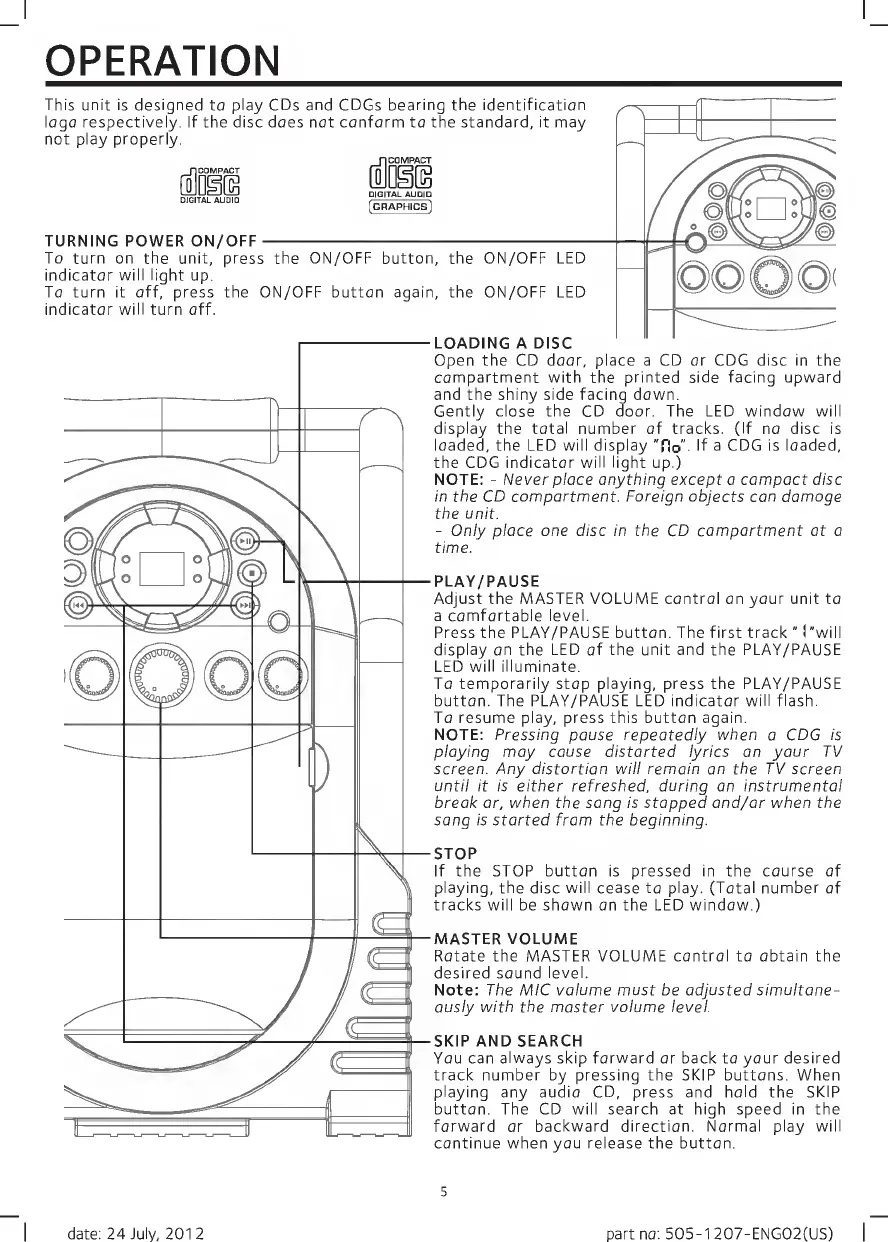
TURNING
POWER
ON/OFF-
To
turn
on
the
unit,
press
the
ON/OFF
button,
the
ON/OFF
LED
indicator
will
light
up.
To
turn
it
off,
press
the
ON/OFF
button
again,
the
ON/OFF
LED
indicator
will
turn
off.
LOADING
A
DISC
Open
the
CD
door,
place
a
CD
or
CDG
disc
in
the
compartment
with
the
printed
side
facing
upward
and
the
shiny
side
facing
down.
Gently
close
the
CD
door.
The
LED
window
will
display
the
total
number
of
tracks.
(If
no
disc
is
loaded,
the
LED
will
display
"flo"
If
a
CDG
is
loaded,
the
CDG
indicator
will
light
up.)
NOTE:
-
Never
place
anything
except
a
compact
disc
in
the
CD
compartment.
Foreign
objects
can
damage
the
unit.
-
Only
place
one
disc
in
the
CD
compartment
at
a
time.
PLAY/PAUSE
Adjust
the
MASTER
VOLUME
control
on
your
unit
to
a
comfortable
level.
Press
the
PLAY/PAUSE
button.
The
first
track
"
("will
display
on
the
LED
of
the
unit
and
the
PLAY/PAUSE
LED
will
illuminate.
To
temporarily
stop
playing,
press
the
PLAY/PAUSE
button.
The
PLAY/PAUSE
LED
indicator
will
flash.
To
resume
play,
press
this
button
again.
NOTE:
Pressing
pause
repeatedly
when
a
CDG
is
playing
may
cause
distorted
lyrics
on
your
TV
screen.
Any
distortion
will
remain
on
the
TV
screen
until
it
is
either
refreshed,
during
an
instrumental
break
or,
when
the
song
is
stopped
and/or
when
the
song
is
started
from
the
beginning.
STOP
If
the
STOP
button
is
pressed
in
the
course
of
playing,
the
disc
will
cease
to
play.
(Total
number
of
tracks
will
be
shown
on
the
LED
window.)
MASTER
VOLUME
Rotate
the
MASTER
VOLUME
control
to
obtain
the
desired
sound
level.
Note:
The
MIC
volume
must
be
adjusted
simultane¬
ously
with
the
master
volume
level.
SKIP
AND
SEARCH
You
can
always
skip
forward
or
back
to
your
desired
track
number
by
pressing
the
SKIP
buttons.
When
playing
any
audio
CD,
press
and
hold
the
SKIP
button.
The
CD
will
search
at
high
speed
in
the
forward
or
backward
direction.
Normal
play
will
continue
when
you
release
the
button.
5
date:
24
July,
2012
part
no:
505-1
207-ENG02(US)

Related product manuals