EasyManua.ls Logo

The Singing Machine SML505 - Lyrics Not Appearing; Microphone Volume Issues; Audio Cut Out; Music or Vocals Playback

The Singing Machine SML505
12 pages
Print Icon
To Next Page IconTo Next Page
To Previous Page IconTo Previous Page
Loading...
I
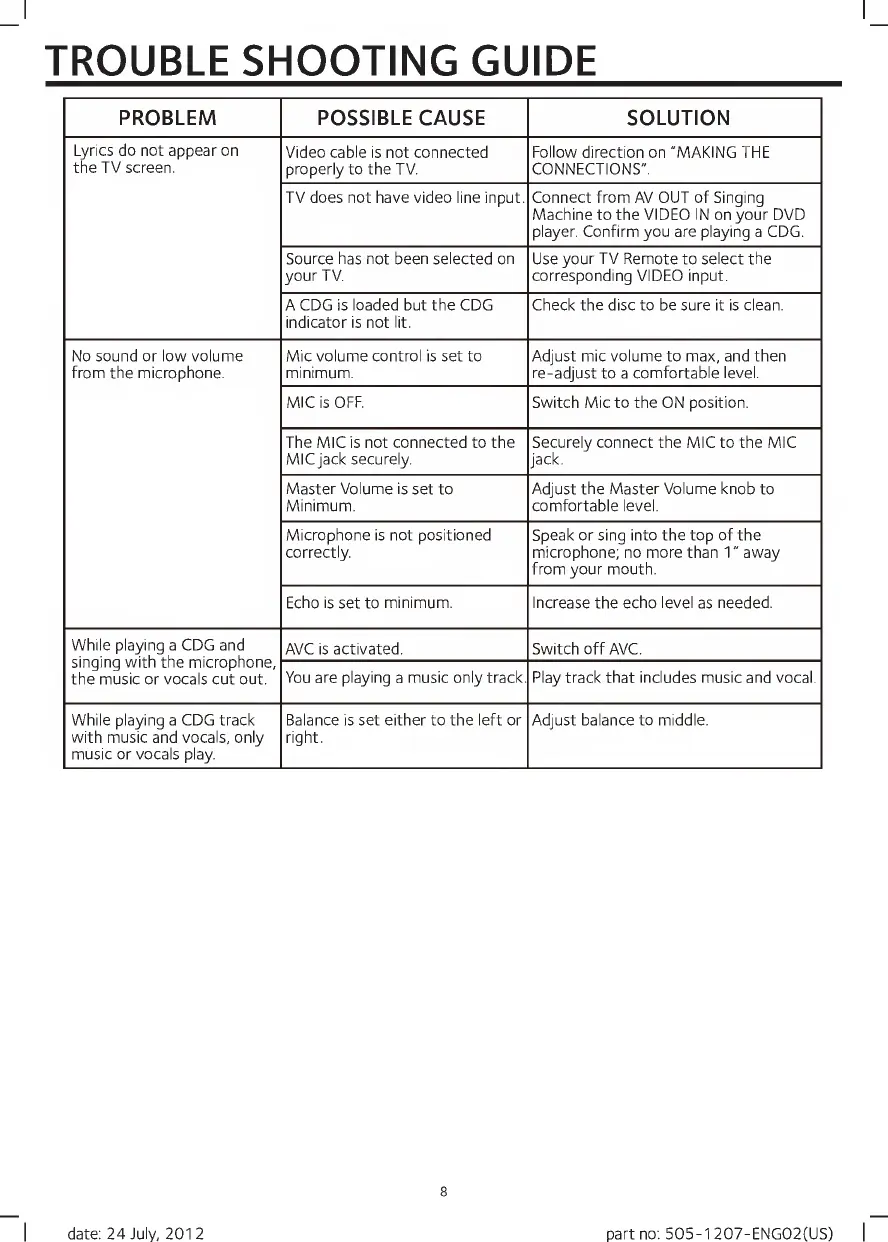
TROUBLE
SHOOTING
GUIDE
PROBLEM
POSSIBLE
CAUSE
SOLUTION
Lyrics
do
not
appear
on
the
TV
screen.
Video
cable
is
not
connected
properly
to
the
TV.
Follow
direction
on
"MAKING
THE
CONNECTIONS".
TV
does
not
have
video
line
input.
Connect
from
AV
OUT
of
Singing
Machine
to
the
VIDEO
IN
on
your
DVD
player.
Confirm
you
are
playing
a
CDG.
Source
has
not
been
selected
on
your
TV.
Use
your
TV
Remote
to
select
the
corresponding
VIDEO
input.
A
CDG
is
loaded
but
the
CDG
indicator
is
not
lit.
Check
the
disc
to
be
sure
it
is
clean.
No
sound
or
low
volume
from
the
microphone.
Mic
volume
control
is
set
to
minimum.
Adjust
mic
volume
to
max,
and
then
re-adjust
to
a
comfortable
level.
MIC
is
OFF.
Switch
Mic
to
the
ON
position.
The
MIC
is
not
connected
to
the
MICjack
securely.
Securely
connect
the
MIC
to
the
MIC
jack.
Master
Volume
is
set
to
Minimum.
Adjust
the
Master
Volume
knob
to
comfortable
level.
Microphone
is
not
positioned
correctly.
Speak
or
sing
into
the
top
of
the
microphone;
no
more
than
1"
away
from
your
mouth.
Echo
is
set
to
minimum.
Increase
the
echo
level
as
needed.
While
playing
a
CDG
and
singing
with
the
microphone,
the
music
or
vocals
cut
out.
AVC
is
activated.
Switch
off
AVC.
You
are
playing
a
music
only
track.
Play
track
that
includes
music
and
vocal.
While
playing
a
CDG
track
with
music
and
vocals,
only
music
or
vocals
play.
Balance
is
set
either
to
the
left
or
right.
Adjust
balance
to
middle.
8
date:
24
July,
2012
part
no:
505-1
207-ENG02(US)

Related product manuals