Using the device / 31
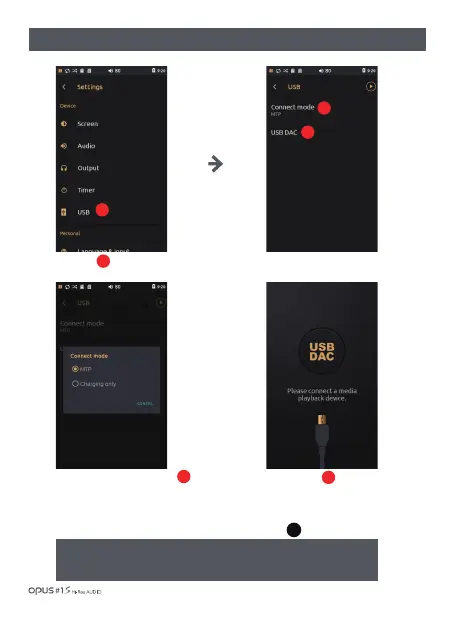
| ‘USB’ settings screen
Press ‘USB’ in Device in settings
menu to enter USB settings screen.
Press the Connect mode button
to enter MTP mode or charging
mode.
Press USB DAC to switch the
device to USB DAC mode and USB
HOST DEVICE connection waiting mode.
If you want deactivate USB DAC
mode, unplug USB cable and
Press button.
2
3
1
2
3
1
USB
DAC
※Caution! Read carefully!
Opus#1 support USC 1.0(UsbAudio Class 1.0 16bit/ 48 kHz only)
USC 1.0 device does not need PC driver. When Opus#1s is connected PC in
USB DAC mode, PC recognizes Opus#1 as PC speaker automatically.


 To Next Page