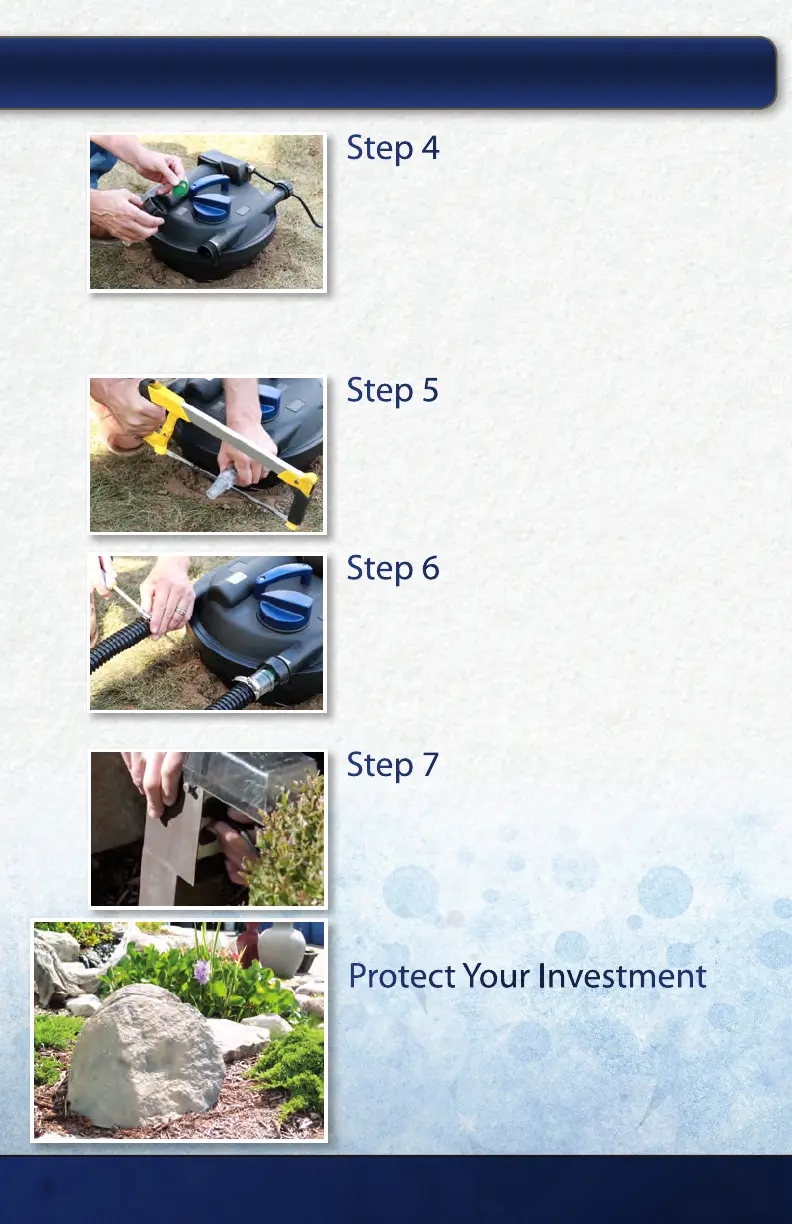
Step 4
Attach the Fittings
Attach the ttings to the inlet and outlet of the
AllClear™ G2 Filter with the compression ring. The
o-rings should be between the lter housing and the
step down tting to create a watertight seal when
secure. Note: The outlet on the opposite side of the
lter is reserved for the backush option. This outlet
should remain capped unless the backush is in use.
Step 5
Cut Fittings to Size
Temporarily slide your tubing onto the tting to
determine the size connection you will use. Then, cut
the ttings to the largest connection that will work
with your plumbing to ensure maximum water ow.
Step 6
Connect the Plumbing
Connect the plumbing coming from your pump into
the inlet indicated on the lter and secure with a
hose clamp. Then, connect plumbing that will return
the water to your pond or waterfall into the outlet
indicated on the lter and secure with a hose clamp.
Step 7
Plug in Pump and Filter
Plug your pump into a GFCI protected outlet. Once
water is owing through the lter plug the AllClear™
G2 UV Filter into a GFCI protected outlet.
INSTALLING YOUR ALLCLEAR
™
G2 FILTER:
Protect Your Investment
AllClear™ Rock Cover
Camouage and protect the AllClear™ G2 Filter
from the outside elements use an AllClear™ Rock
Cover. View online at thepondguy.com/allclearg2
thepondguy.com | 866-POND-HELP (766-3435)
6


 To Next Page