
 Need help?
Do you have a question about the Thermaltake Level 10 GT and is the answer not in the manual?
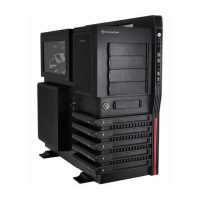
Details about the case's physical and technical specifications.
Important warnings and notices for users before proceeding.
Instructions on how to remove the side panels.
Steps for installing the motherboard into the chassis.
Instructions for installing 3.5-inch and 2.5-inch HDDs.
Specifies the maximum allowed height for CPU coolers.
Specifies the maximum allowed length for graphics cards.
Initial step to lay the chassis flat for motherboard installation.
Steps to place and secure the motherboard.
Connect SATA/power cables and enable AHCI.
Step to install and secure the PCI card.
Connecting USB and Audio ports to the motherboard.
 General
| Type | PC |
|---|---|
| Material | SECC |
| Form factor | Full Tower |
| Product color | Black |
| LED indicators | Yes |
| Supported motherboard form factors | ATX, EATX, Micro ATX |
| Optional fans | 1 |
| Expansion slots | 8 |
| Weight (imperial) | 28 lbs |
| Ventilation fan(s) | 4 |
| External drive bays | 4 x 5.25’’, 1 x 3.5’’ |
| Internal drive bays | 5 x 3.5’’/2.5’’ |
| USB 2.0 ports quantity | USB 2.0 ports have a data transmission speed of 480 Mbps, and are backwards compatible with USB 1.1 ports. You can connect all kinds of peripheral devices to them. |
| USB 3.2 Gen 1 (3.1 Gen 1) Type-A ports quantity | 2 |
 Weight and Dimensions
| Depth | 590 mm |
|---|---|
| Width | 282 mm |
| Height | 584 mm |
| Weight | 12700 g |




 To Next Page