
 Need help?
Do you have a question about the Thermo King Smart Reefer 3 and is the answer not in the manual?
Controller allows selection of named products and/or numeric setpoints.
Clarifies terms 'setpoint'/'product' and specific notes.
Step-by-step guide to changing a numeric setpoint on the controller.
Step-by-step guide to selecting a named product from the controller's list.
Procedure to select a setpoint for a named product with a programmed range.
Procedure to adjust the setpoint for a named product with a programmed range.
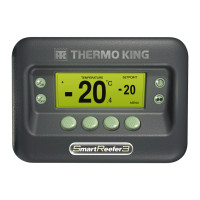
The OptiSet Plus system is a sophisticated controller designed for managing temperature profiles within refrigerated transport units, offering users the flexibility to select either pre-defined named products or specific numeric setpoints. This system is an integral part of the SR-3 Smart Reefer 3 Microprocessor, providing precise control over the refrigeration environment.
The primary function of the OptiSet Plus controller is to maintain a desired temperature within a refrigerated space. It achieves this by allowing users to define and select specific temperature settings, either through a list of named products, each with its own temperature profile, or by directly entering a numeric setpoint. The system is designed to be user-friendly, guiding the operator through various screens to ensure accurate temperature management.
When operating with named products, the controller can be programmed such that each product has a single, fixed setpoint, or a range of setpoints, offering greater flexibility. For instance, "Grapefruit" might have a default setpoint of 35.5°F, while "Potatoes" might have a setpoint range of 40-50°F, allowing the user to choose a specific temperature within that range. This feature is particularly useful for mixed loads or for products that require different temperature conditions at various stages of transport.
The numeric setpoint functionality allows for direct temperature input, similar to how an SR-3 Controller operates. If no named products are loaded onto the controller, the system defaults to displaying "SETPOINT" on the far-left soft key, enabling the user to adjust the temperature numerically. This provides a straightforward method for temperature control when specific product profiles are not required or available.
The controller also incorporates a "Temperature Watch Display," which, if active, can be exited by pressing the MENU soft key to return to the Standard Display, ensuring that the user always has a clear view of the primary operational screen.
The OptiSet Plus controller is designed for intuitive use, primarily through a series of soft keys and a display screen that guides the operator through various selection and adjustment processes.
To select or change a numeric setpoint, the user begins at the Standard Display. Pressing the "PRODUCT/SETPOINT" (or "SETPOINT") soft key brings up a screen that briefly displays "Named Product / Numeric Setpoint?" before showing "Named Product or Numeric Setpoint?". The user then presses the "NUMERIC" soft key. The "Setpoint" screen appears, followed by "Current Setpoint Is," displaying the current temperature. The user can adjust this temperature using the "+" or "-" soft keys. After making the adjustment, pressing the "YES" soft key confirms the new setpoint. If "NO" is pressed, the change is discarded, and the display returns to the Standard Display. Pressing the "EXIT" soft key at any point will also return the display to the Standard Display, providing an easy way to cancel an operation.
The process for selecting a named product is similar. From the Standard Display, the user presses the "PRODUCT/SETPOINT" (or "PRODUCT") soft key. After the "Named Product / Numeric Setpoint?" screen, the user selects the "NAMED" soft key. The "Product" screen appears, followed by "Current Product Is," displaying the currently selected product (e.g., "Grapefruit"). The user can then use the "+" or "-" soft keys to scroll through the available named products. Pressing "YES" confirms the selection, and the display shows "New Product Will Be" followed by the chosen product (e.g., "Potatoes"). If "NO" is pressed, the selection is canceled, and the display reverts to the Standard Display.
If a named product has been programmed with a setpoint range, the user can adjust the setpoint within that range. After selecting the named product and confirming with "YES," if the product has a setpoint range, the "Change Setpoint for [Product Name]" screen appears, followed by "Current Setpoint of [Product Name] & Setpoint Range Is [Min] to [Max]." The user can then use the "+" or "-" soft keys to adjust the setpoint within the specified range. Confirming with "YES" accepts the new setpoint, while "NO" cancels the change.
While the manual primarily focuses on operational aspects, certain design choices imply maintenance considerations:
The OptiSet Plus system, as part of the SR-3 Smart Reefer 3 Microprocessor, is a robust and user-friendly solution for precise temperature management in refrigerated transport, designed to offer both flexibility and reliability in various operational scenarios.
 General
| Model | Smart Reefer 3 |
|---|---|
| Power Source | Diesel, Electric |
| Control System | Microprocessor-based |
| Weight | Varies by configuration |
| Dimensions | Varies by configuration |
| Compatibility | Compatible with a wide range of trailer types and sizes |



 To Next Page