Operating Instructions
24
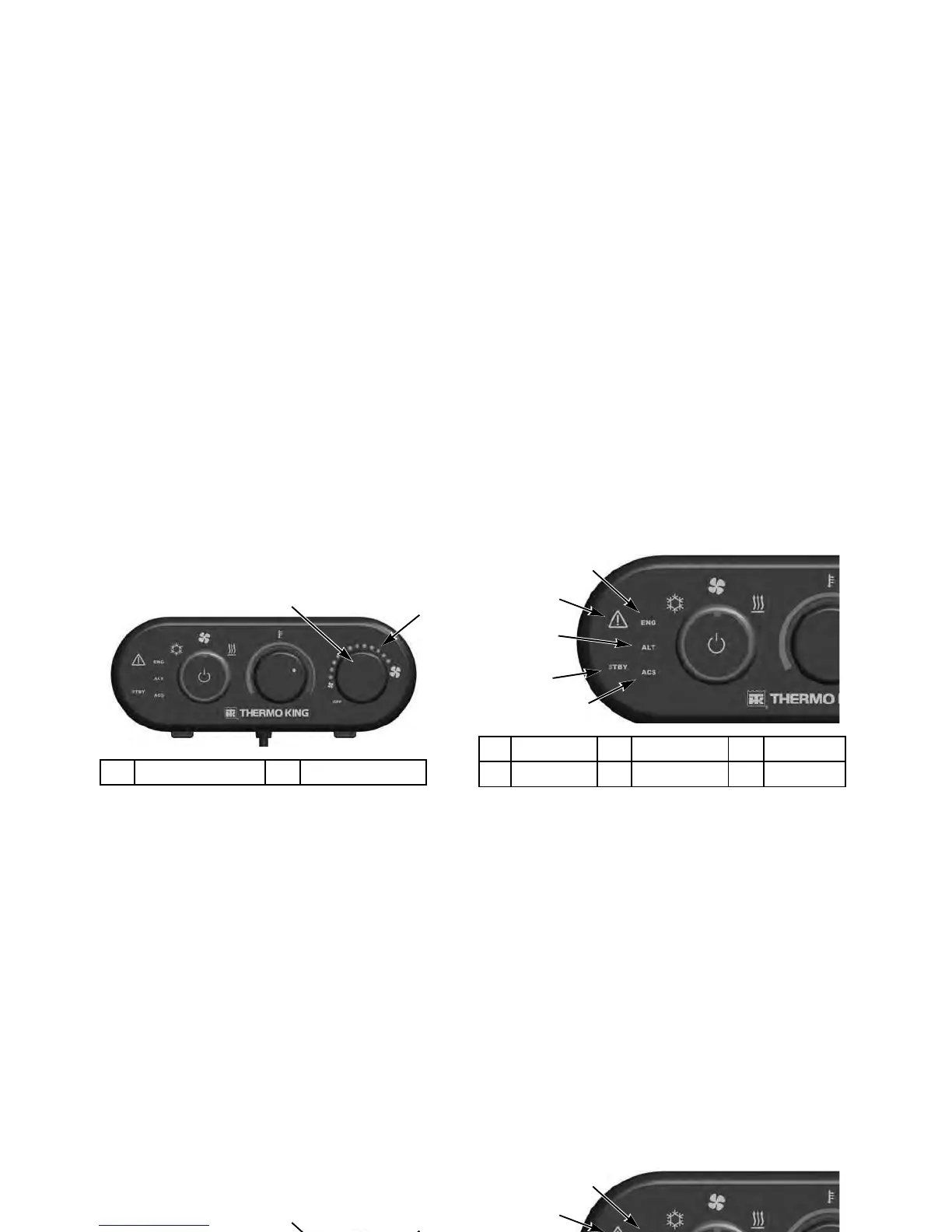
Fan Speed Selector
Evaporator fan speed selections are Off, Low, Medium and
High. Rotating the Fan Speed Selector knob clockwise will
increase fan speed, counterclockwise will decrease fan speed.
As fan speed increases/decreases, groups of four LEDs will
progressively turn on/off. The fan will continue to run at the
chosen speed. When Air Conditioning mode is selected and
Fan Speed is selected OFF, the fan speed will default to LOW.
When Fan Only or Heat mode are selected Fan Speed will
default to OFF.
System Condition
Display Several LED indicators are on the left side of the HMI.
These provide additional System Condition information.
Standby Indicator
STBY is illuminated when the system is in Standby or Monitor
mode.
1. FAN Selector 2. LEDs
Right Knob Adjusts Fan Speed
1. ENG Icon 2. Alarm Icon 3. ALT Icon
4. STBY Icon 5. ACS Icon
System Condition Display Icons
Operating Instructions
24
Fan Speed Selector
Evaporator fan speed selections are Off, Low, Medium and
High. Rotating the Fan Speed Selector knob clockwise will
increase fan speed, counterclockwise will decrease fan speed.
As fan speed increases/decreases, groups of four LEDs will
progressively turn on/off. The fan will continue to run at the
chosen speed. When Air Conditioning mode is selected and
Fan Speed is selected OFF, the fan speed will default to LOW.
When Fan Only or Heat mode are selected Fan Speed will
default to OFF.
System Condition
Display Several LED indicators are on the left side of the HMI.
These provide additional System Condition information.
Standby Indicator
STBY is illuminated when the system is in Standby or Monitor
mode.
1. FAN Selector 2. LEDs
Right Knob Adjusts Fan Speed
1. ENG Icon 2. Alarm Icon 3. ALT Icon
4. STBY Icon 5. ACS Icon
System Condition Display Icons




 To Next Page