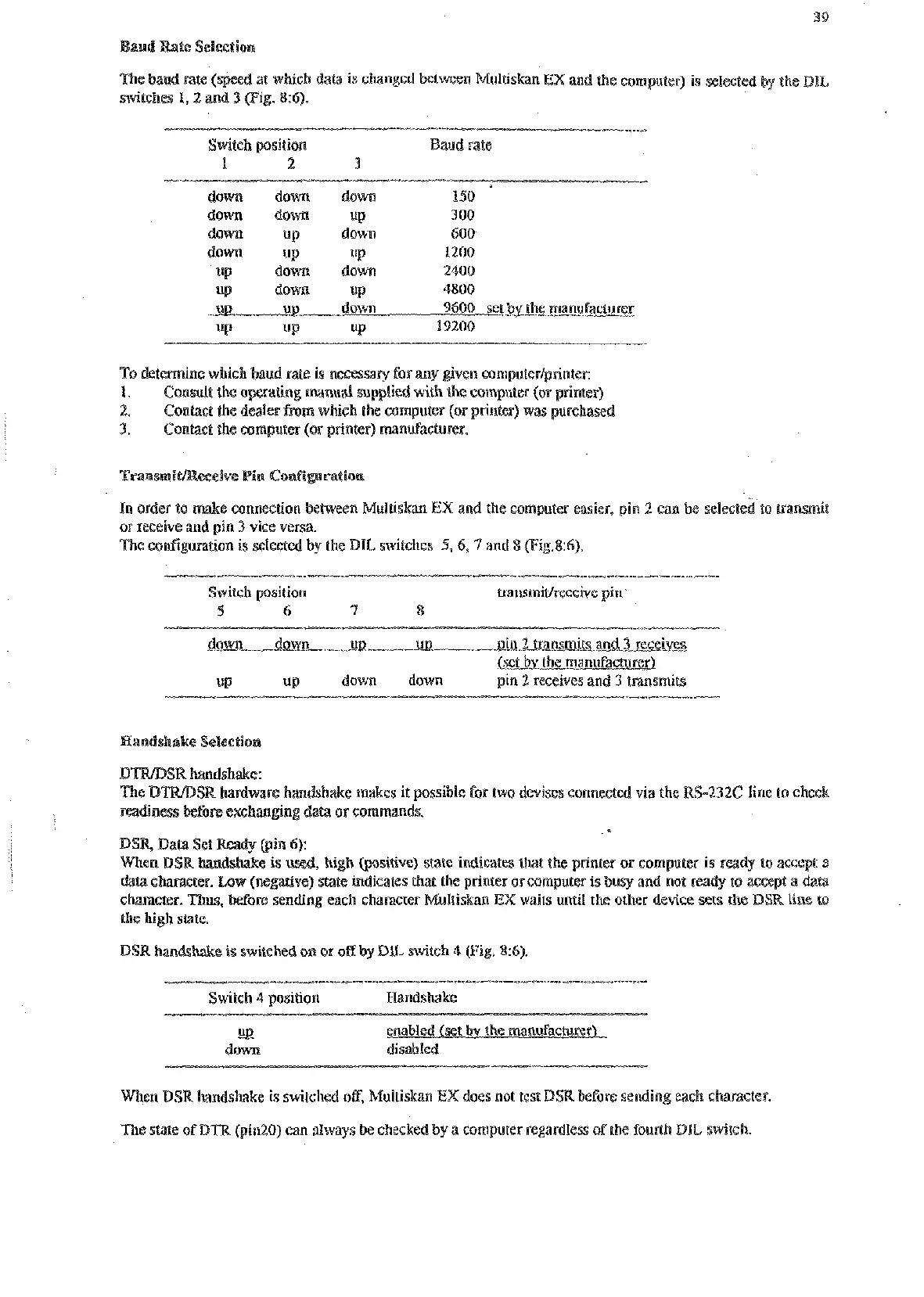
and Rate
Selection
ed at which da(a
is
changed
ultiskan
EX
and the computer)
is
selected
by
the
DL
switches
I,
2
and
3
(Fig.
8:6).
Switch position aud
rate
1
2
3
down down
do-
150
down
down
up
100
dawn
up down
600
down up
UP
1200
up down
down
2400
UP down
up
4800
ui?
ui?
down
9600
set
bv
the manufacmrer
UP up
UP
19200
7%
determine which baud rate
is
nesessary for my given computer/grinter:
1.
Conmlt
(he
operating manual suaplied with
the
computer (or printer)
2.
Contact
the
dealer
from
which the computer (or printer) was purchased
3.
Contact the computer (or printer) manufacturer.
In order to make connection between Multiskan
EX
and the computer easier, pin
2
can be selecte
or receive and pin
3
vise versa.
The conIipration
is
selected by the DIL switches
9,6,
7
and
8
(Fig.86).
Switch position LlansmiWreseive pin
5
6
7
8
down down up-
UB
ain
2
transmits and
3
receives
bet
bv
the manufacturer)
UP down down pin
2
receives and
3
transmits
Raodshake Selection
R
bdwxe handshake makes it possible foe two devises connected via the
RS-232C
line to check
DSR Data Set
Ready
(pin
6):
(positive) state indicates tnat the printer or computer is
ready
to acce
ive) state indicates that the printer
OF
computer
is
busy and not ready to accept a data
ding each character Multiskan
EX
waits until the other device sets
the
DSR
line to
the high
state.
DSR handshake
is
switched on or off by
DE
switch
4
pig.
8:6).
Switch
4
position Handshake
-
u
down disabled
When
DSR
handshake is switched off, Multiskan
EX
does not test
DSR
before sending each character.
The
state
of
DTB
(pin20) can always be checkcd by a computer regardless ofthe fourth
DIL
switch.
Artisan Technology Group - Quality Instrumentation ... Guaranteed | (888) 88-SOURCE | www.artisantg.com










 To Next Page