MULTISKAN RC and MS SERVICE MANUAL
1.
CHECKING THE SUPPLY VOLTAGES
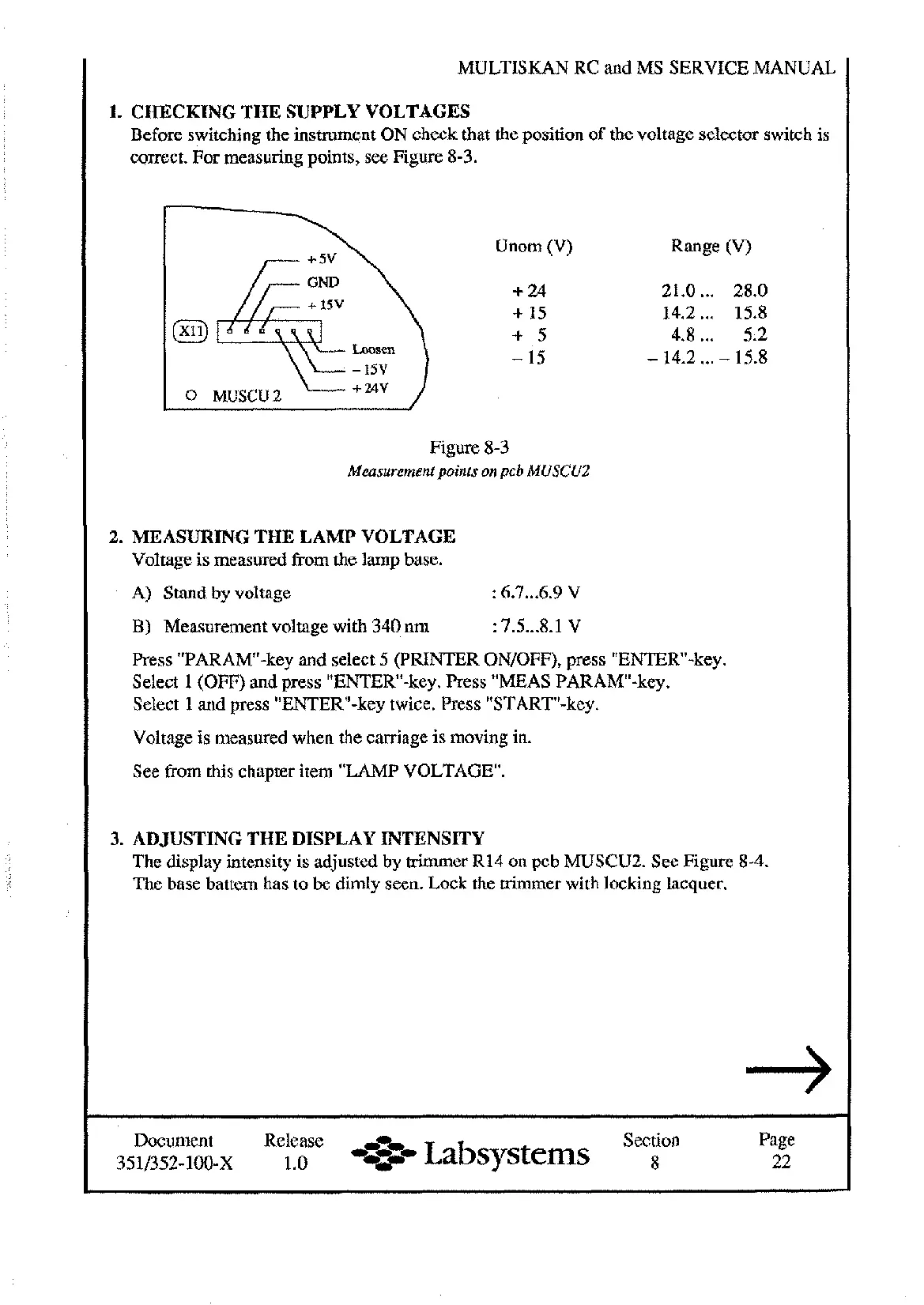
Before switching the instrument ON check that the position of the voltage selector switch is
correct. For measuring points, see Figure 8-3.
Unom (V) Range (V)
+
24 21.0
...
28.0
+
15
14.2
...
15.8
+
5
4.8
...
5.2
Loosen
-
15
-
14.2
...
-
15.8
-
15v
0
MUSCU2
+
2av
Figure 8-3
Measurement points on pcb MUSCUZ
2.
MEASURING THE LAMP VOLTAGE
Voltage is measured from the lamp base.
A) Stand by voltage
:
6.7
...
6.9
V
B)
Measurement voltage with 340 nm
:
7.5...8.1 V
Press "PARAM-key and select 5 (PRINTER ONIOFF), press "ENTER-key.
Select 1 (OFF) and press "ENTER-key. Press "MEAS PARAMw-key.
Select 1 and press "ENTERw-key twice. Press "START-key.
Voltage is measured when the carriage is moving in.
See from this chapter item "LAMP VOLTAGE.
3.
ADJUSTING THE DISPLAY INTENSITY
The display intensity is adjusted by trimmer R14 on pcb MUSCU2. See Figure 8-4.
The base battern has to
be
dimly seen. Lock the trimmer with locking lacquer.
Document Release
,r~,
Section Page
1.0
-+=..-
Labsystems
8 22
Artisan Technology Group - Quality Instrumentation ... Guaranteed | (888) 88-SOURCE | www.artisantg.com










 To Next Page