User Manual
8.
Alarm display
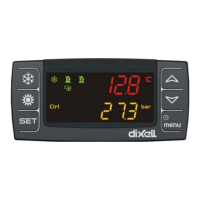
Enter to the function menu:
1. Select “ALrM” function using or ;
2. Press and release ;
3. The pressure on or allows to show active alarms.
Press the Menu key or wait the timeout, to exit to this visualization.
9.
Alarm reset
1. Enter to the function menu;
2. Select the function “ALrM”;
3. Press ; lower display shows the alarm while the upper display shows the label rSt if the
alarm is resettable, or NO if it isn’t. Using or you can slide and show all active
alarms;
4. Press on the label rSt to reset alarm and pass to the next;
5. Press the Menu key or wait the timeout, to exit to this visualization.


 To Next Page