EasyManua.ls Logo

Thermoplan BW4c-CTM - Product Options; Pre-Selecting a Product

Thermoplan BW4c-CTM
60 pages
Print Icon
To Next Page IconTo Next Page
To Previous Page IconTo Previous Page
Loading...
Operation
© Thermoplan AG 23 / 60
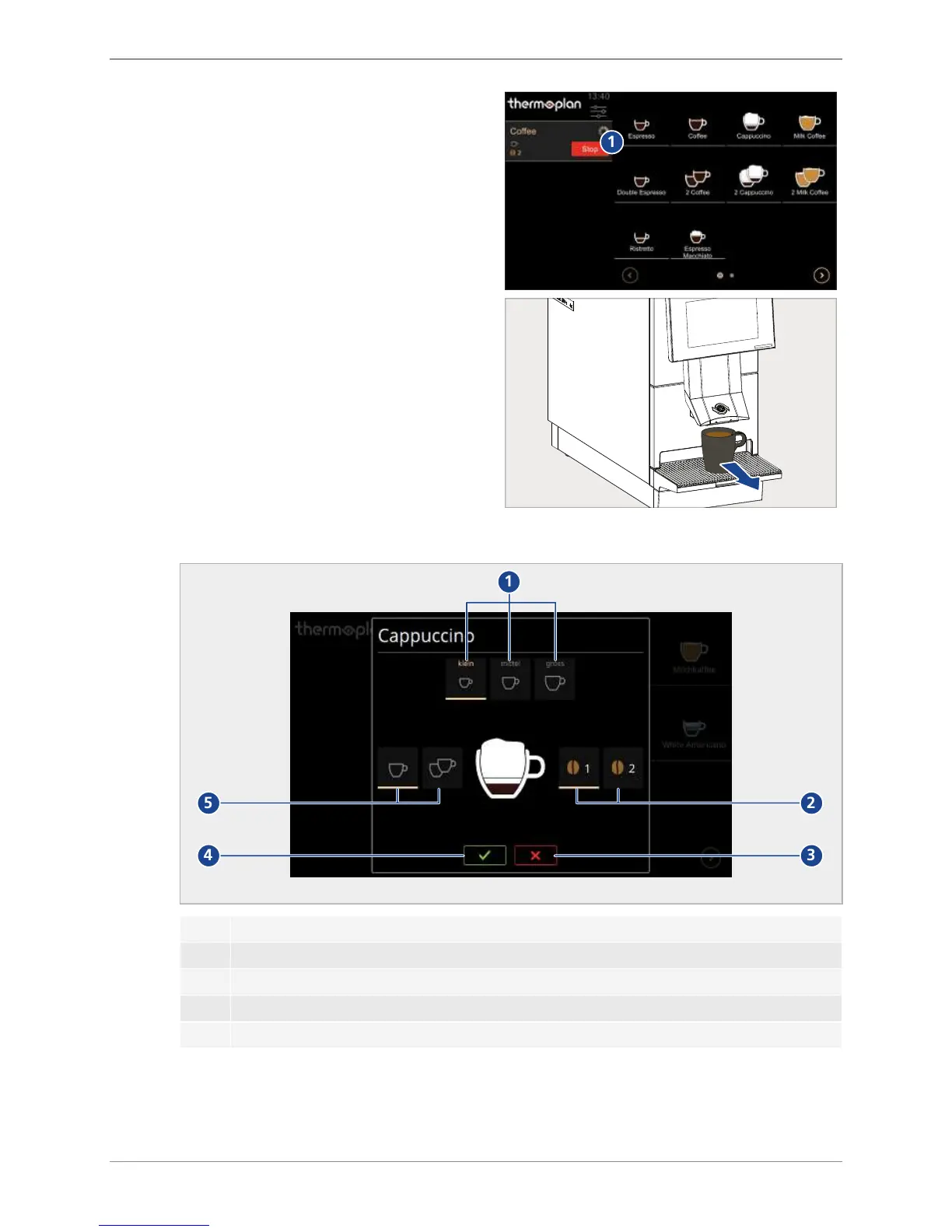
u The symbol
Stop
(1) to stop product outlet
prematurely.
1
u Take the cup out of the cup rack.
ð Product is ready for consumption.
8.2 Product options
1
2
34
5
1 Select product size
small
,
medium
or
large
2 Select beans from grinder 1 or grinder 2 (e.g. if there are two types of coffee beans)
3 Cancel product selection
4 Confirm product dispensing
5 Select single or double product
8.3 Pre-selecting a product
If multiple products should be produced in succession, these can be preselected.


Table of Contents

Related product manuals