Key Definition
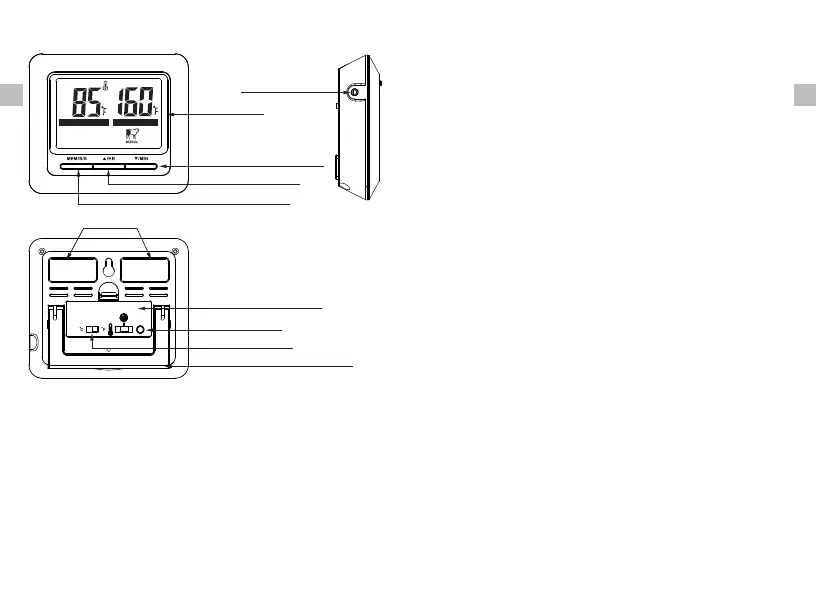
Keys Definition
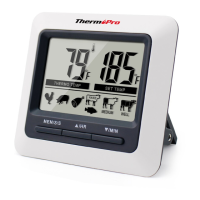
1. Temperature Probe Socket: Firmly Insert temperature
probe into this socket to measure meat temperature.
2. LCD Screen: Displays meat temperature and set
temperature while in cook mode. Displays
countdown/up when in timer mode.
EN EN
LCD Screen
-5-
-4-
Flip-out Counter Top Stand
˚F or ˚C Selector
Mode Selector
Battery Compartment
MEM S/S Button
Up Arrow/HR Button
Down Arrow/MIN Button
Temperature
Probe Socket
Magnet
cook mode to enable the option to adjust quick
temperature settings. Press again to save selection.
Press the S/S button when in timer mode to begin
the count-down timer. Press the S/S button to pause
or restart the timer. When the countdown timer hits
0:00 press the S/S button to silence the unit.
4. Up Arrow/HR Button: Press the up arrow to select
food types while in quick temperature setting. Press
the up arrow to set your desired cooking temperature
while in manual temperature setting. Press the HR
button to set hours while in timer mode. To clear
time, press the HR and MIN buttons at the same time.
5. Down Arrow/ MIN Button: Press the down arrow to
select food types while in quick temperature setting.
Press the down arrow to set your desired cooking
temperature while in the manual temperature
setting. Press the MIN button to set minutes while
in timer mode. To clear time, press the HR and MIN
buttons at the same time.
THE RMO TEM P
SET T EMP
3. MEM/S/S Button: Press the MEM button while in
6. F or ˚C Selector: Move the switch towards ˚F or ˚C,
depending on how you would like your temperature
displayed.
˚
7. Mode Selector: Move the position of the selector
to select cook mode, timer mode or power off the


 To Next Page