Need help?
Do you have a question about the ThermoPro TP-19H and is the answer not in the manual?
Displays the current temperature.
Locks current temperature for 5 seconds, press again to unlock.
Turns the backlight ON/OFF.
Switches between Celsius and Fahrenheit by holding for 3 seconds.
Initiates calibration mode when held for 5 seconds.
Houses 1 x AAA battery to power the unit.
Insert into food to measure internal meat temperature.
High precision sensor providing readings within 3-4 seconds.
Rated IP65 for water and dust resistance.
Features an automatically rotating display for easy viewing.
Automatically sleeps and wakes with motion detection.
Magnets for convenient storage or attachment.
Reference for target food temperatures.
Measures from -58°F to 572°F (-50°C to 300°C); displays LLL/HHH outside this range.
Features LOCK, LIGHT, and °C/°F buttons.
Automatically turns off after 90 seconds of inactivity.
Displays temperature readings with 0.1°C/°F resolution.
Accurate to ±0.9°F (±0.5°C) between 14°F and 212°F.
Comes with one AAA 1.5V battery.
Clean probe tip and wash unit under running water.
Insert probe into food, wait for stable reading, and observe display.
Press LOCK button to hold the temperature for 5 seconds.
Turns off automatically if probe is not folded and no button is pressed for 90 seconds.
Powers on automatically when moved from sleep mode.
Thermometer is pre-calibrated; recalibrate if readings seem inaccurate.
Prepare a mixture of ice and distilled water in a container.
Press and hold CAL button for 5 seconds to enter calibration mode.
Press CAL button once to confirm and exit calibration mode.
Press CAL for 5s, then LOCK to reset to default calibration.
Cool probe with cold water before new readings; wipe clean between uses.
Designed for hand-held use, not in ovens or extreme temperatures.
Avoid touching hot parts, do not use dishwasher, clean probe tip with damp cloth.
Remove batteries if storing for over four months.
Product is free from defects in parts, materials, and workmanship for one year.
Register product online for an extended 3-year warranty.
Contact ThermoPro for repair, service, or inquiries via phone or email.
Product complies with EMC Directive 2014/30/EU requirements.
Do not dispose of electrical equipment in domestic waste; return to collection points.
Caution: Batteries must not be disposed of with household waste; remove and recycle.
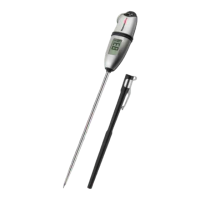
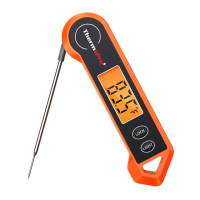
The ThermoPro TP-19H is a digital instant-read thermometer designed for quickly and accurately measuring food temperatures. Its primary function is to provide a fast temperature readout, typically within 3-4 seconds, making it ideal for cooking and grilling.
The thermometer features a temperature probe that is inserted into food to obtain the internal meat temperature. The current temperature is displayed on an LCD screen, which also supports auto-rotation for easy viewing from any angle. The device includes a LOCK button, allowing users to hold the current temperature reading on the display for 5 seconds, which is useful for noting down temperatures without needing to keep the probe in the food. A LIGHT button controls the backlight, enabling use in low-light conditions. Users can switch between Celsius (°C) and Fahrenheit (°F) temperature units by holding the °C/°F button for 3 seconds; the selected unit is saved for future use.
The TP-19H also incorporates a calibration feature. While the thermometer is factory-calibrated for precision, users can re-calibrate it if they suspect inaccuracies after extended use. This involves immersing the probe in an ice/water mixture and using the CAL button to confirm the calibration. An undo-calibration option is also available to revert to default settings.
For power management, the thermometer has a 90-second auto-off feature if the probe is not folded in and no buttons are pressed, conserving battery life. Additionally, it includes motion-sensing sleep and wake modes: if the probe is not folded in and the device is picked up or moved from a sleeping state, it will automatically power on. The device is powered by one AAA battery, which is included.
To use the thermometer, simply pull the probe away from the body to turn it on. Insert the tip of the probe into the thickest part of the food being cooked, avoiding bone or heavy fat areas, to get an accurate internal temperature reading. Wait for the temperature reading to stabilize on the display. For thin portions of meat, it's recommended to take a second reading to ensure accuracy. The 360° global viewing angle of the display ensures readability from various positions.
The built-in magnets allow for convenient storage on metallic surfaces, such as a refrigerator or oven, when not in use. The thermometer is designed for temporary, hand-held use and should not be left in an oven or in extremely hot foods/liquids for more than one minute.
The TP-19H is designed with an IP65 waterproof rating, meaning it can be washed under running water without fear. After each use, it is recommended to wash the probe tip with a warm, soapy sponge or cloth, then rinse and dry it. Wiping the probe tip clean between readings is particularly important when measuring different foods or meats to prevent cross-contamination and ensure accurate readings.
To turn off the thermometer, fold the probe back into the body. This action also helps protect the probe when not in use. When storing the thermometer for more than four months, it is advisable to remove the battery to prevent potential leakage and damage to the electronic parts. The device should not be placed in a dishwasher or immersed in any liquid other than for cleaning the probe tip. Avoid exposing the thermometer to extreme high or low temperatures, as this can damage its electronic components and plastic housing.
The thermometer is not intended for use by persons under age 12. Batteries should be disposed of properly at appropriate collection points and not with household waste, especially if they contain hazardous materials like lead (Pb), cadmium (Cd), mercury (Hg), or lithium (Li).
 General
| Resolution | 0.1°F/°C |
|---|---|
| Response Time | 3-4 seconds |
| Display | LCD |
| Calibration | Yes |
| Type | Digital Thermometer |
| Temperature Range | -58°F to 572°F (-50°C to 300°C) |
| Accuracy | ±0.9°F (±0.5°C) |
| Waterproof | Yes |
| Auto-off | Yes |
| Units | °F / °C |
| Features | Backlight, Foldable probe, Magnetic back |
| Battery | 1 x CR2032 (included) |

 To Next Page