Need help?
Do you have a question about the ThermoPro TP-12 and is the answer not in the manual?
Displays all icons, temperature, and time on the receiver unit.
Details the operation of each button on the receiver unit for various modes.
Explains how to turn on/off and select temperature display units (°C/°F) on the transmitter.
Instructions for inserting AAA batteries into both the receiver and transmitter units.
Guides on how to turn the receiver and transmitter units on and off.
Step-by-step guide for synchronizing the transmitter and receiver for data communication.
Explains alerts for lost signal and how to re-establish communication.
Instructions to set the high temperature alert for the FOOD probe.
Instructions to set the high temperature alert for the BARBECUE probe.
Instructions to set the low temperature alert for the BARBECUE probe.
How to enable or disable temperature alarms for FOOD and BARBECUE probes.
How to set and use the countdown timer function for cooking tasks.
How to set and use the count-up timer function for cooking tasks.
How to use both timer and temperature monitoring features concurrently.
Steps for pairing, probe placement, and transmitter positioning for barbecue use.
Detailed steps for setting temperature alerts for food and barbecue.
Example of setting the timer for a 2-hour cooking task.
Troubleshooting tips for LLL/HHH readings or false temperatures due to probe contact.
Safety warnings regarding probe handling, cleaning, and unit water resistance.
Specifies the device's temperature measurement limits and display indicators.
Information regarding compliance with FCC rules for digital devices and interference.
Details the warranty period and conditions for the product.
Provides contact details for warranty service and support.
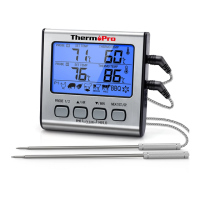
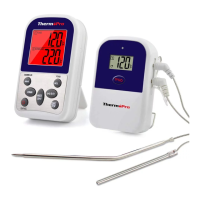
This document describes the ThermPro TP-12, a professional remote food thermometer with dual probes. This device allows users to remotely monitor the temperature of cooking food and the internal temperature of a grill, oven, or smoker from anywhere within their home.
The ThermPro TP-12 operates in two primary modes: Thermometer Mode and Timer Mode, which can also be used simultaneously.
In Thermometer Mode, the device monitors the temperature of food and the barbecue environment using two stainless steel probes: a FOOD probe (6 inches long with a pointed end) and a BARBECUE probe (3 inches long with a grill rack clip). Users can set maximum and minimum temperature alarms for both food and barbecue. The receiver will beep and flash if the actual food temperature exceeds the set maximum, if the barbecue temperature exceeds the set maximum, or if it falls below the set minimum. The unit retains these temperature settings even when turned off. The device displays temperatures in either Celsius or Fahrenheit, selectable by the user.
In Timer Mode, the device functions as a countdown or count-up timer. Users can set a countdown timer for up to 24 hours (displayed as hours and minutes for settings under 10 hours, and only hours for settings over 10 hours). When the countdown reaches 0:00, it starts counting up and beeps for 30 seconds. A count-up timer can also be initiated, which will beep for 30 seconds when it reaches 9:59. The timer settings are retained even after the unit is turned off.
When Timer Mode and Temperature Mode are used simultaneously, the receiver provides distinct alarms for each function. For temperature alarms, it beeps once per second for barbecue temperature and twice per second for food temperature, with corresponding icons and probe temperatures blinking. For timer alarms, it beeps three times per second, with an upward or downward arrow blinking to indicate count-up or countdown.
The device also features a Loss Link Alert. If the receiver loses connection with the transmitter for over 4 minutes (due to being out of range or external interference), it will beep once every 4 seconds to indicate signal loss. Pressing any button on the receiver will stop this alert. To restore the connection, the receiver should be moved closer to the transmitter.
The ThermPro TP-12 consists of a receiver unit and a transmitter unit, each powered by two AAA batteries.
To begin, insert two AAA batteries into both the receiver and transmitter, ensuring correct polarity. The transmitter and receiver must be synchronized or paired. This can be done by inserting the probes into the transmitter, turning on the transmitter (which will display current temperature and send readings), then turning on the receiver (which enters synchronization mode for 120 seconds). The display will show "---" and flash until the temperature reading appears, indicating successful pairing. This pairing is only required once, or whenever batteries are replaced in either unit.
The device complies with part 15 of the FCC Rules. Users are warned that changes or modifications not expressly approved by the responsible party could void their authority to operate the equipment. The device is designed to provide reasonable protection against harmful interference in a residential installation. If interference occurs, users are encouraged to try measures such as reorienting the receiving antenna, increasing separation between equipment, connecting to a different circuit, or consulting a dealer or experienced technician.
 General
| Display | LCD |
|---|---|
| Power Source | 2x AAA batteries |
| Wireless Range | 300 feet |
| Probe Material | Stainless steel |
| Auto Shut-off | Yes |
| Waterproof | No |
| Resolution | 1° |
| Features | Alarm, Timer |
| Cable Length | Not applicable |
| Probe Length | 6.5 inches |

 To Next Page