Need help?
Do you have a question about the ThermoPro TP-25 and is the answer not in the manual?
The ThermoPro TP-25 is a smart, wireless Bluetooth-connected cooking thermometer designed to help you monitor food temperatures remotely from your smartphone. This device allows you to cook like a pro by providing real-time temperature readings and even an estimate of how much time is left for your food to be done.
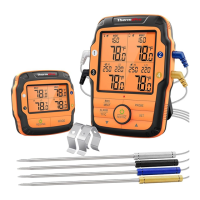
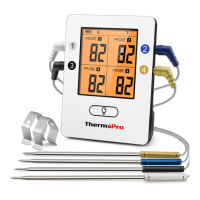
The core function of the ThermoPro TP-25 is to measure and transmit food temperatures to a connected smartphone application. It utilizes four temperature probes, allowing you to monitor up to four different food items simultaneously. The thermometer unit itself features a clear display that shows the temperature readings from all four probes. A Bluetooth module facilitates the wireless connection to your smartphone, enabling you to receive alerts and track cooking progress from a distance. The device is powered by a built-in lithium rechargeable battery, ensuring portability and convenience during use.
Getting started with the ThermoPro TP-25 is a straightforward process. First, you need to download and install the "ThermoPro BBQ" app on your smartphone, available on both the Apple App Store for iOS devices and the Google Play Store for Android devices. Once the app is installed, ensure that Bluetooth is enabled on your smartphone. For Android users, it's also recommended to enable GPS and Auto Run to prevent disconnections during the cooking process.
Before its first use, the thermometer should be fully charged using the provided USB charging cable. It's important to note that the device requires a 6V USB charger; using an adapter with an output voltage larger than 6V will prevent the thermometer from charging.
After charging, insert the four colored temperature probes into their corresponding colored sockets on the thermometer transmitter. This color-matching system helps in easily identifying which probe corresponds to which food item.
To power on the thermometer, press the power button located on the back of the transmitter unit. The Bluetooth icon on the display will flash, indicating that it's ready to pair. Next, launch the "ThermoPro BBQ" app on your smartphone and press "Start." The app will then search for and pair with the thermometer. Once pairing is complete, the Bluetooth icon on the transmitter display will stop flashing, and the app will transition to the "Cooking" page, where you can view the temperatures measured by each probe.
The thermometer unit itself offers several user-friendly features. It has a backlight button that allows you to turn the display backlight on or off, improving visibility in various lighting conditions. A dedicated °C/°F button enables you to switch between Celsius and Fahrenheit temperature units by pressing and holding it for three seconds. A quick press of this button also serves as the ON/OFF switch for the unit.
The device also includes a Bluetooth button. Pressing and holding this button for three seconds will turn the Bluetooth function on or off. If the mobile app is not connected within 10 minutes, the Bluetooth function will automatically turn off, and the Bluetooth symbol will disappear from the display, conserving battery life.
For convenient placement, the ThermoPro TP-25 features a wire stand. This stand allows you to place the unit on a tabletop, or it can be reversed and used as a hanger, providing flexibility in how you position the thermometer during cooking.
The temperature range of the probes is from 14°F to 572°F (-10°C to 300°C), making it suitable for a wide variety of cooking applications. The internal food reading has a temperature tolerance of ±1.8°F (±1.0°C), ensuring accurate measurements.
The ThermoPro TP-25 is designed for ease of use and durability. The built-in lithium rechargeable battery simplifies power management, eliminating the need for disposable batteries. Regular charging via the USB cable ensures the device is always ready for use.
In terms of care, the electronic appliance should not be disposed of with normal household waste. Instead, it should be taken to an approved facility or a local recycling center. This ensures environmentally responsible disposal and compliance with current rules and regulations. If in doubt about disposal procedures, contacting your local council is recommended.
The device comes with a limited one-year warranty, covering defects in parts, materials, and workmanship from the date of purchase. Should any repairs or servicing be required under this warranty, customers can contact ThermoPro Customer Service for instructions on how to proceed. This warranty provides specific legal rights, and additional rights may vary from state to state. Customer service is available via telephone and email during weekdays, offering support for any questions or setup assistance.
 General
| Type | Wireless Meat Thermometer |
|---|---|
| Temperature Range | 14°F to 572°F (-10°C to 300°C) |
| Accuracy | ±1.8°F (±1°C) |
| Display | LCD |
| Number of Probes | 4 |
| Timer | Yes |
| Response Time | 3-4 seconds |
| Battery Type | AAA |
| Backlight | Yes |
| Wireless Range | 300 ft |
| Battery | 2 x AAA |
| Resolution | 1° |
| Auto Shut-off | Yes |
| Weight | 0.5 lbs |

 To Next Page