11 Synchronize Remote Sensors with The Base Station
1. Place the remote sensor near the base station.
2. Insert the batteries into the base station, the RF indicator (located on the
upper left of the outdoor temperature display section) will begin to flash for
3 minutes, indicating that the base station is in synchronization mode and
waiting for remote sensors to be registered.
3. Set the CHANNEL selector (on the back of the remote sensor unit) to position
1 or 2 or 3. The unit is pre-set to Channel 1 and you can always leave it
unchanged unless you have purchased more than 1 remote sensor.
4. Press and hold ON/OFF button on the back of the remote sensor for 2 seconds
to turn on the remote sensor. Then wait for a moment until the temperature/
humidity of the remote sensor is displayed on the base station which indicates
the synchronization is complete.
5. If the synchronization is not successful after 3 minutes since the batteries
were inserted into the base station and the RF indicator no longer flashes,
press and hold the CHANNEL button on the back of the base station for 3-4
6. If you have additional remote sensors, repeat the above steps to synchronize
the additional remote sensors (up to 3 remote sensors can be registered with
one base station). Please note the additional sensors should be set to a
different channel.
12 Thermometer
1. Once the remote sensor and the base station are synchronized, the indoor
temperature/humidity and outdoor temperature/humidity will both be shown
the base station display.
-6- -7-
EN EN
10 Display Unit Selection
1. Press °C/°F button on the back of the base station to change the temperature
display unit between °C or °F.
2. Press inHg/mb button on the back of the base station to change the
barometric pressure display unit between inHg or mb (hPa).
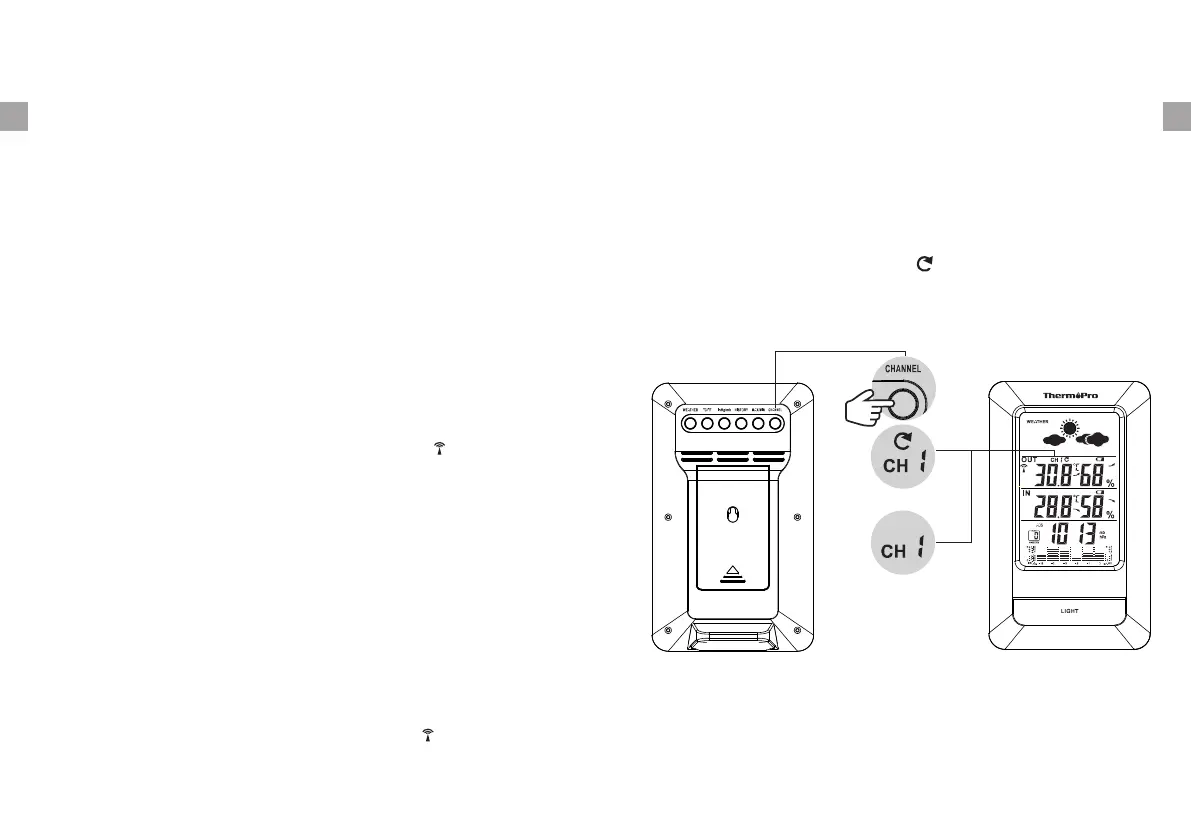
on the base station. If wanting to observe all channels, press the CHANNEL
button until you observe a circular arrow on the base station LCD display
under the channel number, the unit will auto-scroll, changing from channel to
channel every 5 seconds. Press CHANNEL button until you observe the
circular arrow disappear, the unit will stop cycling.
7. If you have registered more than one sensor, press the CHANNEL button on
the base station to select the remote channel you want displayed permanently
9 Low Battery Warning
If the battery power (base station or remote sensor) is low, there will be low
battery icon showing on the base station display.
If the low battery icon for base station is displayed, please replace the batteries
with new batteries.
If the low battery icon for remote sensor is displayed, please charge the remote
sensor as soon as possible.
seconds until the RF indicator begins to flash again, setting it back into
synchronization mode;


 To Next Page