14 Weather Forecast
change. Choose one of five weather symbols (sunny, partially cloudy, cloudy,
rainy, snow) that best reflect the current weather condition.
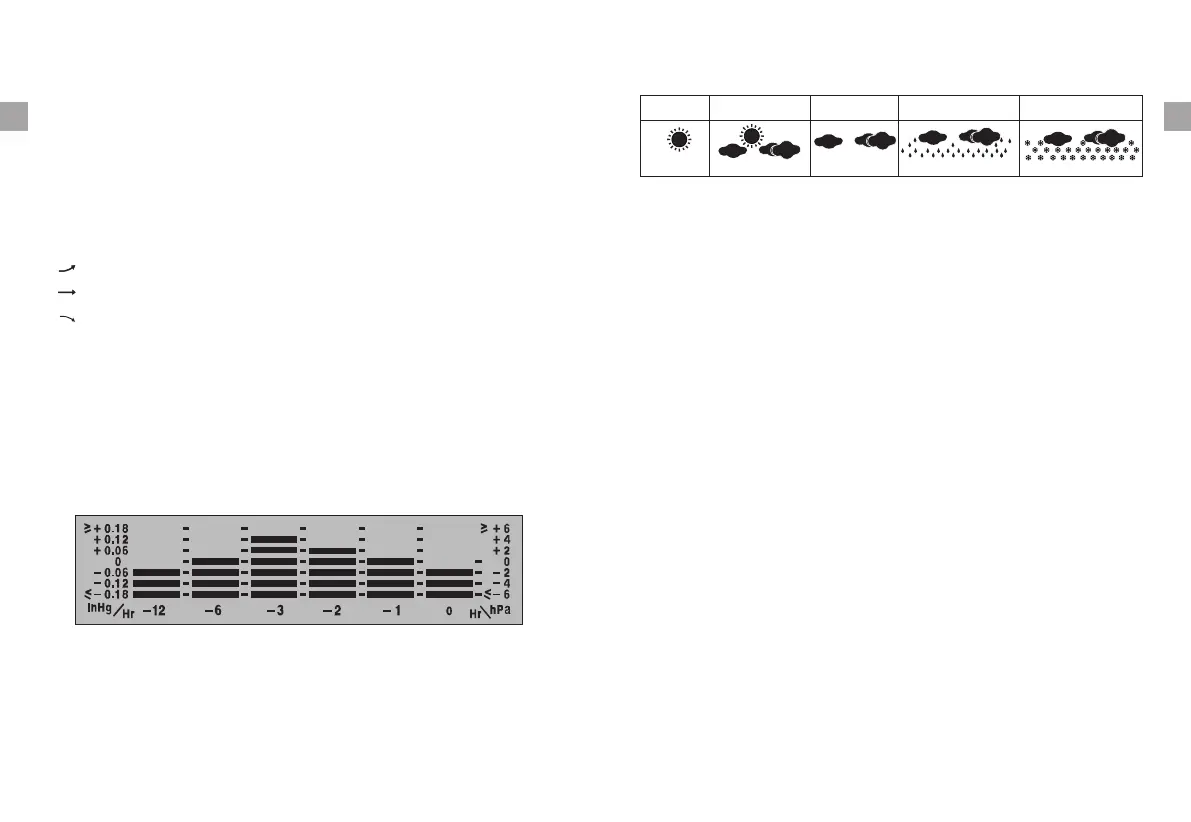
15 Interpreting the weather forecast symbols
The weather station requires at least 24 hours to acclimatize to local weather
conditions. The weather station processes and analyzes the weather patterns
including temperature and barometric pressure change for the past 24 hours to
determine the forecast. Only then the predicted weather forecast will reflect
The weather station will display the symbols to indicate the predicted weather
forecast for the next 12 to 24 hours for an area within a radius of approximately
20-30 miles or 30-50 km.
Note:
a.The weather forecasting is approximately 70% accurate. The accuracy rate
might be lower in extreme weather conditions. The weather forecasting is
for reference and for domestic use only. Do NOT rely on the weather station's
weather forecast for any serious matters such as health, business and
financial decisions and/or agricultural planning and certainly not for life and
death situations.
sunny
partially cloudy cloudy
rainy
snow
-8- -9-
EN EN
b.The weather forecast does not display the current weather. It forecasts the
weather for the next 12~24 hours.
Rising(up) Falling(down)
2. Barometric Pressure Trend: on the bottom of the display, the graph shows
the barometric pressure change in the last 12 hours.
13 Barometer
1. Press the HISTORY button on the back of the base station to show the actual
barometric pressure value in the past 1 to 12 hours.
the actual weather for your immediate area. Until that time has elapsed, the
predicted weather forecast may not accurately reflect the actual weather in
your immediate area.
indicates the temperature and humidity are in an increasing trend.
indicates the temperature and humidity are in a no change trend.
indicates the temperature and humidity are in a decreasing trend.
3. Temperature and Humidity Trend: there are 3 types of icon on the base
station display:
c. To clear and reset the max/min records, press and hold MAX/MIN/Clear
for 3 seconds.
2. Maximum & Minimum Recorded Temperature & Humidity
The initial current weather condition should be set before using the weather
forecast feature to allow for the weather station to accurately forecast the
weather for the upcoming 12-24 hours. Press the WEATHER button on the back
of the base station and the weather symbols on the top of the screen will
a. Press MAX/MIN/CLEAR button once to display the highest indoor and
outdoor temperatures/humidity recorded. MAX is shown on the display.
b. Press MAX/MIN/CLEAR button again to display the lowest indoor and
outdoor temperatures/humidity recorded. MIN is shown on the display.


 To Next Page