EasyManua.ls Logo

Thermor R4GHD2-Mk22 - 2.4 - Set the day and time

Thermor R4GHD2-Mk22
Print Icon
To Next Page IconTo Next Page
To Previous Page IconTo Previous Page
Loading...
User’s manual
GBGB
58
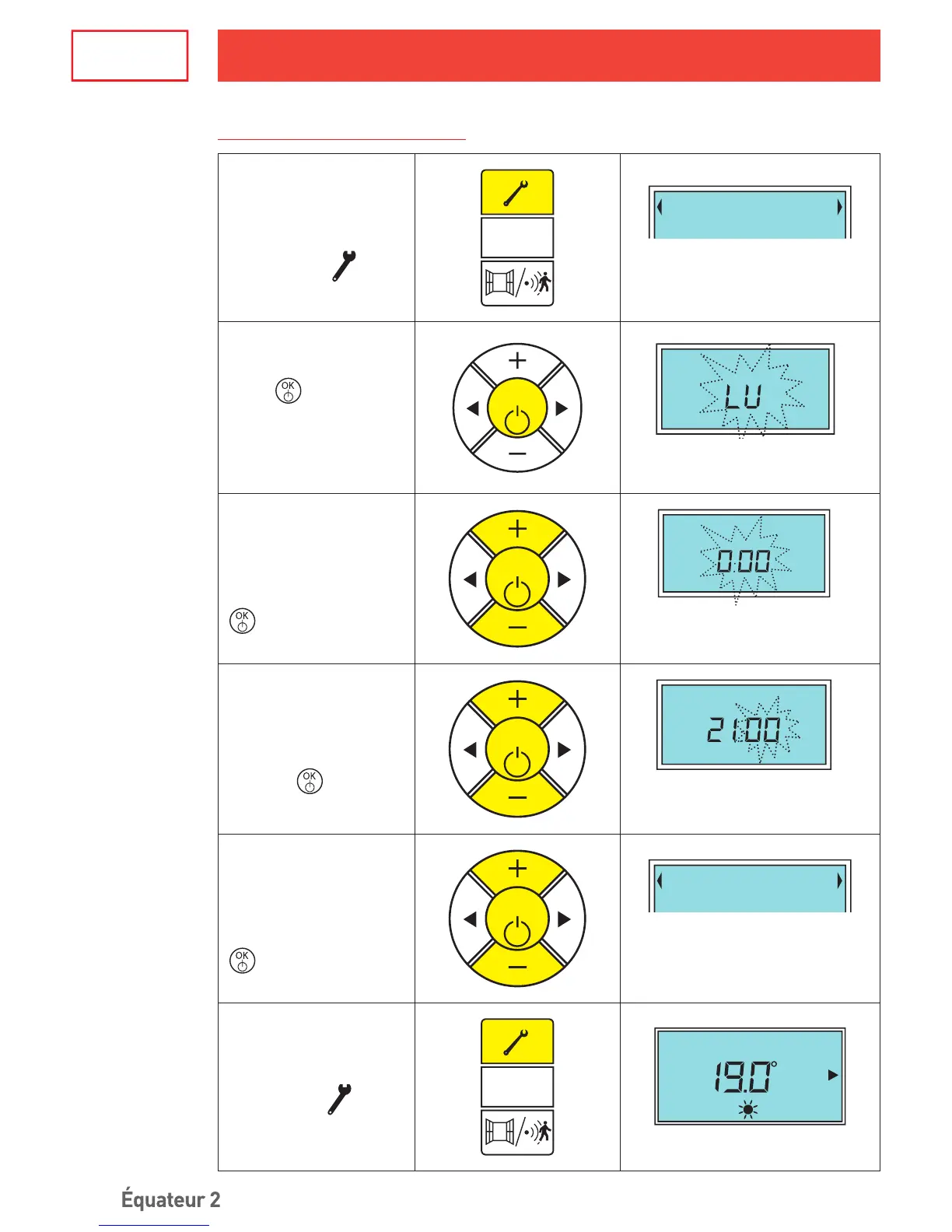
2.4 - Set the day and time
To reach the “set day
of the week”
menu , press
.
AUTO
Set : D/H/Min
«Set D/H/Min» is displayed on
the text line.
Press
to access
the “set day of the
week” submenu .
OK
Set
:D
ay
The rst two letters of the day
of the week blink.
Select the day of the
week by pressing the +
and – buttons and then
conrm by pressing
.
OK
Set: Hour
Once the day has been
conrmed, the hours blink.
Select the current hour
by pressing the + and –
buttons and conrm by
pressing
.
OK
Set
:M
inute
Once the hour has been
conrmed, the minutes blink.
Select the current
minutes by pressing
the + et – buttons and
conrm by pressing
.
OK
Set : D/H/Min
Once the minutes have been
conrmed, the settings menu is
displayed again.
To quit the settings
menu, press
.
AUTO
Day Hour
Return to the standby screen.
Equateur2_1880-1585_interieur.indd 58 18/06/12 06:22

Table of Contents

Related product manuals