EasyManua.ls Logo

ThermoWorks WAND THD2FE - User Manual

ThermoWorks WAND THD2FE
6 pages
Print Icon
To Next Page IconTo Next Page
Loading...
WAND
Non-Contact,
Digital Forehead Thermometer
Operating Instructions
For tips on using infrared thermometers visit the ThermoWorks Help Center at help.thermoworks.com.
THD2FE
Question and Answer IconNeed help?

Do you have a question about the ThermoWorks WAND THD2FE and is the answer not in the manual?

Summary

Indications and Operation

Indications for Use

Product is intended for intermittent measurement of human body temperature in people of all ages.

Operating Instructions for Forehead Use

Steps to turn on, measure temperature, and turn off the forehead thermometer.

Tips for Best Results

Guidance on keeping the forehead clean and stable environment for accurate readings.

Features and Specifications

Features

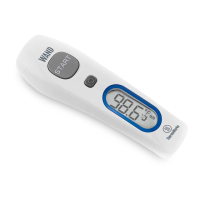
Diagram labeling key components like Lens, START button, LCD, and Battery Cover.

Specifications

Detailed technical specifications including ranges, accuracy, dimensions, and battery life.

Functions, Maintenance, and Troubleshooting

Device Functions

Details on forehead/surface temperature, alerts, memory, unit switching, and mute.

Battery Replacement

Instructions for replacing the device's AAA batteries.

Troubleshooting

Common error codes (Er1, Er3, Er, Hi, Lo) and solutions.

Storage, Warranty, and Symbols

Storage & Cleaning

Guidelines for storing the instrument at room temperature and cleaning the sensor lens.

Warranty and Contact Information

Details on the one-year warranty and contact information for technical support.

Symbol Descriptions

Explanation of caution, BF type applied part, IP22, and other device symbols.

Electromagnetic Compatibility Declarations

Electromagnetic Emissions

Declaration for RF emissions compliance in a home healthcare environment.

Electromagnetic Immunity

Declaration for immunity to electrostatic discharge and power frequency magnetic fields.

RF Wireless Communications Equipment Immunity

Test specifications for immunity to RF wireless communications equipment.

Overview

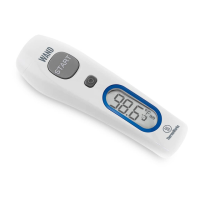
The ThermoWorks WAND™ THD2FE is a non-contact digital forehead thermometer designed for the intermittent measurement of human body temperature in people of all ages. It provides an "oral equivalent" temperature reading.

Function Description:

The WAND measures temperature by detecting infrared energy from the forehead. It is intended for personal use and not as a substitute for a doctor's visit. The device can also measure surface temperature, which is the actual unadjusted surface temperature and differs from body temperature. It stores up to 25 recent temperature readings for easy recall. The thermometer includes an audible alert for high temperatures (≥99.5°F / 37.5°C) consisting of three short beeps followed by one long beep. The sound can be muted if desired. The device automatically turns off after 60 seconds of inactivity to conserve battery life, but can also be manually turned off by pressing and holding the power button for 5 seconds.

Important Technical Specifications:

  • Forehead Range: 93.2 to 108°F (34 to 42.2°C)
  • Surface Range: -7.6 to 176°F (-22 to 80°C)
  • Operating Range: 50 to 104°F (10 to 40°C), 15 to 85% RH
  • Storage Range: -4 to 122°F (-20 to 50°C), RH≤85%
  • Transport Temperature: Shall be less than 158°F (70°C), RH≤95%
  • Atmospheric Pressure: 800 to 1013 hPa
  • Forehead Accuracy: ±0.4°F (0.2°C) within 95 to 107.6°F (35 to 42°C); otherwise ±0.5°F (0.3°C)
  • Surface Accuracy: ±0.5°F (±0.3°C) with 17.6 to 108°F (22 to 42.2°C); otherwise ±4% or ±4°F (±2°C), whichever is greater
  • Resolution: 0.1°
  • Units: °F/°C (switchable)
  • Response Time: 1 second
  • Auto-Off: 60 seconds
  • Battery: 2 x AAA, 3,000 hours
  • Dimensions: 6.2 L x 1.9 W x 1.6 D inches (158 L x 48 W x 40.2 D mm)
  • Weight: 3.5 oz (100 g)
  • Expected Service Life: 4 years
  • Contents: Thermometer x 1, Operating Instructions x 1, Battery AAA x 2

Usage Features:

  • Turning On: Press the power button to turn on the instrument.
  • Taking a Forehead Measurement: Hold the instrument within 1.5 inches from the center of the forehead. Press and hold 'Start' until one beep is heard (unless muted), indicating the reading is complete. Readings take approximately 1 second.
  • Taking a Surface Measurement: To access surface mode, press and hold the power button while pressing 'Start' once. The "surface" icon will appear on the display. Press and hold 'Start' for continuous surface measurements.
  • Memory Recall: With the instrument turned on, press the memory button once to view the last saved reading. Press again to cycle through the 25 stored readings.
  • Switching Units (°F/°C): With the instrument turned off, press and hold 'Start' for approximately 3 seconds while pressing the power button once. The unit icon will switch. Repeat the process to switch back. Note: All stored memory readings are deleted when switching units.
  • Mute/Unmute: The default setting is sound on. To turn sound off, press and hold the mute button for 3 seconds. The mute icon will flash, and the instrument will be muted. Repeat the process to turn sound on.
  • Best Results: Keep the forehead area clean, away from sweat, cosmetics, and scars. Remain in a stable environment for 5 minutes, avoiding exercise, bathing, or showering for 30 minutes before measurement.

Maintenance Features:

  • Battery Replacement: When the "Low Battery" icon flashes, replace the 2x AAA, 1.5 volt batteries immediately. To open the battery cover, press down and slide it off with your thumbs. Dispose of used batteries properly and keep them away from children. Insert new batteries according to the correct polarity and replace the cover.
  • Storage: Store the instrument at room temperature, away from liquids and direct sunlight. Allow at least 15 minutes for the instrument to stabilize to ambient temperature if there are significant temperature differences between storage and measurement locations.
  • Cleaning: The sensor lens is the most delicate part. Keep it clean using only a soft cloth or cotton swab with medical alcohol, allowing the lens to dry fully before use.
  • Troubleshooting:
    • Er1: Measurement taken before instrument stabilized.
    • Er3: Ambient temperature is not between 50 to 104°F (10 to 40°C). Allow 15 minutes for stabilization.
    • Er5-9: For other error messages, reset the thermometer by turning it off, removing batteries for at least one minute, reinserting batteries, and turning it on. If the error persists, contact Technical Support.
    • Hi/Lo: Temperature measured is outside the measurement range (e.g., forehead mode: lower than 93.2°F / 34°C or higher than 108°F / 42°C; surface mode: lower than -7.6°F / -22°C or higher than 176°F / 80°C).
    • Instrument cannot be powered on: Try a new battery.
  • Safety Warnings:
    • This is not an AP or APG product.
    • Do not submerge the device in liquids or expose it to direct moisture.
    • There is no gender or age limitation for using the infrared thermometer.
    • Choking hazard: Keep small parts and batteries out of reach of children and pets.

Warranty:

The instrument carries a one-year warranty against defects in components or workmanship. Defective products will be repaired or replaced at ThermoWorks' discretion. Full details are available at www.thermoworks.com/product-warranty. For support, contact ThermoWorks Technical Support at (801) 756-7705 or techsupport@thermoworks.com.

Electromagnetic Compatibility:

The WAND is intended for use in a home healthcare electromagnetic environment. It uses RF energy for internal function, resulting in very low RF emissions that are unlikely to cause interference. It is suitable for domestic establishments and those connected to the public low-voltage power supply. Users should ensure the device is used in such an environment.

ThermoWorks WAND THD2FE Specifications

General IconGeneral
BrandThermoWorks
ModelWAND THD2FE
CategoryThermometer
LanguageEnglish

Related product manuals