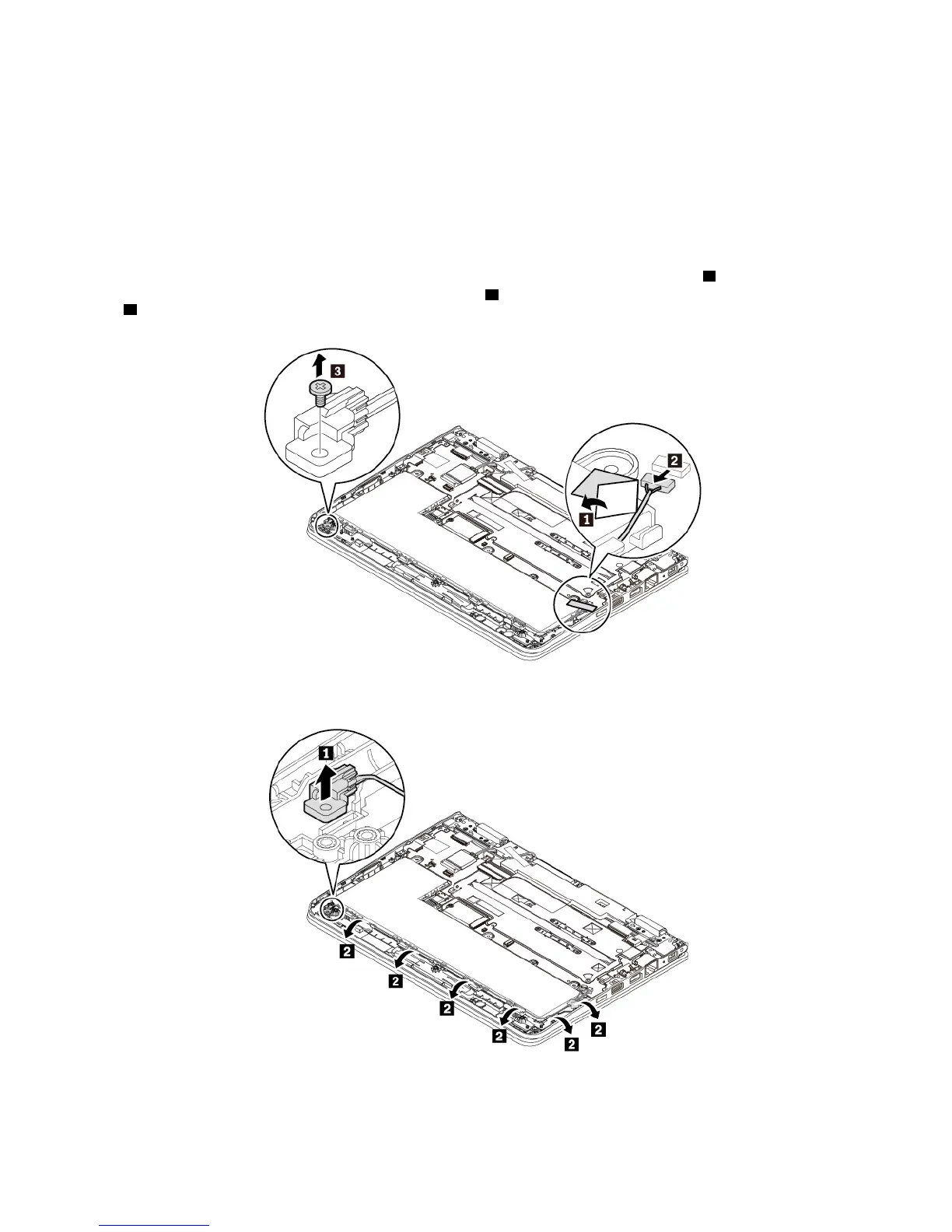
To replace the ThinkPad pen pro charger (hereinafter referred to as the pen charger), do the following:
Attention: Do not touch the golden contact during replacing.
1. Disable the built-in battery. See “Disabling the built-in battery” on page 84.
2. Ensure that the computer is turned off and disconnected from ac power and all cables.
3. Close the computer display and turn the computer over.
4. Remove the base cover assembly. See “Replacing the base cover assembly” on page 85.
5. Remove the tape that secures the pen charger cable connector to the system board
1 . Disconnect the
pen charger cable connector from the system board
2 . Remove the screw that secures the pen charger
3 .
6. Remove the pen charger with the cable from the computer as shown.
94 11e 5th Gen and Yoga 11e 5th Gen User Guide


 To Next Page