4 Touch pad
Your computer is equipped with a touch pad under the bottom edge of the keyboard. The touch pad enables
you to move the pointer, without the use of a conventional mouse. For more information, see “Using the
touch pad” on page 25.
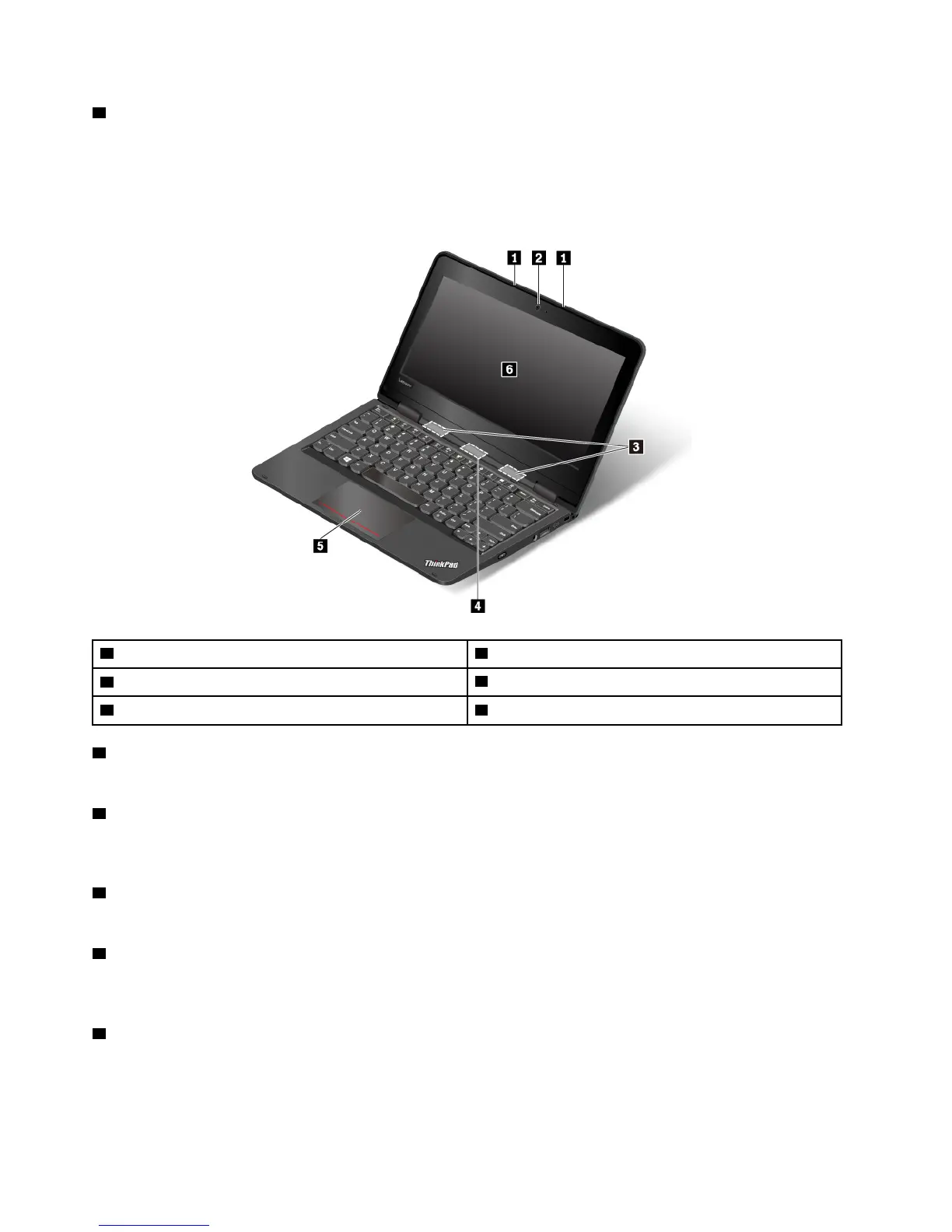
Front view for ThinkPad Yoga
®
11e 5th Gen
1 Microphones 2 Front camera
3 Speakers
4 Rear camera
5 Touch pad 6 Multi-touch screen
1 Microphones
The microphones capture sound and voice when used with a program capable of handling audio.
2 Front camera
The camera enables you to take pictures or hold a video conference. For more information, see “Using the
cameras” on page 30.
3 Speakers
Your computer is equipped with a pair of stereo speakers.
4 Rear camera
The camera enables you to take pictures or hold a video conference in the tablet mode. For more
information, see “Using the cameras” on page 30.
5 Touch pad
Your computer is equipped with a touch pad under the bottom edge of the keyboard. The touch pad enables
you to move the pointer, without the use of a conventional mouse. For more information, see “Using the
touch pad” on page 25.
2
11e 5th Gen and Yoga 11e 5th Gen User Guide


 To Next Page