Operating of the Inverter
15
16
Operating of the Inverter
3 Operating of the Inverter
3.1 LED and LCD Display
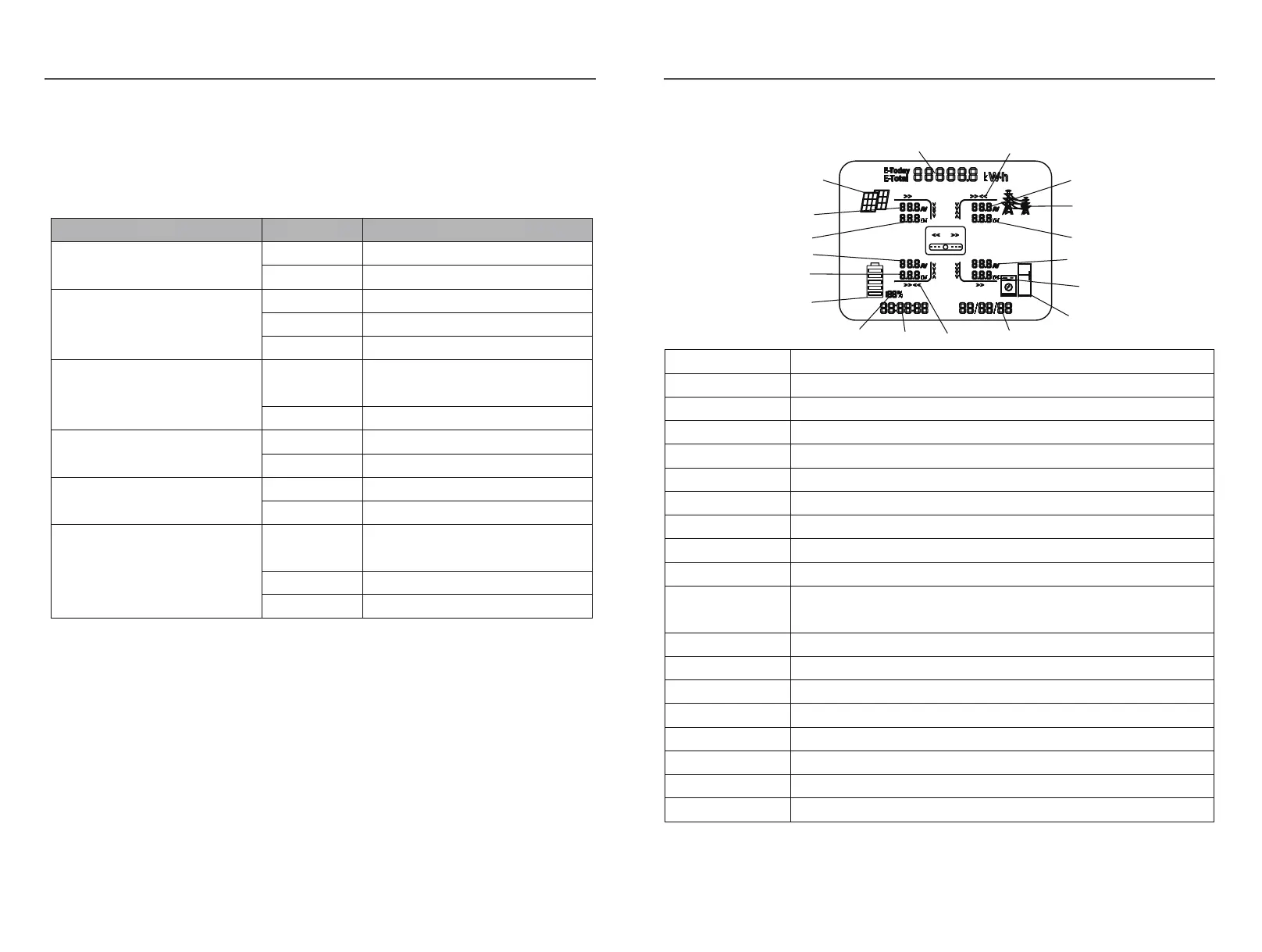
The LED indicators are shown as blow:
LED Status Explanation
SYSTEM
ON System is powered up
OFF System is not powered up
GRID
ON Grid is normal
OFF Grid loss
FLASH Grid is abnormal
EPS
ON
Inverter in offline mode, EPS is
active
OFF Inverter is not in offline mode
COM
ON WIFI module connected
OFF WIFI module not connected
METER
ON Smart meter communication OK
OFF Smart meter communication fail
FAULT
ON
Alarm occurred and inverter stop
work
OFF No Alarm
FLASH Alarm occurred but inverter still work
The LCD display shows the detailed information of the inverter
PV12
A
C
A
B
C
B
A
B
C
D
E
F
G
H
I
J
K
L
M
N
O
P
Q
R
Position Description
A It indicates the power output amount of total and today alternately. Unit: kWh or MWh
B PV panels indicator
C PV1,PV2 panels parameters. Voltage and current are displayed alternately.
D Total PV power
E Battery parameters. Voltage and current are displayed alternately.
F Battery power
G Battery indicator
H SOC of battery
I Current time
J
Power flow array of battery. When it towards battery, it means charging; when it towa
rds inverter,it
means discharging.
K Default as current date. When an error occ
urs, fault code will be displayed alternately.
L Loads indicator
M Loads power consumption of each phase
N Load parameters. Voltage and current of each phase are displayed alternately.
O Power export or import of each phase
P Grid indicator
Q Gr
i
d parameters. Voltage and current of each phase are displayed alternately.
R Power flow array of load


 To Next Page