4 SpeedTouch™ for Mac OS
3EC 36714 BAAA TCZZA Ed. 02
33
How to make a
connection
Proceed as follows:
Note In case you ticked the 'Save password' box, the next time, you can open a connection by
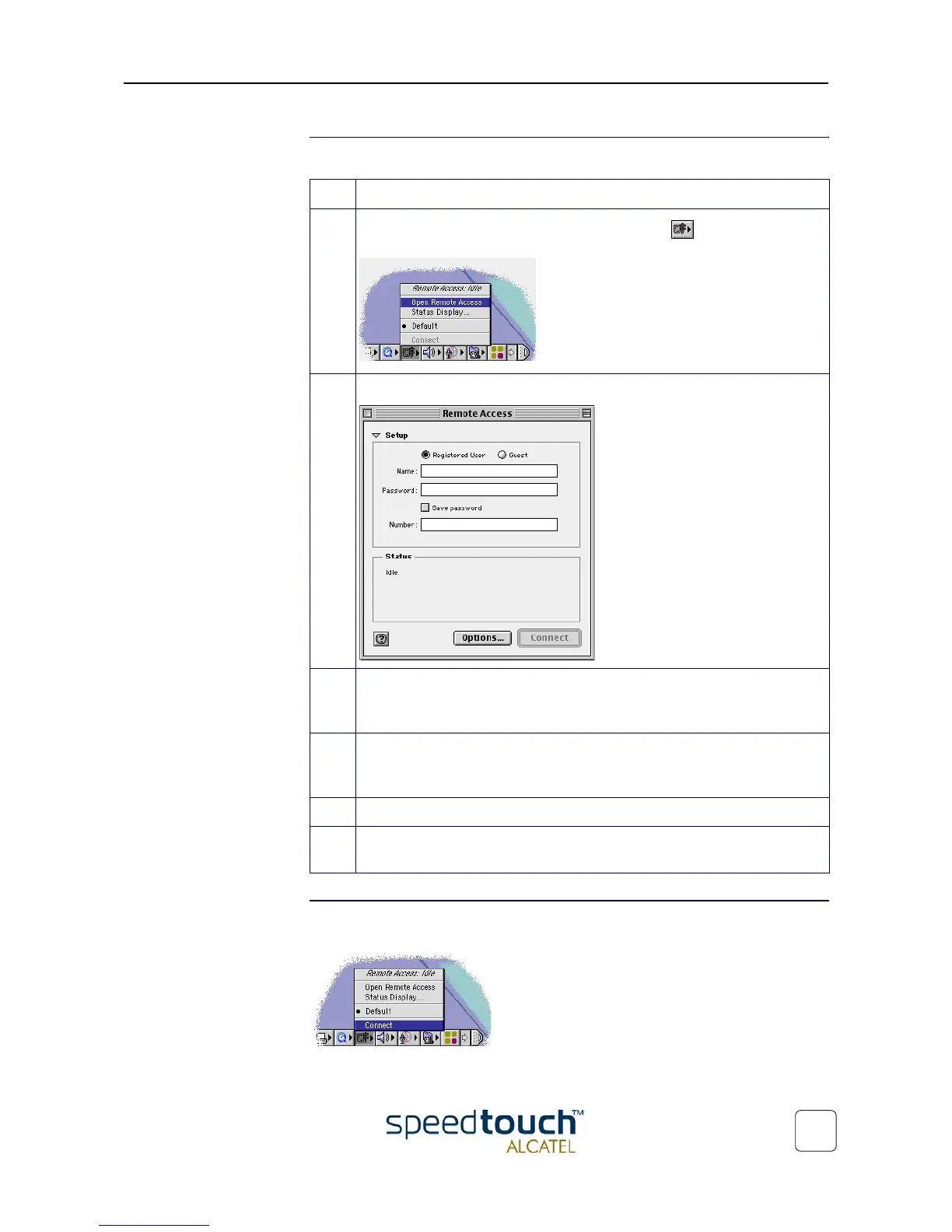
simply clicking the Remote Access icon in the control strip, and selecting 'Connect':
Step Action
1 In the control strip, click the Remote Access icon and select 'Open
Remote Access':
2 As a result the 'Remote Access' window appears:
3 Enter user name and password for your user account at the Service Provider.
Note: Tick 'Save password' in case you want the application to remember your
user name, and password.
4 In case of PPPoA connectivity you must enter a digit, e.g. 0, into the 'Number'
field. In case of PPPoE connectivity you may need to enter a Service Name,
which is provided by your Service Provider.
5 Click Connect.
6 As soon the connection is made you can open your web browser and surf the
Internet.



 To Next Page