Getting Started
EN
5
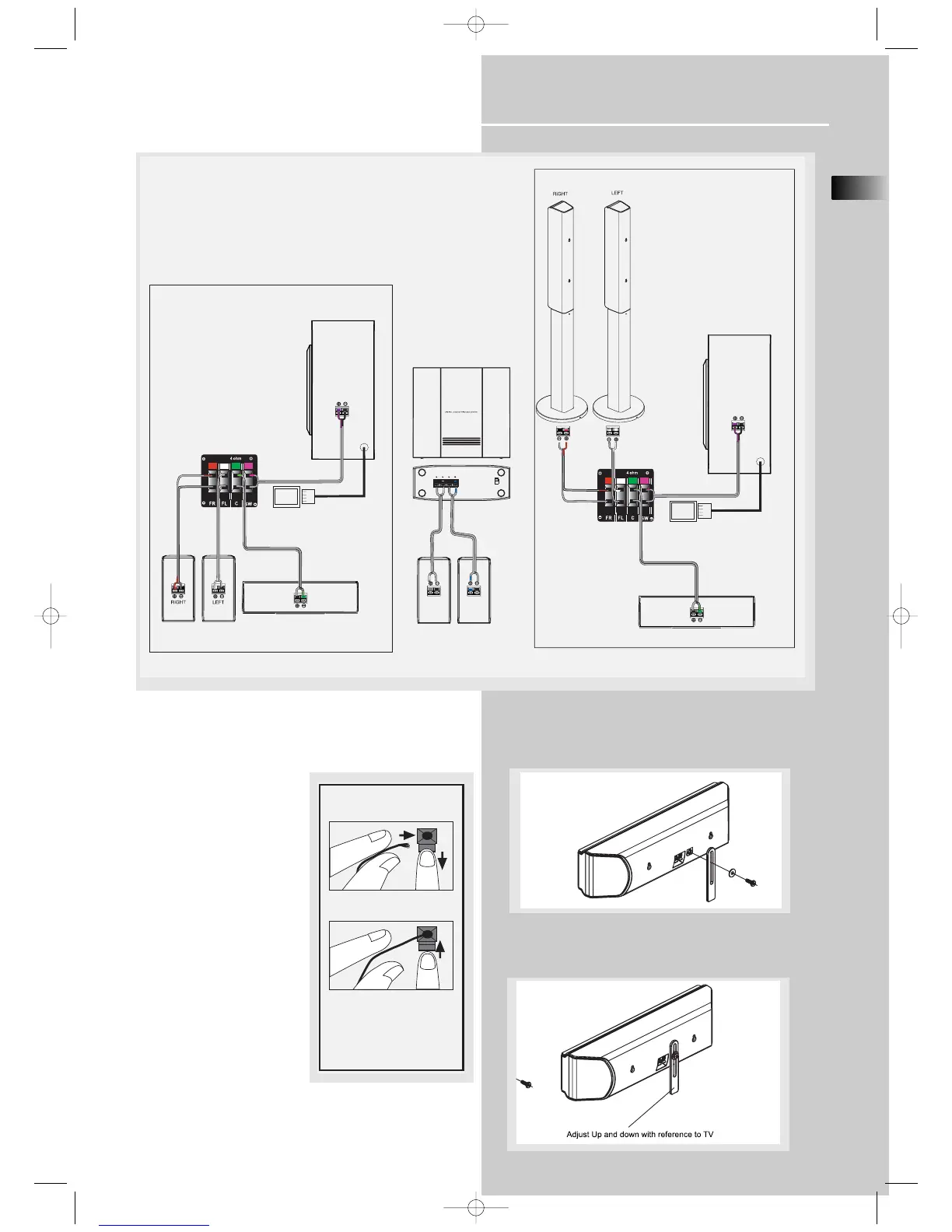
Connecting the Speakers
Speakers
There are 6 speakers equipped
with the unit (2 front, 1 center,
2 rear, 1 subwoofer). In order
to enjoy good surround effects,
You need to connect the front
speakers, center speakers and
subwoofer to the main unit;
and connect the rear speakers
to the wireless receiver.
Speaker Polarity
When connecting the speakers,
make sure the polarities (“+”
speaker wire to “+” on the
receiver) of speaker wires and
terminals are matched. If the
cords are reversed, the sound
will be distorted and lack bass
(“out of phase” effect).
Do not ground the output line,
it will cause damage to the
speaker.
Center Speaker Support Stand (Optional)
1. Secure the support rod in place using the screw
and washer provided as illustrated below.
2. Move the TV support rod up and down as illustrated
to adjust the height of the stand. Tighten the screw
to fix the support rod in place.
Antenna and Speaker
Wire Connection
Push Speaker terminal tab
down to insert wire.
Release tab to lock wire in
the terminal.
NOTE: Make sure the insulation
is completely removed from the
ends of the Antenna and
speaker wires at all connection
points.



 To Next Page