36 - EN
User’s Manual - Hero - 10.1’’
mythomson.com
- Switching on -
Note
: Charge your Thomson device before using it for the rst time.
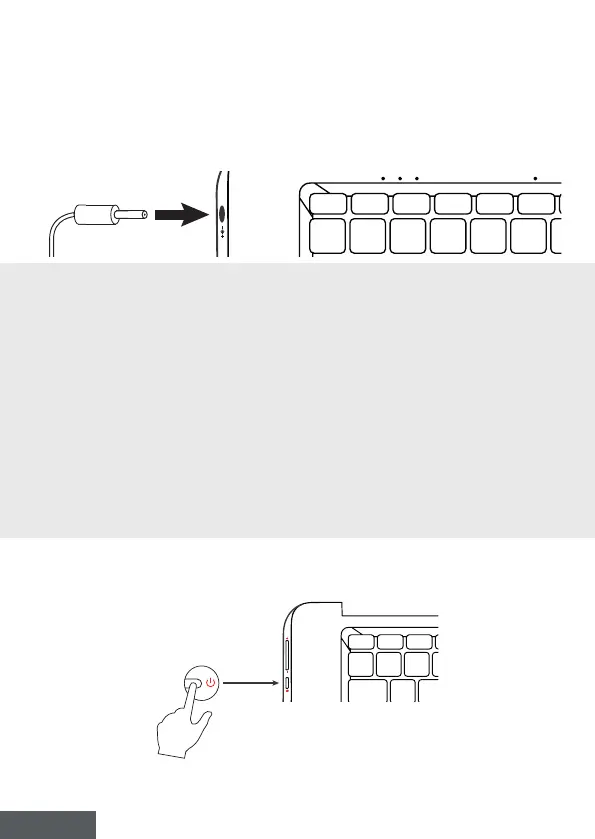
Charging the battery of your device
Connect the AC adapter to an earthed electrical outlet.
WARNING :
Read carefully the following instructions concerning the battery of your THOMSON
device:
• Only a technician authorized by Thomson is authorized to remove and handle the
battery.
• The battery in your Thomson device may present a re or burn hazard if it is removed
or disassembled.
• Comply with the information on the device’s warning labels to avoid any risk of injury.
• There is a risk of explosion if the battery is replaced by an incorrect model.
• Do not dispose of the battery in a re.
• Do not attempt to short-circuit the battery of the Thomson camera.
• Do not attempt to disassemble the battery or reassemble the battery.
• Stop using the battery if it leaks.
• The battery and its components must be recycled or disposed of properly.
• Keep the battery and its components out of reach of children.
Turning your device on / off
Turn on your device by pressing and holding the power button for a
long time.
To turn off your device, go to the Start menu and select Start/Stop > Stop.



 To Next Page