10
HOME CINEMA 5.1
HTS300
SAFETY REGULATIONS
EN
INFORMATION ABOUT BATTERIES
• The appliance must be equipped with the appropriate batteries in order to function
properly.
• Only recommended batteries should be used.
• Polarity must be respected when inserting batteries.
• The batteries should be inserted in such a way as to avoid any short circuit.
• Do not mix used and new batteries.
• Do not mix alkaline, standard (carbon-zinc) and rechargeable (nickel-cadmium)
batteries.
• Do not recharge or try to open the batteries. Do not throw the batteries in re.
• Replace all batteries at the same time with new, identical batteries.
• Remove the batteries when unused for a long time.
• If the liquid contained in the batteries comes in contact with eyes or skin, wash the
area immediately and carefully with clear water and consult a doctor.
• Battery shall not be exposed to excessive heat such as sunshine, re or the like.
ATTENTION: Danger of explosion if batteries are not inserted correctly.
Insertion (lithium battery)
Replacing the button battery
The battery usually lasts for about 1 year.
Replace the battery if the remote control does not operate the appliance in normal use.
Button battery (lithium battery)
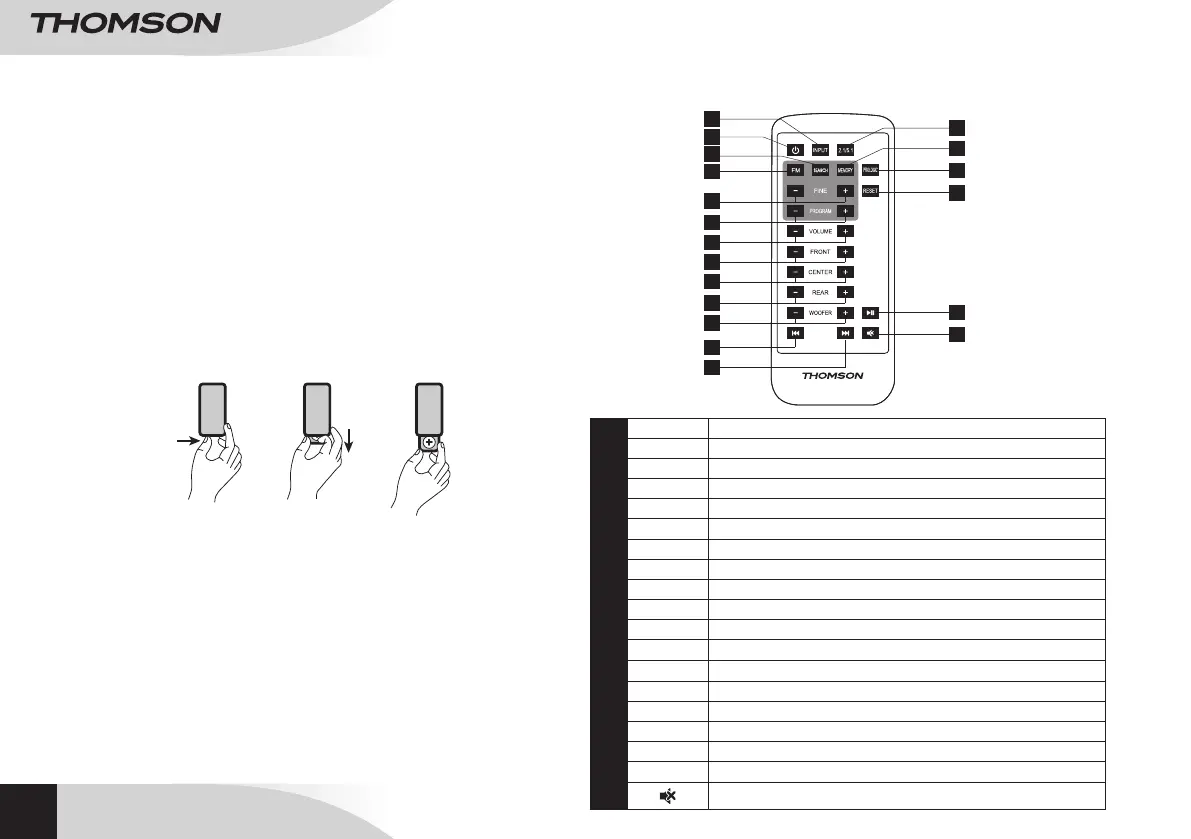
• Grip the battery compartment on the back of the remote control, then pull the strip
to lift the battery holder up.
• Insert 1 CR.2025 3V lithium mini battery, taking care to respect the polarity
indicated.
• Close the battery compartment.
14
15
3
1
2
5
6
4
7
8
9
10
11
12
13
19
18
17
16
1
INPUT
Input selection
2
POWER
On/Standby
3
SEARCH
FM frequency search
4
FM
FM radio function
5
FINE
100KHz frequency search
6
PROGRAM
Selects a saved FM station
7
VOLUME
General volume setting
8
FRONT
Front speaker volume setting
9
CENTER
Center speaker volume setting
10
REAR
Rear speaker volume setting
11
WOOFER
Bass sound volume setting
12
7
Last track backward.
13
8
Next track forward.
14
2.1/5.1
Selection outputs 2.1 or 5.1
15
MEMORY
Saves FM frequencies
16
PROLOGIC
This function is not available for this product reference.
17
RESET
Resets volume
18
12
Plays/pauses tracks
19
Turns sound off
REMOTE CONTROL


 To Next Page