15
HOME CINEMA 5.1
HTS300
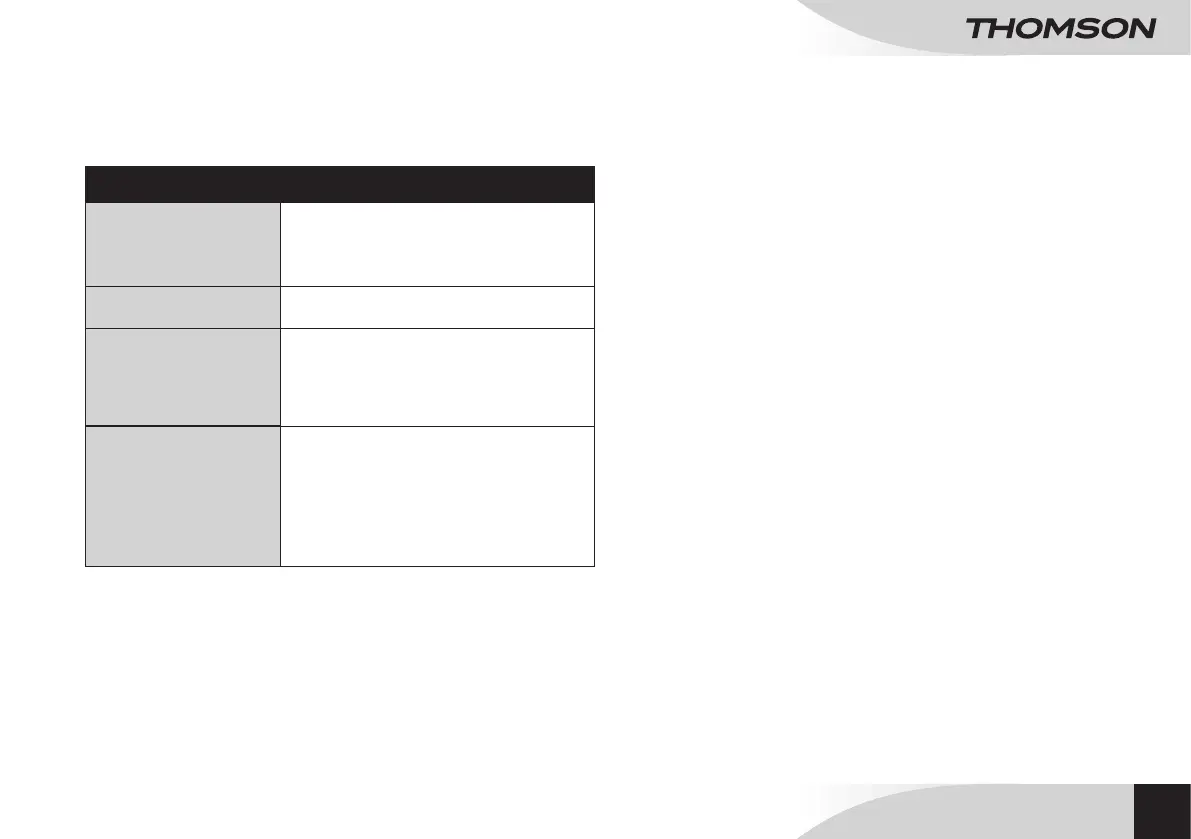
Problems Solutions
The unit does not turn on
• Make sure the mains supply cord is properly
connected.
• Make sure there is current at the sector socket
output.
• Make sure the units receives power supply.
The unit does not respond • Disconnect and connect the mains supply cord,
then turn the device on again.
No sound
• Make sure the system is properly connected.
• Make sure the volume is adjusted at the minimum
level. Adjust as needed.
• Make sure the audio input is set to Reproduction
mode.
• Make sure the remote control is working properly.
The remote control
is not working
• First, select the source using the remote control,
instead of the main unit.
• Reduce the distance between the remote control
and the unit.
• Insert the batteries in correct polarity (+ / -) as
indicated.
• Replace the batteries.
• Point the remote control directly at the sensor on
the front side of the device.
REPAIR AND MAINTENANCE
MAINTENANCE AND CLEANING
• Unplug the appliance before cleaning it.
• Remove ngerprints and dust with a soft and slightly damp cloth. Do not use
abrasive products or solvents that may damage the appliance’s surface.
ATTENTION: Never immerse the appliance in water or in any liquid whatsoever.
• If it is not used for a long time, unplug the appliance and remove the batteries.
EN


 To Next Page