Chapter 1: Connections and Setup
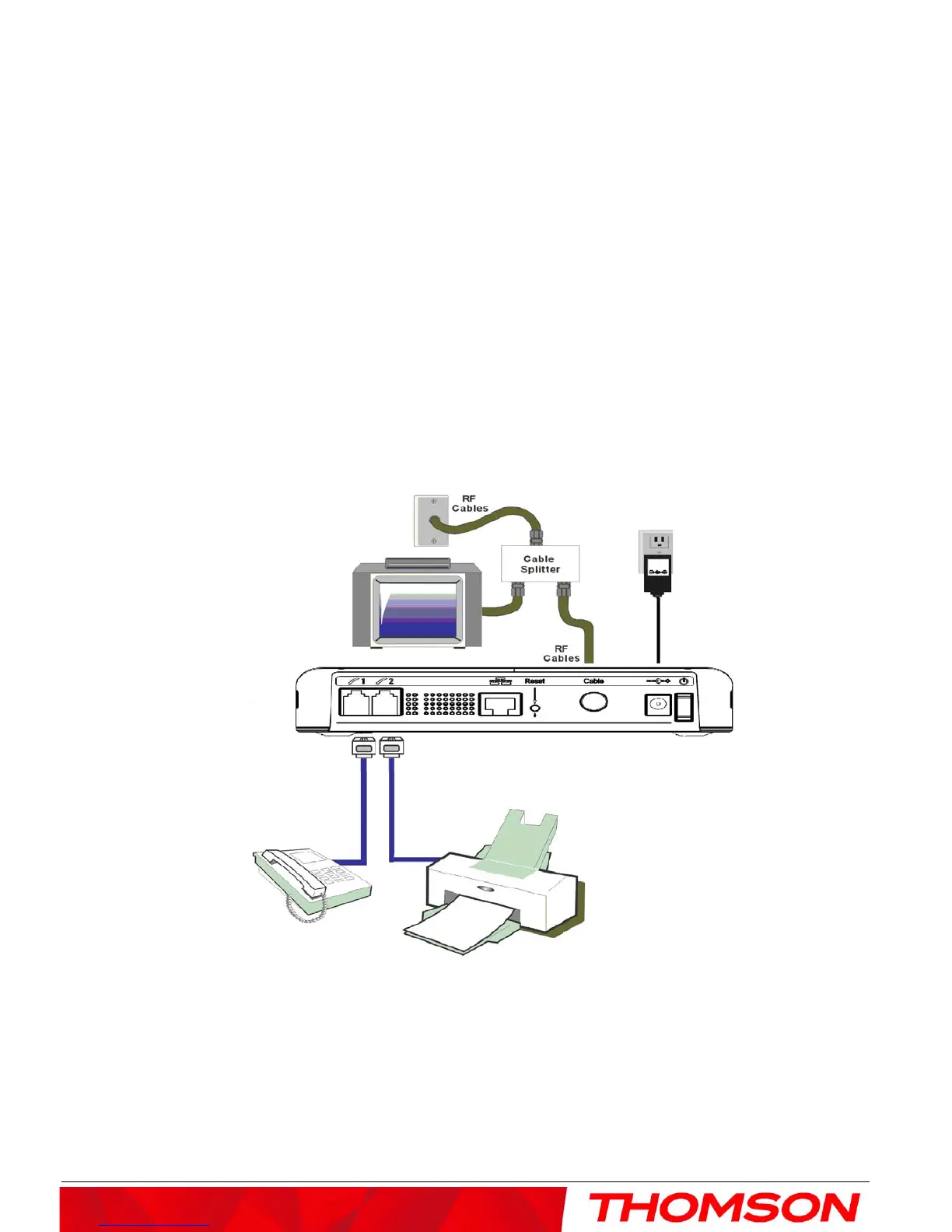
Telephone or Fax Connection
When properly connected, most telephony devices can be used with the EMTA just as with conventional
telephone service. To make a normal telephone call, pick up the handset; listen for a dial tone, then dial the
desired number. For services such as call waiting, use the hook switch (or FLASH button) to change calls. The
following procedures describe some of the possible connection schemes for using telephony devices with the
EMTA.
1. Connect a standard phone line cord directly from the phone (fax machine, answering machine, caller ID
box, etc.) to one of the LINE jacks on the EMTA.
2. If there is a phone line in your home which is NOT connected to another telephone service provider,
connect a standard phone line cord from a jack on this line to one of the LINE jacks of the EMTA. Connect
a standard phone line cord directly from the phone (fax machine, answering machine, caller ID box, etc.) to
one of the other jacks in the house that uses that line.
3. If you have a multi-line telephone, connect a standard phone line cord (not an RJ-14 type line cord) from
the phone to the LINE jacks on the EMTA. (Other phones can be added to each line by using standard
phone line splitters.
Fig. 4: Phone/Fax Connection
11



 To Next Page